11
Operation (continued)
7
Viewing recorded videos
Viewing images by computer through a card
reader.
□ Press the mode button on the bottom of the unit for
3 seconds to stop the unit from turning.
□ Open the weatherproof cover on the unit.
□ To remove micro card, press on the card to eject
then pull out.
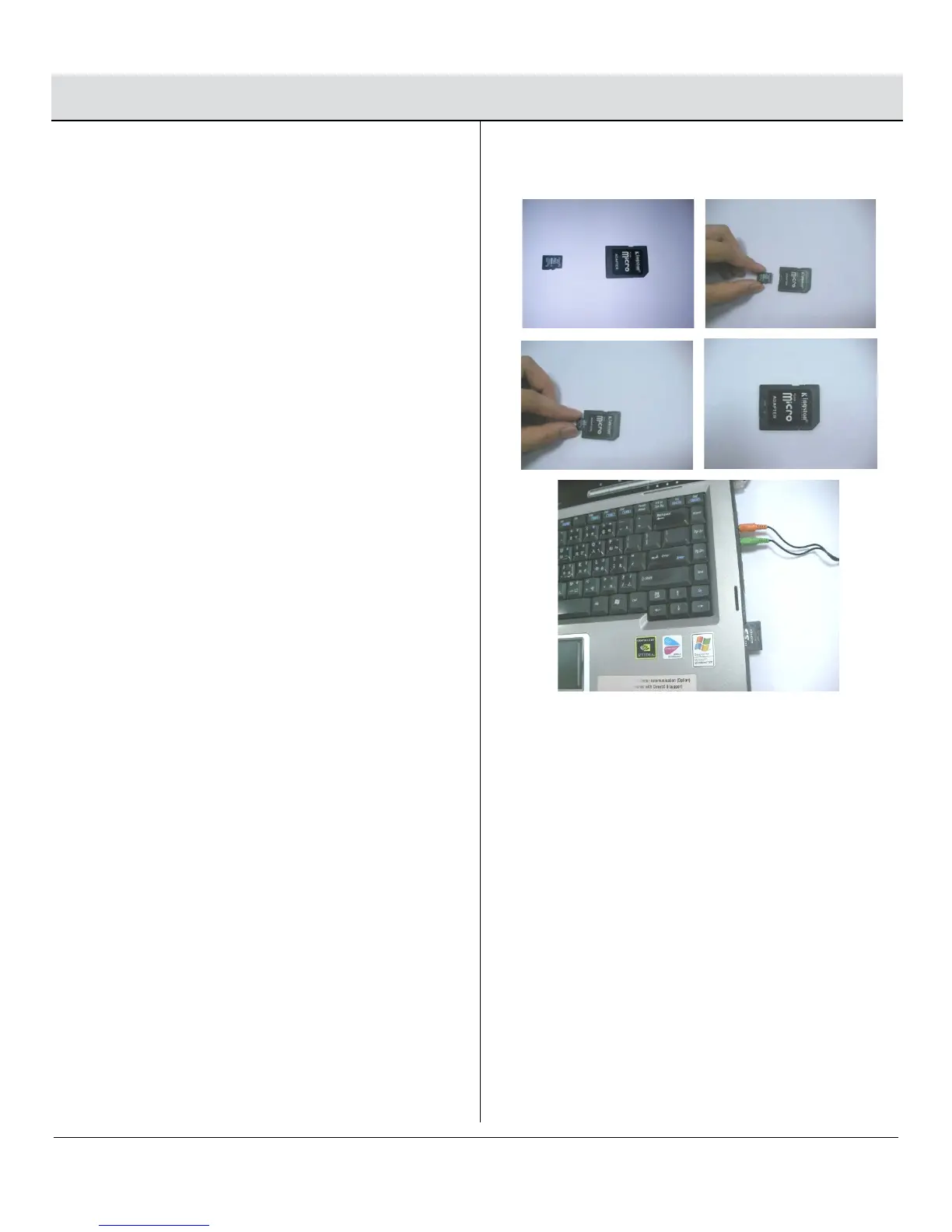
□ Slide the card into supplied card adapter as
indicated in the pictures to the right.
□ If your computer has a card slot you may insert the
micro card directly into the computer. Otherwise
you will need to use a USB card reader (not
supplied).
□ Once your computer is powered on, insert the card
adapter into your computer. Regardless of whether
you are using Windows or MAC OS, your card
should be recognized by your computer after a few
seconds.
□ Follow your computers instructions to view the
contents of the removable storage device (micro
card). Each recorded event will be listed in order by
date. Simply click on the filename to view the file.
□ After viewing the files, remove the card from your
computer and remove the micro card from the
adapter.
□ Insert the micro card into the slot on the light until it
is secure. Then close the card compartment door
and tighten the screw with the Allen key.
□ Press the “Mode” button once to resume normal
tracking operation.


 To Next Page