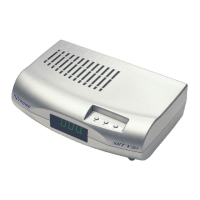
The STRONG DiSEqC Positioner v50 is a sophisticated device designed to control the movement of satellite dishes, ensuring optimal reception for a wide range of satellite television systems. This positioner acts as an intermediary between your satellite receiver and the actuator or H-H mount that physically moves the dish, translating commands into precise movements. Its primary function is to accurately position the satellite dish to receive signals from various satellites, offering users the flexibility to access numerous channels and satellite broadcasts.
Function Description
The core function of the DiSEqC Positioner v50 is to manage the precise movement of a satellite dish, allowing it to point accurately at different satellites in orbit. It achieves this by interacting with either a DiSEqC 1.0 or 1.2 compatible receiver, or by operating independently with an optional remote control. The positioner receives commands, typically indicating a desired satellite position, and then drives the connected actuator or H-H mount to move the dish to that exact location.
For DiSEqC 1.2 receivers, the positioner is fully controlled by the receiver, allowing for seamless integration into a modern satellite system. This setup enables the receiver to send commands directly to the positioner to store, recall, and adjust satellite positions. When used with a DiSEqC 1.0 receiver, the positioner can manage up to four distinct satellite positions, which are typically mapped to LNB inputs or DiSEqC commands (A, B, C, D) from the receiver. In scenarios where the receiver lacks DiSEqC capabilities or when more than four positions are desired with a DiSEqC 1.0 receiver, the optional remote control becomes essential, transforming the positioner into a standalone unit capable of managing up to 60 positions.
The positioner utilizes a pulse counting system to track the dish's movement. Each pulse from the Reed Switch Sensor on the actuator or H-H mount corresponds to a small increment of movement. The positioner counts these pulses, allowing it to know the exact current position of the dish and to move it to a new desired position with high accuracy. The 3-digit LED display provides a visual representation of the current position index, with a "1K Indicator" dot lighting up to signify positions above 999, effectively extending the display's range to 1,999 pulse counts.
A crucial aspect of its function is the ability to store and recall satellite positions. Users can manually drive the dish to a position where the TV picture is clear, and then store this position into one of the 60 available memory slots. Once stored, these positions can be recalled at any time, causing the positioner to automatically move the dish to the saved location. This eliminates the need for manual adjustment every time a different satellite is desired.
The "Re-calculate (Adjust Shift)" function is a sophisticated feature that allows for fine-tuning all stored satellite positions simultaneously. If, over time, the entire arc of stored positions shifts slightly (perhaps due to minor dish movement or environmental factors), this function enables users to correct the entire set of positions by adjusting just one. By recalling a known satellite, manually correcting its position for a clear picture, and then activating the "Shift" function, all other stored positions are automatically re-calculated relative to this new reference point, ensuring continued accuracy across the entire satellite arc.
The positioner also incorporates "Software Limits Protection," allowing users to set virtual East and West boundaries for the dish's movement. These software limits prevent the dish from moving beyond a safe or desired range, offering an additional layer of protection even if the actuator has its own mechanical limit switches. This is particularly useful for preventing the dish from hitting obstacles or exceeding its physical operational range.
Usage Features
The DiSEqC Positioner v50 is designed for both ease of operation and quick installation, catering to a range of user needs from basic setup to advanced fine-tuning.
For installation, the positioner requires a straightforward cable connection. The motor of the actuator or H-H mount connects to the M1 & M2 terminals, while the Reed Switch Sensor connects to the SENSOR terminals. It's critical to ensure correct wiring between the motor and sensor to prevent damage. A coaxial cable connects the receiver to the positioner's "To Receiver" input, and another coaxial cable connects the positioner's LNB output to the LNB on the dish. The positioner is powered by an AC outlet, and it automatically turns on/off in sync with the LNB power from the receiver, indicating a stand-by mode with three dots on the LED display.
Operating the positioner can be done either through its manual buttons, an optional remote control, or via DiSEqC commands from a compatible receiver. The manual buttons on the unit itself provide basic control for moving the dish East/West and storing positions. For more comprehensive control, especially with non-DiSEqC or DiSEqC 1.0 receivers, the optional remote control offers a full suite of functions, including direct input of satellite position numbers (1-60), setting software limits, and activating the "Shift" function.
The "Fine-tune Function for Better Reception" is implicitly handled by the manual East/West movement buttons, allowing users to make small adjustments to the dish's position until the optimal signal quality is achieved on their TV screen before storing the position.
The "60 Programmable Memories" feature allows users to store a vast array of satellite positions, making it convenient to switch between different satellite broadcasts without manual repositioning. Each memory slot can be assigned a number from 1 to 60.
"Lock Key Protection" is a security feature that prevents unintended operations. By pressing the "Lock" key followed by "Enter" on the remote control, the positioner enters a locked mode, disabling most functions except power on/off and DiSEqC commands from the receiver. This is useful in environments where accidental button presses might occur.
The "Auto Turn-off Function" ensures energy efficiency and convenience. The positioner automatically turns off its display when the LNB power from the receiver is off, indicating a low-power standby state.
Maintenance Features
The DiSEqC Positioner v50 incorporates several features aimed at ensuring its longevity and reliable operation, as well as providing diagnostic information for troubleshooting.
"Short Circuit and Overload Protection" is a critical safety and maintenance feature. If the positioner detects an overcurrent condition, such as a short circuit in the wiring or an overloaded motor, it will display an "Er1" message and shut down the system to prevent damage. This protects both the positioner and the connected motor/actuator. The troubleshooting guide suggests checking for wire short-circuits, antenna blockages, motor malfunctions, or an excessively heavy antenna if this error occurs.
"Anti-Noise Circuit to avoid miscounting" helps maintain the accuracy of the dish's position. This circuit filters out electrical noise that could interfere with the pulse counts from the Reed Switch Sensor, ensuring that the positioner accurately tracks the dish's movement and prevents errors in stored positions.
"Software Limits Protection," as mentioned earlier, also serves as a maintenance feature by preventing the dish from moving into potentially damaging physical limits. If the dish attempts to move beyond these set software limits, the display will show "HL" (High Limit) or "LL" (Low Limit), indicating that the movement has been stopped.
The positioner provides clear error messages on its LED display to assist with troubleshooting. An "Er2" message (No Pulses) indicates a problem with the Reed Switch Sensor or its connection, suggesting checks for wire connection, mechanical limit stops, or a broken sensor or motor. "Er3 / Er4" messages (Internal Error) point to an internal issue within the positioner itself, recommending a reset of the unit.
The "Restore Factory Default (Reset)" function is a powerful maintenance tool. It allows users to clear all stored data, including high/low limits and satellite positions, returning the positioner to its original factory settings. This can be useful for resolving persistent issues or when setting up the system from scratch. This reset can be initiated either by a specific power-on sequence with the manual power button or by holding the "Reset" button on the optional remote control.
The "Go to the mechanical Position 0" function, available for DiSEqC 1.2 receivers, is another maintenance-oriented feature. It drives the motor towards the East until it hits the mechanical limit switch, effectively resetting the position index to 000 and displaying "Er2" first, then "000". This ensures that the positioner's internal count aligns with the physical starting point of the dish, which is crucial for accurate positioning. It's important to ensure mechanical limit switches are properly adjusted before using this function to prevent damage.
In cases where the LED lights are on but the positioner is unresponsive, the troubleshooting guide suggests unplugging and re-plugging the AC power cord after a short wait. It also notes that unstable AC power can cause the positioner to lock itself to protect stored data, recommending the use of a voltage regulator to prevent such occurrences.
Overall, the STRONG DiSEqC Positioner v50 is a robust and user-friendly device that simplifies satellite dish control, offering a blend of advanced features for precise positioning, convenient operation, and built-in protections for reliable long-term use.


 To Next Page
 General