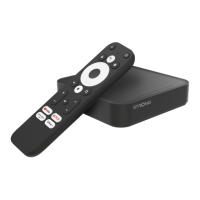
The STRONG LEAP-S3 is a 4K Ultra HD Google TV Box designed to provide extensive entertainment and versatility by exploring the Android world. This device allows users to stream content, download apps, and interact with Google services through a user-friendly interface.
Function Description
The LEAP-S3 serves as a central hub for your home entertainment system, connecting to your television via an HDMI cable. It supports 4K Ultra HD resolution, HDR, and Dolby Vision, ensuring a high-quality visual experience. The device runs on Google TV, offering access to a vast ecosystem of applications, streaming services, and voice-controlled functionalities through the Google Assistant. It integrates seamlessly with Google Home, allowing for easy setup and control via a mobile device.
The core function of the LEAP-S3 is to deliver streaming content from various platforms. Users can access popular services like YouTube, Netflix, Prime Video, and Disney+, among others. The device also supports Google Cast, enabling users to cast content from their mobile devices or Google Chrome browser directly to their TV. This feature enhances flexibility, allowing users to share videos, photos, and other media from their personal devices onto the larger screen.
Connectivity is a key aspect of the LEAP-S3. It offers both Wi-Fi (2.4GHz and 5GHz) and Ethernet (RJ45) options for internet access, ensuring stable and fast connections for streaming and downloading. For audio, it includes an S/PDIF (optical) port, allowing connection to digital or home cinema audio amplifiers for an immersive sound experience. A USB 2.0 port is also available for connecting external storage or other peripherals.
The device comes with a voice-enabled remote control, which is central to its ease of use. This remote allows users to navigate menus, control playback, adjust volume, and activate the Google Assistant with voice commands. The remote can also be configured to control certain functions of a connected TV, such as power, input source, and volume, simplifying the overall control setup.
Usage Features
Setting up the LEAP-S3 is a guided process that begins with language selection and location settings. Users can choose to set up the device using the Google Home app on their phone by scanning a QR code, or manually through the TV screen. This initial setup includes connecting to a Wi-Fi network or using an Ethernet cable.
A crucial step in the setup is signing in with a Google Account, which unlocks the full potential of Google TV, including personalized recommendations, app downloads from the Google Play Store, and access to Google services. Users are also prompted to accept Google's Terms of Service and Privacy Policy and can configure diagnostic report settings.
The Google Assistant is a prominent feature, allowing for hands-free control and interaction. Users can ask the Assistant to play specific shows, movies, or music, search for content, control playback (pause, stop, resume), adjust volume, and even ask general questions or get news updates. To enable voice control, the Bluetooth remote must be paired with the TV Box, a process that involves pressing specific buttons on the remote for a few seconds until an LED blinks.
The LEAP-S3 offers extensive customization through its settings menu. Users can adjust display and sound options, including HDMI-CEC settings for integrated control with other devices, screen formats, resolutions, and Dolby audio formats. Network and internet settings allow for managing Wi-Fi connections and adding or removing accounts. The "Apps" section provides an overview of installed applications, their permissions, and allows for removal.
Bluetooth pairing is managed through the "Remote & Accessories" menu, where users can connect the voice-enabled remote and other Bluetooth devices. This menu also allows for configuring remote buttons to control external devices like TVs or digital home amplifiers. Language settings can be changed under "System," and device information, including model, version, and firmware, can be viewed in the "About" section.
Downloading apps is straightforward via the Google Play Store. Users can search for specific apps by typing their name or using voice commands through the remote. The device also suggests recommended apps during the initial setup.
Maintenance Features
The LEAP-S3 is designed for minimal user maintenance, focusing on software updates and basic troubleshooting. The "About" section in the settings menu allows users to check for and install system updates, ensuring the device runs on the latest software with improved features and security.
For troubleshooting, the manual provides a simple guide for common issues. For example, if there's no LED after power on, users are advised to check the power adapter connection. If there's no sound, they should check the TV's mute status or volume level. Network connection issues can often be resolved by restarting Wi-Fi or adjusting the router's position.
Remote control failures, such as unresponsiveness or lost pairing, are addressed by suggesting battery replacement or re-pairing the remote by pressing specific buttons (BACK and HOME) for 5 seconds. If there's no picture on the screen, users are advised to ensure the correct HDMI input is selected on the TV and to use the provided HDMI cable. Voice search not working often indicates that the remote is not paired, requiring users to follow the Bluetooth pairing instructions.
In cases where audio settings are misconfigured, users can navigate to "Settings > Display & Sound > Advanced sound settings" to make adjustments.
For more drastic issues or to prepare the device for a new user, a "Factory Reset" option is available under "Settings > System > About." This option erases all manually installed apps and user data, restoring the device to its original factory state.
The device is built with safety precautions, including warnings against opening the device, which would void the warranty. Users are advised to refer all maintenance and servicing to qualified personnel. Proper disposal of the product and its batteries is also emphasized, aligning with WEEE Directive guidelines to promote environmental safety and sustainable reuse of materials. Batteries, in particular, should not be recharged, disassembled, or exposed to excessive heat, and incorrect replacement carries a risk of explosion.


 To Next Page
 Video and Audio Decoding