EasyManua.ls Logo

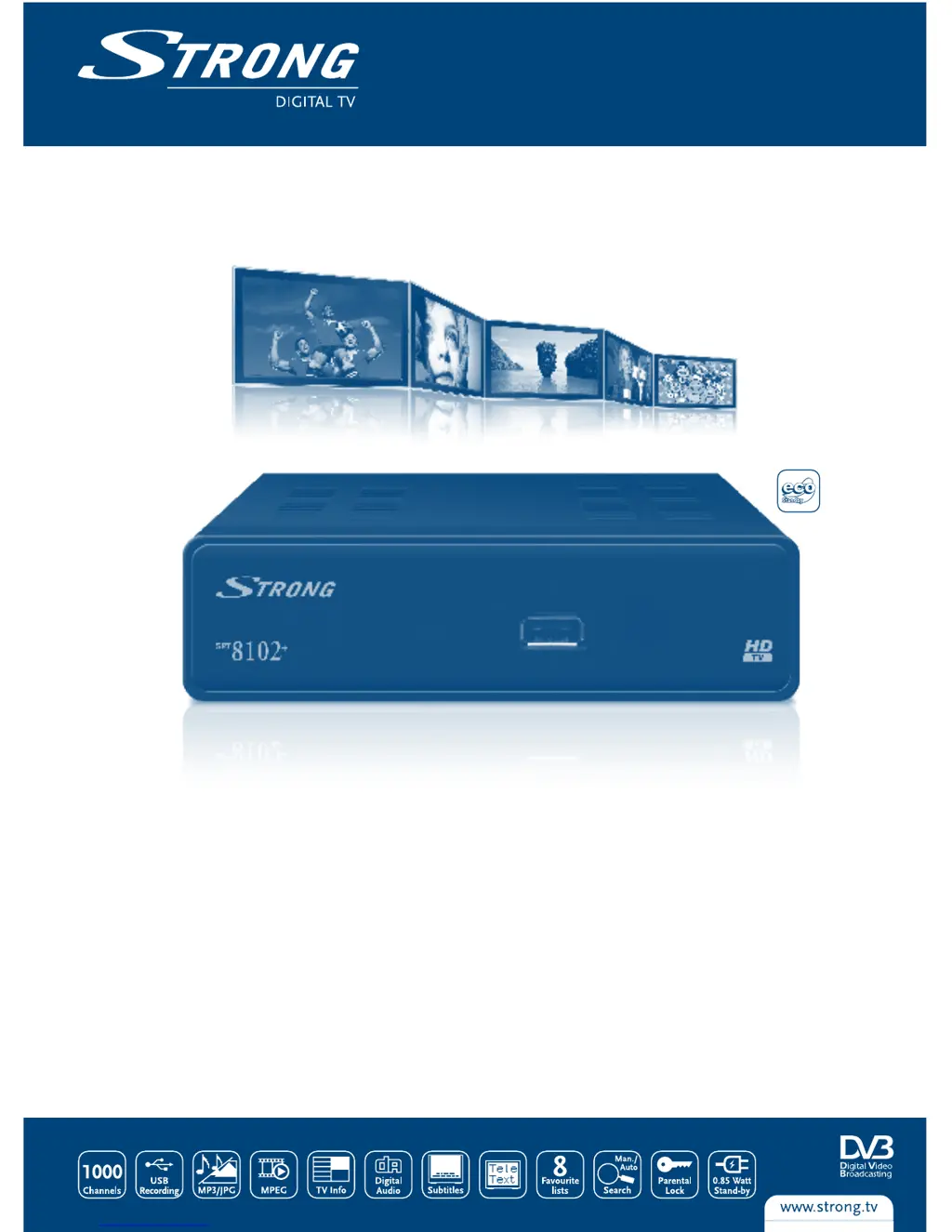
Strong SRT 8102+ - User Manual

Strong SRT 8102+
23 pages
Print Icon
To Next Page IconTo Next Page
Loading...
www.strong.tv
User manual
Manuel d’Utilisateur
Manuale Utente
Manual del usuario
Manual do Usuário
Felhasználói kézikönyv
Instrukcja obsługi
Руководство пользователя
Digital High Denition Terrestrial Receiver
SRT 8102+
Picture similar

Questions and Answers

  • J
    Jeremy AvilaJul 30, 2025
    What to do if Strong SRT 8102+ Receiver remote control not working?
    • S
      Shelly DunnJul 30, 2025
      If your Strong Receiver isn't responding to the remote control, there might be a few reasons. First, ensure the receiver is plugged in and turned on. Then, make sure you're aiming the remote directly at the front panel of the receiver without any obstructions. Finally, the remote batteries might be dead, so try replacing them.
  • A
    Aaron KimAug 3, 2025
    Why is there no picture or sound on my Strong SRT 8102+?
    • M
      Mark TaylorAug 4, 2025
      If you're not getting any picture or sound from your Strong Receiver on your TV, the issue might be with the TV input selection. Ensure that your TV is set to the correct HDMI input for the receiver. Also, the resolution set on receiver may be higher than your TV supports. Also, verify that your TV is powered on.
  • M
    Mackenzie ChenAug 8, 2025
    How to fix 'No signal found' on Strong SRT 8102+?
    • S
      Shannon CardenasAug 8, 2025
      If your Strong Receiver displays a 'No signal found' message, several things could be wrong. Check that the aerial is properly connected. The aerial itself might be damaged or misaligned, so inspect it carefully. If you are using an active antenna, ensure that the receiver’s Antenna Power is switched ON or connect external power. It's also possible you're out of the digital signal area, in which case you should check with your dealer.
  • J
    Jose HumphreyAug 12, 2025
    What to do if Strong Receiver loses signal after moving it?
    • S
      Sandy HarrisAug 12, 2025
      If you've moved your Strong Receiver and are now unable to receive digital reception, the antenna signals may be too weak. Press the INFO button on remote 3 times to call up signal bars and adjust antenna for maximum reception, or rescan channels.
  • B
    Brett JohnsonAug 16, 2025
    Why does my Strong SRT 8102+ Receiver switch off automatically?
    • H
      Henry SteinAug 16, 2025
      If your Strong Receiver is automatically switching off, it's likely that the Auto Standby function is enabled. To stop this, disable the auto standby feature. See section 7.3.8 for details.
  • R
    Robert MitchellAug 20, 2025
    What does 'Scrambled channel' mean on Strong Receiver?
    • S
      Scott ContrerasAug 20, 2025
      If you see a 'Scrambled channel' message on your Strong Receiver, it means the current channel is scrambled. You should select an alternative channel.
  • G
    georgedawnAug 25, 2025
    Why is the LED indicator not lit on my Strong SRT 8102+?
    • P
      Patricia PadillaAug 25, 2025
      If the LED indicator on your Strong Receiver isn't lit, the mains lead might be unplugged. Check the mains plug to ensure it's properly connected.

Summary

1.0 INTRODUCTION

1.1 Safety Instructions

Important warnings and precautions for installation, operation, and handling of the receiver.

3.0 CONNECTION

3.1 Connecting to a Terrestrial Antenna

How to connect an indoor or outdoor antenna for receiving broadcast signals.

3.2 Connecting to TV with HDMI cable

Guide on connecting the receiver to a TV using an HDMI cable for high quality.

3.5 Connecting to a Digital Audio Amplifier and TV using HDMI

Connecting to digital amplifiers and TV via HDMI for optimal audio and video.

4.0 STARTING UP FOR THE FIRST TIME

6.0 OPERATION

6.8 Instant Recording

Enables instant recording of the current program to a connected storage device.

7.0 MAIN MENU

7.1 Edit Channel

Allows management of channels, including adding to favorites and locking.

7.2 Installation

Guides through automatic and manual channel scanning and aerial adjustment.

7.3 System Setup

Configures system settings like language, TV system, time, and parental lock.

8.0 TROUBLESHOOTING

9.0 TECHNICAL SPECIFICATIONS

Strong SRT 8102+ Specifications

General IconGeneral
Aspect ratio4:3, 16:9
Signal sourceCable
Supported video modes1080i, 1080p, 576i, 576p, 720p
Analog signal format systemPAL
Digital signal format systemDVB-T
Personal Video Recorder (PVR) included-
Tuner typeAnalog & digital
Demodulation16-QAM, 64-QAM
Product colorBlack
Audio decodersDolby Digital Plus
Number of tuners2 tuner(s)
Parental controlYes
Channels quantity1000 channels
Audio output channels- channels
Audio formats supportedAAC, AC3, PCM
Video formats supportedAVI, H.264, M2T, M2TS, MKV, MOV, MPEG1, MPEG2, MPEG4, TS, VOB
Flash memory2 MB
Internal memory64 MB
Built-in HDDNo
HDMI version1.3
RF ports quantity2
USB 2.0 ports quantityUSB 2.0 ports have a data transmission speed of 480 Mbps, and are backwards compatible with USB 1.1 ports. You can connect all kinds of peripheral devices to them.
USB 3.2 Gen 1 (3.1 Gen 1) Type-A ports quantity0
Input frequency range174 - 230 MHz
AC input voltage220-240 V
AC input frequency50 - 60 Hz
Power consumption (standby)0.85 W
Power consumption (typical)5.5 W
Storage temperature (T-T)-30 - 80 °C
Operating temperature (T-T)0 - 40 °C
Operating relative humidity (H-H)10 - 85 %
Weight and Dimensions IconWeight and Dimensions
Depth112 mm
Width142 mm
Height40 mm
Weight350 g

Related product manuals