EasyManua.ls Logo

Strong SRT 8541FTA - User Manual

Strong SRT 8541FTA
27 pages
Print Icon
To Next Page IconTo Next Page
Loading...
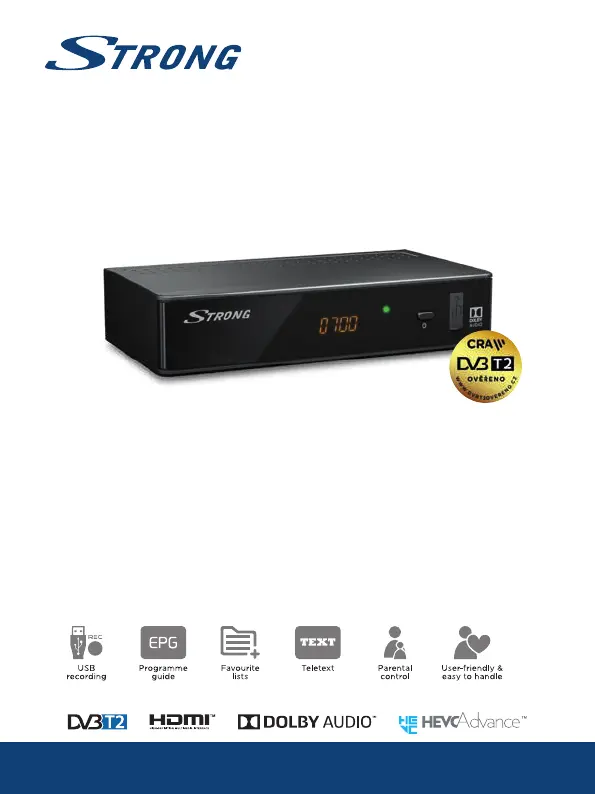
Digital Terrestrial Receiver
SRT 8541FTA
Picture similar
User Manual
Bedienungsanleitung
Manuel d’ulisaon
Manuale d’uso
Manuale utente
Manual del usuario
Manual do ulizador
Instrucciones de instalación
Návod k obsluze
Používateľská príručka
Telepítési Utasítás
Bruksanvisning
Uživatelská příručka
Korisnički priručnik
Používateľská príručka
Εγχειρίδιο χρήστη

Questions and Answers

  • B
    bethany60Aug 14, 2025
    Why does my Strong Receiver say no signal found?
    • W
      wmaldonadoAug 14, 2025
      The 'no signal found' message usually means there's an issue with your antenna connection. Check the antenna lead to make sure it is securely connected. The antenna itself might be damaged or misaligned, so inspect it carefully. If you are in an area with a weak digital signal, consult with your dealer. If you're using an active antenna, ensure that the antenna power is switched on, or connect external power.
  • S
    Stephanie AvilaAug 18, 2025
    What to do if my Strong SRT 8541FTA Receiver has no picture or sound on TV or amplifier?
    • M
      Mary ChambersAug 18, 2025
      If you're not getting any picture or sound, ensure that your TV or amplifier is set to the correct HDMI or SCART input. Also, the receiver might be set to a higher resolution than your TV supports, so select a lower resolution. Finally, make sure your TV or amplifier is switched on and check the S/PDIF connection if it's in use.
  • J
    john49Aug 21, 2025
    What to do after moving the Strong Receiver I am no longer able to receive digital reception?
    • M
      Megan DunnAug 21, 2025
      If you've moved your receiver and can't get digital reception, the antenna signals might be too weak. If you're using an indoor antenna, the signal strength/quality might be less than before. Press the INFO button on the remote to view the signal bars on screen and adjust the antenna for the best possible reception. Alternatively, rescan the channels. If using an active antenna, ensure the antenna power setting is On. Consider trying an outdoor antenna.
  • J
    Jessica RamseyAug 25, 2025
    What to do if my Strong Receiver remote control is not responding?
    • P
      Peter SmithAug 25, 2025
      If your remote isn't working, first ensure the receiver is plugged in and turned on. Make sure you're aiming the remote directly at the front panel of the receiver, without any obstructions. Finally, try replacing the remote's batteries.
  • A
    Ashley RubioAug 27, 2025
    What to do if my Strong Receiver is showing a scrambled channel message?
    • B
      burgessspencerAug 27, 2025
      If you see a 'scrambled channel' message on your Strong Receiver, it simply means that the channel you're trying to watch is scrambled. Select an alternative channel.
  • K
    katherine45Aug 31, 2025
    Why does my Strong Receiver switch off automatically?
    • P
      pkeithAug 31, 2025
      If your receiver is turning off by itself, it's likely because the Auto Standby function is enabled. Disable the Auto Standby function.
  • A
    Amber DeckerSep 3, 2025
    How to fix picture freeze or distortion during video playback on Strong SRT 8541FTA Receiver?
    • H
      Holly SandersSep 3, 2025
      If you're experiencing picture freezing or distortion during video playback, especially with HD content, the read speed of your USB device could be too slow. Use a USB storage device with sufficient speed and space. Pen drives (‘USB sticks’) may not support sufficient speed.
  • D
    Darren SmithSep 7, 2025
    What to do if the LED indicator and display are not switching on Strong SRT 8541FTA?
    • P
      pandersonSep 7, 2025
      If the LED indicator and display aren't turning on, check that the mains lead is properly plugged in and that the power switch on the rear panel is set to ON. Switch main power to ON.
  • M
    Michelle RiveraSep 10, 2025
    What is the default PIN code for Strong Receiver?
    • I
      iedwardsSep 10, 2025
      The default PIN is 0000.

Strong SRT 8541FTA Specifications

General IconGeneral
HDTV CompatibleYes
HDMI OutputYes
EthernetYes
Resolution1080p
ConnectivityHDMI, USB
Video DecodingMPEG-2, MPEG-4
Audio DecodingMPEG, AAC
Power SupplyAC 100-240V
Power Consumption10W

Related product manuals