EasyManua.ls Logo

Strong SRT 8108 - User Manual

Strong SRT 8108
22 pages
Print Icon
To Next Page IconTo Next Page
Loading...
www.strong.tv
User manual
Bedienungsanleitung
Manuel d’Utilisateur
Manual del usuario
Manual do Utilizador
Uživatelská příručka
Návod k obsluze
Instrukcja obsługi
Manuale utente
Felhasználói kézikönyv
Ръководство на
потребителя
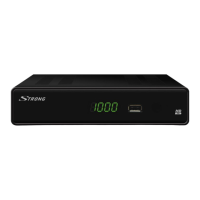
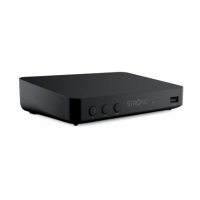
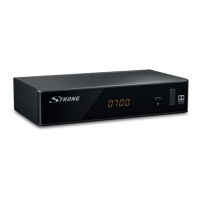
Digital Terrestrial HD Receiver SRT 8108
Picture similar
Question and Answer IconNeed help?

Do you have a question about the Strong SRT 8108 and is the answer not in the manual?

Summary

Introduction and Safety

Safety Instructions

Essential safety precautions for installation, operation, and handling of the receiver to prevent damage or injury.

Storage and Setup

Storage

Guidelines for storing the receiver and its accessories safely, especially during transport or returns.

Equipment Set-up

Recommendations and steps for properly setting up the receiver with your TV and antenna.

Accessories

List of included accessories such as the user manual, remote control, and batteries.

Usage of external USB devices

Information on using USB storage devices for recording, playback, and compatibility.

Your Receiver Overview

Default PIN

The default Personal Identification Number (PIN) for initial access and security features.

Front Panel

Description of the receiver's front panel controls, indicators, and ports for basic interaction.

Rear Panel

Details the various connectors and ports on the back of the receiver for external connections.

Remote Control

Explains the function of each button on the remote control for operating the receiver.

Connection Guide

Connecting to a Terrestrial Antenna

Guide on how to connect an antenna for receiving broadcast signals.

Connecting to TV with HDMI cable

Instructions for connecting the receiver to a TV using an HDMI cable for high-quality output.

Connecting to TV with SCART cable

Instructions for connecting the receiver to a TV using a SCART cable.

Connecting to a Digital Audio Amplifier with S;PDIF

How to connect to digital audio systems for enhanced sound quality.

Connecting to a Digital Audio Amplifier and TV using HDMI

Connecting for both audio and video via HDMI to amplifiers and TVs.

Connecting to an analogue Audio Amplifier

Guide for connecting to older analogue audio systems using a 3.5mm jack.

Connecting a USB storage device

How to connect USB devices for recording and media playback.

First Time Setup

Quick Guide and Operation

Quick Guide to Using Your Receiver

A brief overview to get users started with basic receiver operations.

Changing Channels

Methods for switching between available TV and radio channels using the remote.

Info Banner

Displaying current channel and event information on the screen.

Selection of audio language

How to choose different audio streams or languages for channels.

Teletext

Accessing and navigating the Teletext service for additional information.

Subtitles

How to select and display subtitle languages for programs.

Timeshift

Functionality to pause live TV broadcasts and resume playback later.

EPG (Electronic Programme Guide)

Viewing TV schedules, programme information, and setting recordings.

Instant Recording

How to record the current program immediately.

Main Menu Navigation

Program Management

Managing channels, adding to favorites, locking, and skipping channels.

EPG Menu Access

Accessing the Electronic Programme Guide via the menu.

LCN (Logical Channel Numbering)

Managing channel order based on operator-defined numbering.

Picture Settings

Adjusting picture settings like aspect ratio, resolution, and TV format.

Channel Search

Scanning for available channels manually or automatically.

Time Settings

Setting time-related options, including time offset and timers.

Language Settings

Configuring On Screen Display (OSD) language, subtitles, and audio preferences.

System Settings

System settings including parental guidance, factory reset, information, and standby options.

Media Playback

Accessing media playback functions for music, video, and photos.

Troubleshooting

Technical Specifications

Summary

Introduction and Safety

Safety Instructions

Essential safety precautions for installation, operation, and handling of the receiver to prevent damage or injury.

Storage and Setup

Storage

Guidelines for storing the receiver and its accessories safely, especially during transport or returns.

Equipment Set-up

Recommendations and steps for properly setting up the receiver with your TV and antenna.

Accessories

List of included accessories such as the user manual, remote control, and batteries.

Usage of external USB devices

Information on using USB storage devices for recording, playback, and compatibility.

Your Receiver Overview

Default PIN

The default Personal Identification Number (PIN) for initial access and security features.

Front Panel

Description of the receiver's front panel controls, indicators, and ports for basic interaction.

Rear Panel

Details the various connectors and ports on the back of the receiver for external connections.

Remote Control

Explains the function of each button on the remote control for operating the receiver.

Connection Guide

Connecting to a Terrestrial Antenna

Guide on how to connect an antenna for receiving broadcast signals.

Connecting to TV with HDMI cable

Instructions for connecting the receiver to a TV using an HDMI cable for high-quality output.

Connecting to TV with SCART cable

Instructions for connecting the receiver to a TV using a SCART cable.

Connecting to a Digital Audio Amplifier with S;PDIF

How to connect to digital audio systems for enhanced sound quality.

Connecting to a Digital Audio Amplifier and TV using HDMI

Connecting for both audio and video via HDMI to amplifiers and TVs.

Connecting to an analogue Audio Amplifier

Guide for connecting to older analogue audio systems using a 3.5mm jack.

Connecting a USB storage device

How to connect USB devices for recording and media playback.

First Time Setup

Quick Guide and Operation

Quick Guide to Using Your Receiver

A brief overview to get users started with basic receiver operations.

Changing Channels

Methods for switching between available TV and radio channels using the remote.

Info Banner

Displaying current channel and event information on the screen.

Selection of audio language

How to choose different audio streams or languages for channels.

Teletext

Accessing and navigating the Teletext service for additional information.

Subtitles

How to select and display subtitle languages for programs.

Timeshift

Functionality to pause live TV broadcasts and resume playback later.

EPG (Electronic Programme Guide)

Viewing TV schedules, programme information, and setting recordings.

Instant Recording

How to record the current program immediately.

Main Menu Navigation

Program Management

Managing channels, adding to favorites, locking, and skipping channels.

EPG Menu Access

Accessing the Electronic Programme Guide via the menu.

LCN (Logical Channel Numbering)

Managing channel order based on operator-defined numbering.

Picture Settings

Adjusting picture settings like aspect ratio, resolution, and TV format.

Channel Search

Scanning for available channels manually or automatically.

Time Settings

Setting time-related options, including time offset and timers.

Language Settings

Configuring On Screen Display (OSD) language, subtitles, and audio preferences.

System Settings

System settings including parental guidance, factory reset, information, and standby options.

Media Playback

Accessing media playback functions for music, video, and photos.

Troubleshooting

Technical Specifications

Overview

The STRONG Digital Terrestrial HD Receiver SRT 8108 is a device designed for receiving and playing back digital terrestrial television broadcasts. It supports High Definition (HD) content and offers a range of multimedia and recording features.

Function Description:

The SRT 8108 acts as a digital terrestrial receiver, allowing users to access free-to-air (FTA) digital television and radio channels. It decodes MPEG-2 and AVC/H.264 video streams, supporting resolutions up to 1080p. The device includes a DVB-T tuner for both UHF and VHF bands. Beyond live TV, it offers PVR (Personal Video Recorder) functionality when connected to an external USB storage device, enabling instant recording and Timeshift. Multimedia playback is also supported, allowing users to view photos, listen to music, and watch videos from a USB device. The receiver features various connectivity options for integration into a home entertainment system, including HDMI, SCART, coaxial S/PDIF, and analogue audio outputs.

Important Technical Specifications:

  • Demodulator: COFDM; 16 QAM/64 QAM, QPSK. Transmission mode: 2K – 8K.
  • Video Decoder: MPEG-2 MP@ML, AVC/H.264HP@L4.1, MPEG4 ASP supported. Video resolutions: 480i/480p/576i/576p/720p/1080i/1080p. Decoding: PAL/NTSC. Aspect ratio: 4:3 Letterbox, 4:3 Pan & Scan, 16:9, Auto.
  • Audio Decoder: AAC/Dolby® Digital Plus*/AC3/PCM. Sampling rate: 32, 44.1, 48 KHz. Audio mode: Stereo, Mono.
  • Tuner: DVB-T, UHF & VHF Tuner. Input frequency range: 174-230 MHz (VHF) and 470 – 862 MHz (UHF). Loop through frequency range: 47-862 MHz. Input signal level: -20 ~ 82 dBm.
  • Memory and System: Flash memory: 4 MBytes. SDRAM: 64 MBytes.
  • Multimedia Playback: MPEG-1 and MPEG-2 encoded (mpg), VOB, AVI, MKV, TS, M2TS, MPEG-4 and MOV video; MP3 and OGG audio; BMP and JPEG pictures.
  • Connectors: RF IN – IEC Female, RF OUT – IEC Male, TV SCART (RGB, CVBS, Audio L&R), HDMI, S/PDIF (coax.), 3.5 mm stereo audio jack (audio left/right), USB 2.0 port: 5 V/500 mA (max.) supported.
  • General Data: Supply voltage: 220 - 240 V AC (SMPS), 50/60 Hz. Power consumption: 6 W (typ.), 9 W (max). Power consumption in standby: 0.44 W. Operating temperature: 0 ~ +40°C. Storage temperature: -30 ~ +80°C. Operating humidity range: 10~85%, RH, Non-condensing. Size (WxDxH) in mm: 160 x 105 x 38. Net-weight: 0.25 kg.

Usage Features:

The receiver is designed for user-friendly operation with a comprehensive remote control.

  • Channel Management: Direct access via 0-9 buttons, channel list navigation with OK and PG+/PG- buttons, and channel switching with ▲▼ buttons. Users can create up to 4 favourite lists (Movie, News, Sport, Music), lock channels with a PIN (default 1234), and skip channels during zapping.
  • EPG (Electronic Programme Guide): Provides event schedules and programme information. Users can select channels and events, and book events for recording.
  • Timeshift: Allows pausing live broadcasts and resuming playback later. Requires a fast USB 2.0 HDD for optimal performance, especially with HD content.
  • Recording: Instant recording of programmes by pressing the record button. Recording duration can be set. Access to the Record Manager via the RED button or USB menu.
  • Audio and Subtitle Selection: Supports multiple audio formats/languages and subtitle languages (DVB/HoH subtitles or Teletext).
  • Teletext: Fully featured Teletext with page navigation via 0-9 buttons and coloured buttons for direct jumps.
  • Picture Settings: Adjustable aspect ratio (Auto, 4:3 Panscan, 4:3 Letterbox, 16:9) and video resolution (576i to 1080p). OSD transparency can be adjusted.
  • Channel Search: Auto search for all available channels (FTA or encrypted) and manual search for specific programmes. Country selection is important for scan process and LCN.
  • Time Settings: Automatic time offset from broadcaster, with manual adjustment for daylight saving.
  • Timer Function: Set up to 30 timed events for recording or waking up the receiver, with options for channel type (TV/Radio), channel number, start/end time, and repeat mode (Once, Daily, Weekly).
  • Parental Guidance: Channels can be protected with a PIN code based on age rating (Off, 04-18 years).
  • Digital Audio Output: Toggles between PCM (stereo audio conversion) and RAW HDMI (Dolby® Digital/Dolby® Digital Plus** multi-channel audio). RAW HDMI Off transfers raw bitstream to S/PDIF.

Maintenance Features:

  • Software Update: Supports Over Air Distribution (OAD) for software upgrades (availability depends on region) and USB Upgrade via a USB storage device (formatted in FAT32).
  • Restore Factory Default: Resets the receiver to factory settings, deleting all stored channels and settings. Requires PIN (default 1234).
  • Auto Standby: Reduces power consumption by switching to standby after 1, 2, or 3 hours of inactivity. Can be deactivated.
  • Troubleshooting Guide: Provides solutions for common issues like no signal, no picture/sound, scrambled channels, or remote control unresponsiveness.
  • Storage and Transport: Advised to repack the receiver in its original packaging for transport to prevent damage and voiding warranty.
  • Cleaning: Clean with a soft, lint-free cloth slightly dampened with mild soap solution, only after disconnecting from mains. Avoid alcohol or ammonia-based liquids.

Strong SRT 8108 Specifications

General IconGeneral
BrandStrong
ModelSRT 8108
CategoryReceiver
LanguageEnglish

Related product manuals