EasyManua.ls Logo

Strong SRT 8115 - User Manual

Strong SRT 8115
25 pages
Print Icon
To Next Page IconTo Next Page
Loading...
www.strong.tv
User manual
Bedienungsanleitung
Manuel d’Utilisateur
Manuale Utente
Manual del usuario
Manual do Utilizador
Felhasználói kézikönyv
Instrukcja obsługi
Ръководство на потребителя
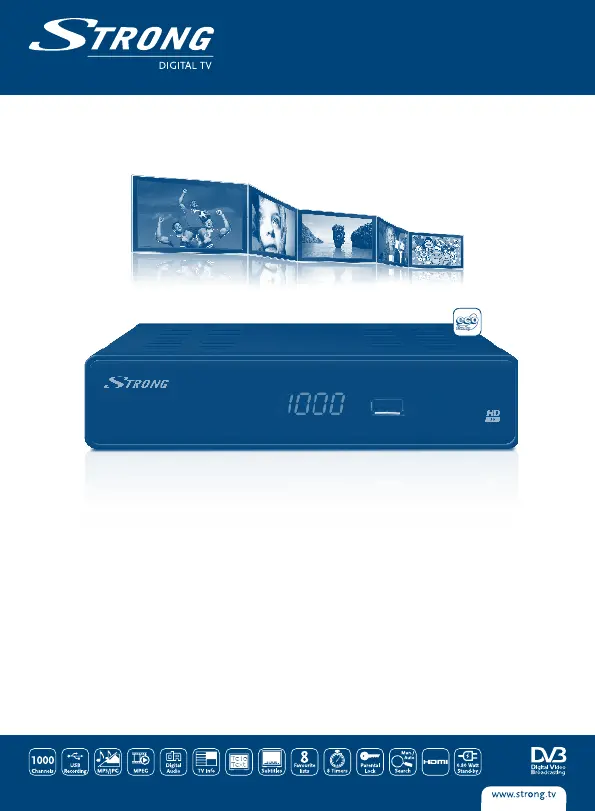
Digital Terrestrial HD Receiver SRT 8115
Picture similar

Questions and Answers

  • J
    Jonathan DayAug 13, 2025
    Why does my Strong SRT 8115 say no signal?
    • T
      Tammy CookAug 13, 2025
      If your Strong Receiver displays a 'No signal found' message, the cause may be a disconnected or damaged aerial. Check the aerial lead and the aerial itself for damage or misalignment. You might be out of the digital signal area, in which case you should check with your dealer. If you are using an active antenna, ensure the receiver’s Antenna Power is switched ON or connect external power.
  • J
    Jennifer RobertsonAug 17, 2025
    What to do if Strong SRT 8115 Receiver remote control not working?
    • E
      Emily BakerAug 17, 2025
      If your Strong Receiver is not responding to the remote control, the receiver might be off, so ensure it is plugged in and turned on. Make sure you are aiming the remote at the front panel without any obstructions. Also, the remote batteries may be exhausted, so try replacing them.
  • R
    Ruben PadillaAug 20, 2025
    How to fix no picture or sound on Strong Receiver?
    • C
      Caitlin HoltAug 20, 2025
      If there is no picture or sound from your Strong Receiver on your TV or amplifier, ensure that the correct HDMI or SCART input is selected on your TV or amplifier. Also, check that your TV/amplifier is switched on and if S/PDIF connection is used. The unit may be set to a higher resolution than your TV supports, so select a lower resolution on the receiver.
  • A
    Amber SimsAug 25, 2025
    What to do if Strong Receiver lost signal after moving?
    • A
      averyrobertAug 25, 2025
      If you are no longer able to receive digital reception after moving your Strong Receiver, the antenna signals may be too weak. Press the INFO button on the remote 3 times to check the signal bars and adjust the antenna for maximum reception or rescan channels. If using an indoor antenna, try using an outdoor antenna instead, as the signal strength/quality might be less than before.
  • B
    bnguyenAug 27, 2025
    What does 'scrambled channel' mean on Strong Receiver?
    • J
      Jessica RodriguezAug 28, 2025
      If you see a 'Scrambled channel' message on your Strong Receiver, it means the selected channel is scrambled. Select an alternative channel.
  • T
    Timothy BakerAug 31, 2025
    Why is my Strong SRT 8115 video playback freezing?
    • S
      Sarah BradshawAug 31, 2025
      If the playback of video (or Timeshift) is causing picture freeze, macro blocks, or similar distortion, especially on HD content, the read/write speed of your USB device could be too low. Ensure you use a USB storage device with sufficient speed and space. Pen drives (‘USB sticks’) may not support sufficient speed.
  • A
    Amanda HaleySep 4, 2025
    Why does my Strong SRT 8115 Receiver turn off by itself?
    • M
      Michelle LewisSep 4, 2025
      If your Strong Receiver switches off automatically, the Auto Standby function may be enabled. Disable auto standby.
  • C
    cindybakerSep 8, 2025
    How to fix Strong Receiver if LED indicator is not lit?
    • R
      Randall LarsonSep 8, 2025
      If the LED indicator on your Strong Receiver is not lit, the mains lead might be unplugged. Check the mains plug.

Strong SRT 8115 Specifications

General IconGeneral
BrandStrong
ModelSRT 8115
CategoryReceiver
LanguageEnglish

Related product manuals