EENN
1-48 2971-109-001 REV B www.stryker.com
Service
Power cord replacement
Tools required:
• Zipper pull tool or equivalent
• 5/16” Nut driver
• 1” Combination wrench
• Diagonal pliers
Procedure:
1. See Foot box cover access on page 1-40.
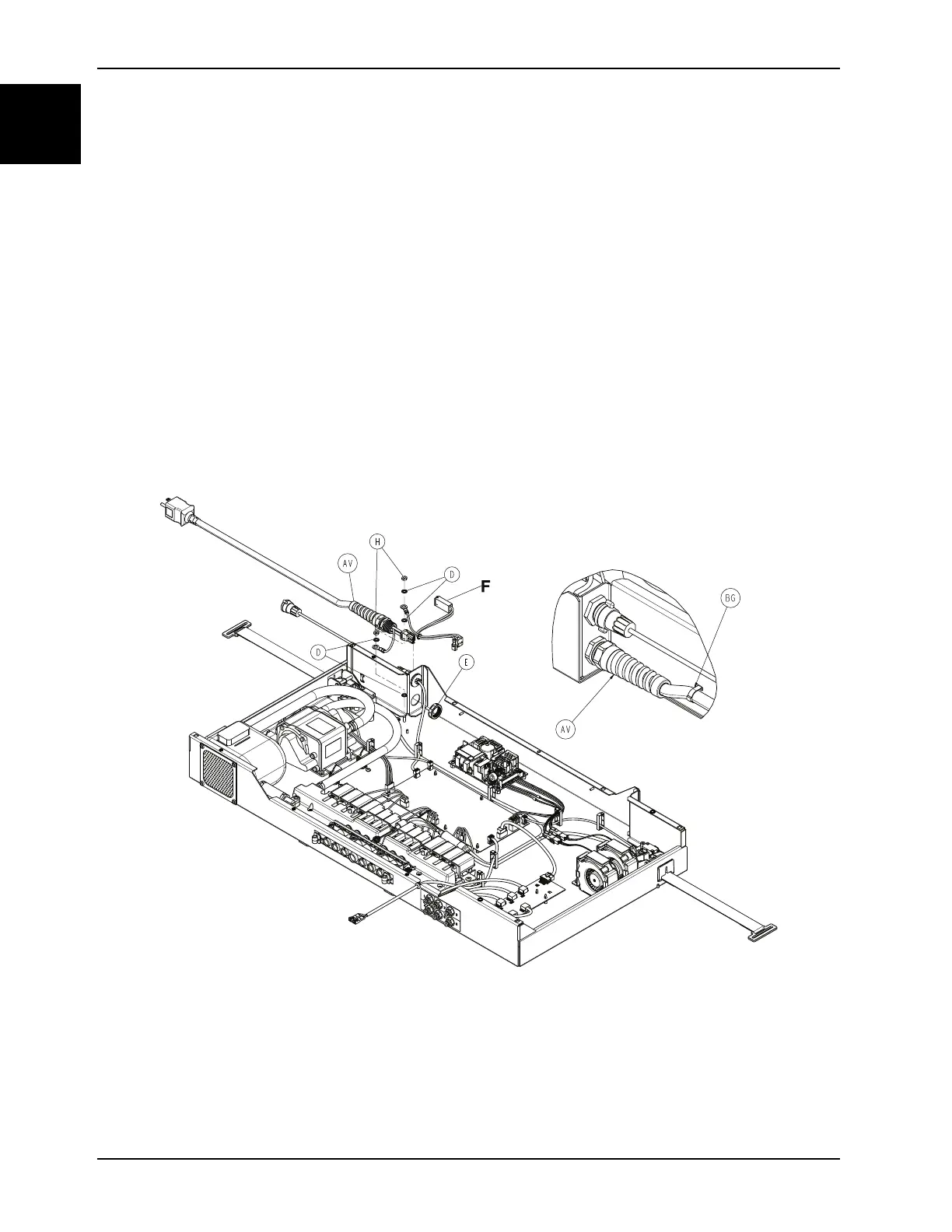
2. Using diagonal pliers, cut the cable tie (BG) (Figure 1-22 on page 1-48) and discard.
Notes
• Pay attention to the orientation of the cable tie for installation of the new power cord.
• From the inside of the foot box, install the supplied cable tie through the top hole with the cable tie lock facing
upward. Then feed the cable tie around the new power cord and through the bottom hole in the foot box to
secure the power cord to the foot box.
• During installation, before cutting the end off of the cable tie, use the diagonal pliers to pry the slack out of the
cable tie (one to two clicks).
Figure 1-22: Power cord
3. Using a 5/16” Nut driver, remove the two nuts (H) and four star washers (D) that secures the power cable ground
connector (Figure 1-22 on page 1-48). Save the nuts and star washers.
Note: During reinstall, torque (H) to 22 ± 4 in-lb
4. Using a 1” combination wrench, remove the nut (E) securing the power cord strain relief to the foot box.
5. Feed the ground through the plastic retaining nut (E) (Figure 1-22 on page 1-48).














 To Next Page