EENN
www.stryker.com 2971-109-0 01 REV B 1-53
Service
Low Air Loss (LAL) fan replacement
Tools required:
• Zipper pull tool or equivalent
Procedure:
1. Apply the InTouch brakes.
2. Unplug the support surface power cord.
3. Remove the headboard and footboards.
4. Lower all the siderails.
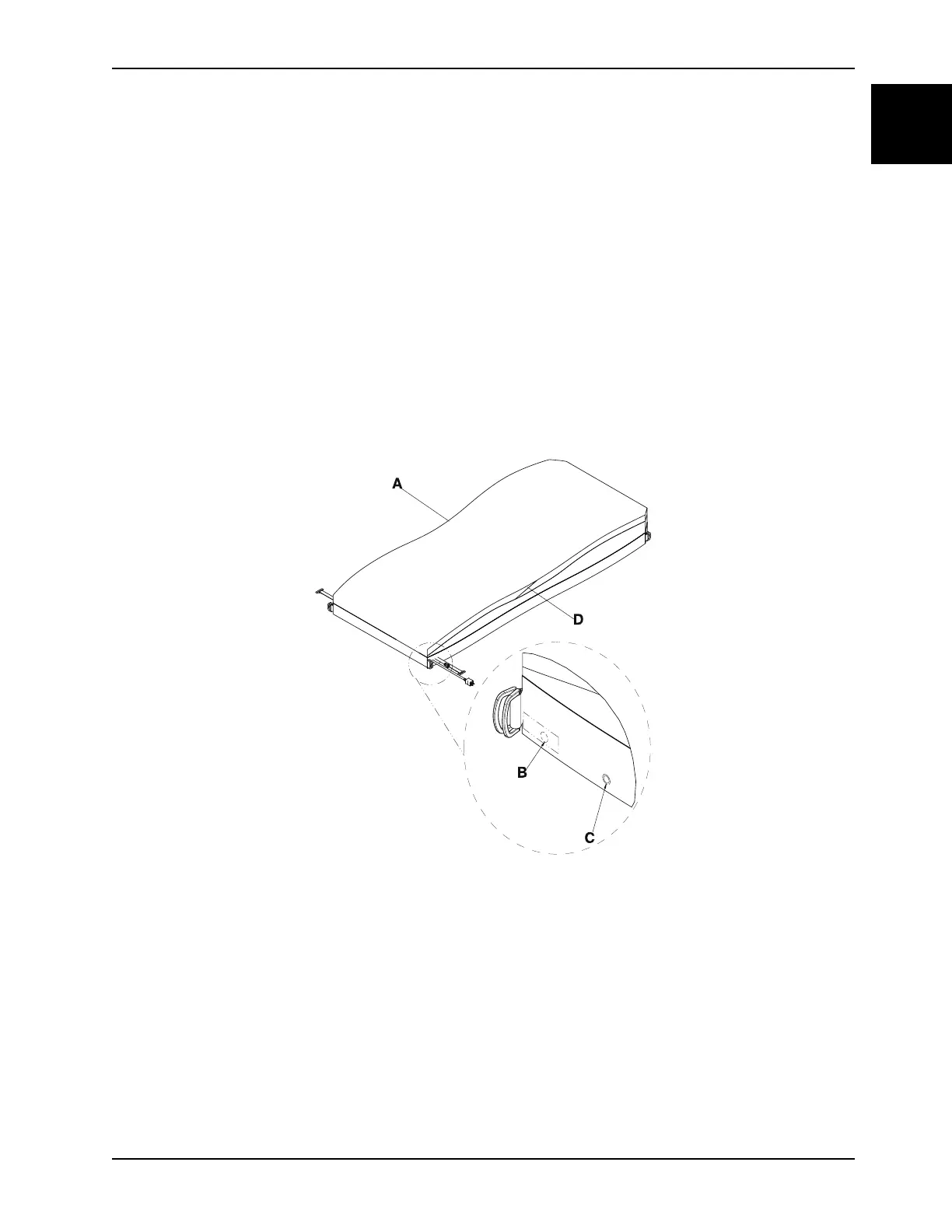
5. Unsnap the two secure snaps (C) at the foot end corners (Figure 1-25 on page 1-53).
6. Unsnap the two foot end corner retainers (B) (Figure 1-25 on page 1-53).
7. Insert a zipper pull tool or equivalent through the hole in the zipper slider to unlock.
8. Unzip the support surface top cover from the bottom cover using the zipper pull tool or equivalent (A) (Figure 1-25 on
page 1-53) and stop unzipping at the middle of the opposite side (D).
Note: The zipper starts on the patient right side near the foot end.
Figure 1-25: Top cover
9. Fold the cover up toward the head end.
10. Separate the six Velcro® connectors holding the foot section gel crib to the pod assembly.
11. Remove the foot section gel crib (F) by lifting upward (Figure 1-26 on page 1-54). Save gel crib.














 To Next Page