FACTORY RESET
Press and Hold ON while connecting power. Hold until the LEDs stop blinking.
Release the footswitch and turn the MIDDLE knob from 0-100% and back two (2) times.
Note: This will erase all custom IRs and presets and restore the factory default settings.
STRYMON IMPULSE MANAGER SOFTWARE
It’s easy to replace the pre-installed IRs with custom IRs from your own
collection by using Strymon Impulse Manager software.
Visit strymon.net/support/iridium to learn more and download the software.
STEREO
MONO
IN OUT L OUT R EXP
SUM
USB
CABAMP
ROOM
TREBLE
BASS
DRIVE LEVEL
a
b
c
MIDDLE
round
chime
punch
CLASSIC CLEAN
Room Size: Medium
STEREO
MONO
IN OUT L OUT R EXP
SUM
USB
CABAMP
ROOM
TREBLE
BASS
DRIVE LEVEL
a
b
c
MIDDLE
round
chime
punch
CLEAN JANGLE
Room Size: Small
STEREO
MONO
IN OUT L OUT R EXP
SUM
USB
CABAMP
ROOM
TREBLE
BASS
DRIVE LEVEL
a
b
c
MIDDLE
round
chime
punch
CROWN JEWEL
Room Size: Medium
STEREO
MONO
IN OUT L OUT R EXP
SUM
USB
CABAMP
ROOM
TREBLE
BASS
DRIVE LEVEL
a
b
c
MIDDLE
round
chime
punch
PUNCHED UP
Room Size: Large
STEREO
MONO
IN OUT L OUT R EXP/MIDI
SUM
USB
CABAMP
ROOM
TREBLE
BASS
FAV ON
DRIVE LEVEL
a
b
c
amp & ir cab
MIDDLE
round
chime
punch
STEREO
MONO
IN OUT L OUT R EXP/MIDI
SUM
USB
CABAMP
ROOM
TREBLE
BASS
FAV ON
DRIVE LEVEL
a
b
c
amp & ir cab
MIDDLE
round
chime
punch
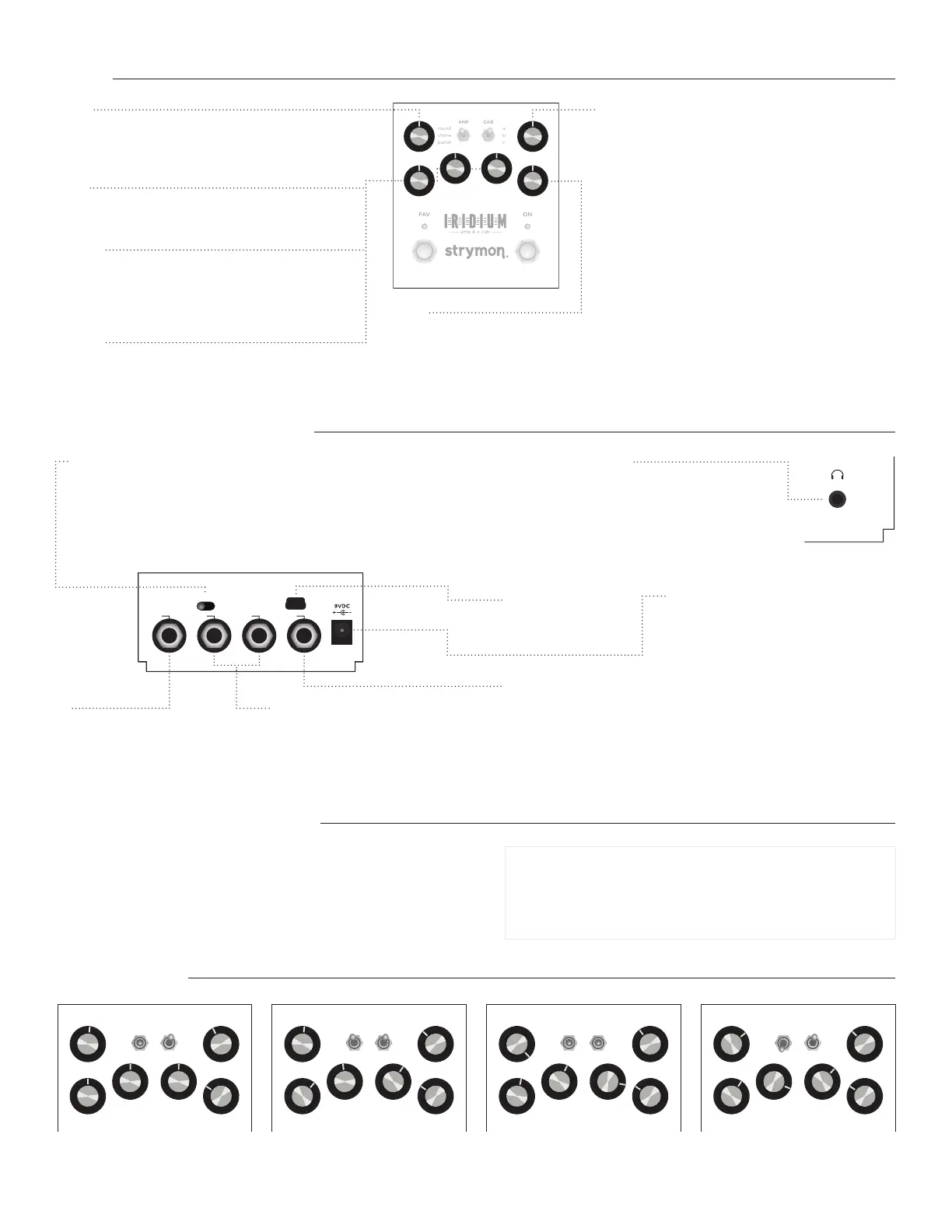
USB
Can be used to load IR
files via computer.
IN
Instrument (default) or Line level
input. See complete manual for
configuration details. TRS adapter
cable required for stereo use.
OUTPUTS
Audio signal outputs. Use OUT L for
mono output.
AUDIO INPUT SELECTOR
Selects input/output configuration modes.
MONO : Use with a mono input signal such as a guitar. Output is stereo.
STEREO : Use with a stereo input signal. Output is stereo.
SUM : For a stereo input that is summed to MONO and sent out the OUT L jack.
9VDC
Use the included power supply or an adapter
with the following rating: 9VDC center
negative. 500mA minimum.
HEADPHONE OUTPUT
Stereo 1/8 inch headphone output. Designed to be
used with relatively highimpedance headphones
(between 25 to 70 ohms). LEVEL knob adjusts volume.
Note: The higher the impedance of your headphones,
the lower the output volume of Iridium’s headphone
output will be.
EXP / MIDI Multifunction communication jack for external control of Iridium’s
features and functions. Use a standard TRS expression pedal to act as a volume
pedal before the amp (default configuration). EXP / MIDI input can also be used
to connect a Strymon MiniSwitch, MultiSwitch Plus, or MIDI EXP cable for remote
preset selection and MIDI automation. See complete manual for details.
REAR CONTROLS AND CONNECTIONS
FACTORY RESET & IMPULSE MANAGER
SAMPLE SETTINGS
Rev G
Download the complete manual at strymon.net/support/iridium
DRIVE
Adjusts the amount of gain applied to the incoming signal.
The character and response of the DRIVE setting is
different for each amp type.
BASS
Adjusts the tone stack of the selected amp type to
highlight the low frequencies.
MIDDLE
Adjusts the tone stack of the round and punch amp
types to highlight the middle frequencies. Rolls off high
frequencies as the knob is turned up for the chime amp
type.
TREBLE
Adjusts the tone stack of the selected amp type to
highlight the high frequencies.
ROOM
Controls the level of natural room ambience.
ROOM SIZE: Press and hold ON footswitch for a few seconds to enter Secondary Function mode. Release
footswitch and then turn ROOM to select between three room sizes. ON LED will change color indicating
room size selection: Small (GREEN), Medium (AMBER), Large (RED).
LEVEL
Controls the output volume when the pedal is ON. Applies to
left and right outputs as well as the headphone output.
LEVEL TRIM: Press and hold ON footswitch for a few seconds
to enter Secondary Function mode. Release footswitch and
then turn LEVEL to temporarily scale the output level. LEVEL
TRIM is not saved as part of the FAVORITE setting and will
reset on pedal restart. This is a useful way to adjust the level
when using headphones.
KNOBS
STEREO
MONO
IN OUT L OUT R EXP
SUM
USB
CABAMP
ROOM
TREBLE
BASS
FAV ON
DRIVE LEVEL
a
b
c
amp & ir cab
MIDDLE
round
chime
punch


 To Previous Page
 Loading...