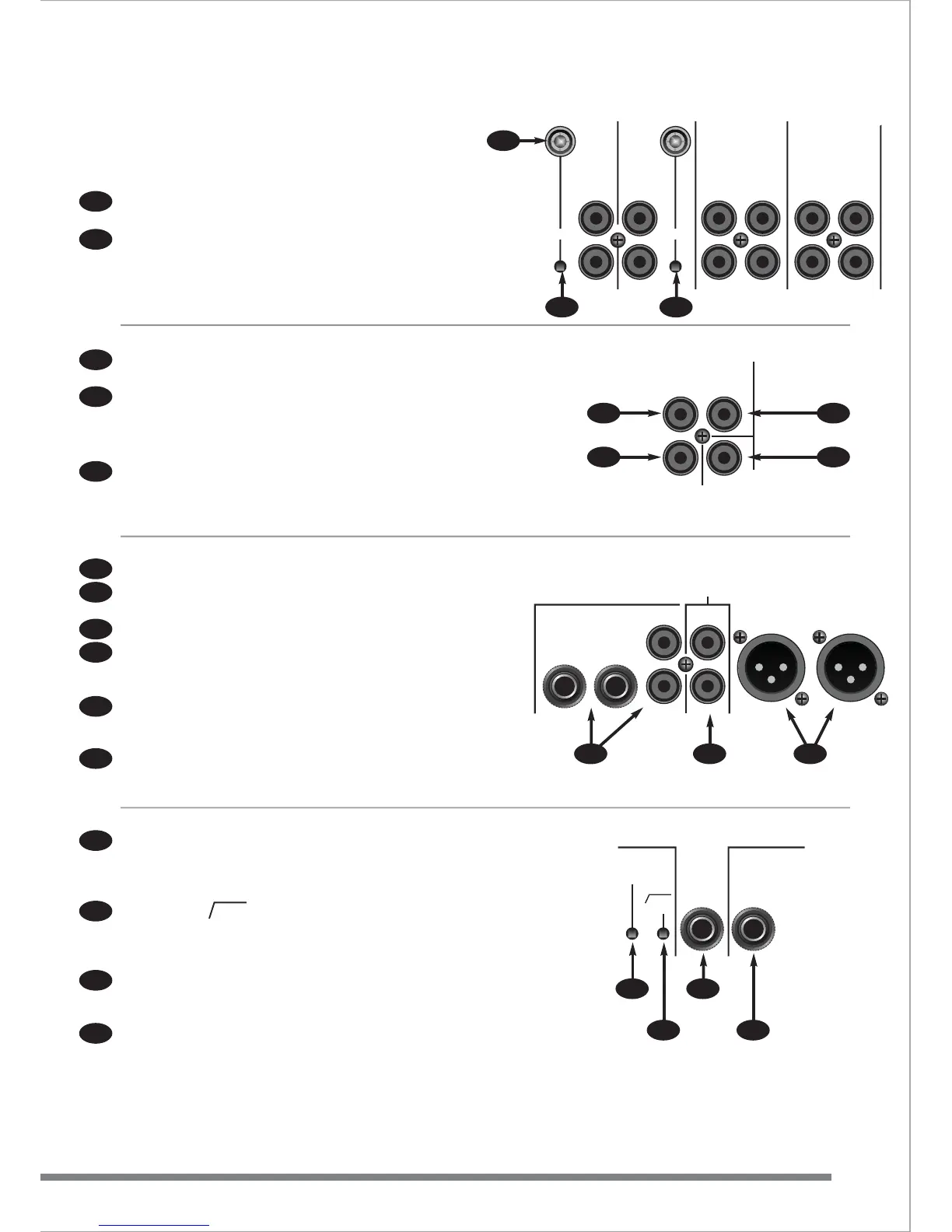
REAR PANEL
Connectors for stereo channels are all RCA/phono type.
Stereo channels 8-9 & 10-11 are fitted with ‘ground’ terminals for
record decks.
The recessed PHONO switches activate internal RIAA circuitry
making these inputs suitable for record decks. (channels 8-9 & 10-11)
Stereo channels 4-5 & 6-7 have dual input connectors selectable by
the front panel switch (10).
VIDEO A & B IN - Connect the composite video output of each
video/karaoke machine here.
VIDEO OUT - Connect to a composite video monitor.
Note: these sockets (45 & 46) do not connect to the audio signal
within the Fusion and should be used only for composite video
signals.
MONO OUTPUT provides a line level (-6dB) mono sum of the main
output. This can be used for additional mono amplifiers (zone or sub
bass) or used to connect to lighting controllers.
POWER ON/OFF switch turns the Fusion on and off.
The Voltage selector allows the Fusion to operate on either 115 or
230 Volt AC supplies.
The AC power connector also contains the internal A.C. power fuse.
BOOTH OUTPUT is available on both 1/4” jacks and RCA/phono
connectors. These outputs should be connected to the input of the
amplifier powering the booth monitor system.
OUTPUT/RECORD provide the main mix on RCA/phono connectors.
They can be used to provide a signal to the main amplifier/speaker
system or for recording.
The 3 pin XLRs provide the main mix with a balanced signal to
drive a professional amplifier/speaker system.
The recessed MONO switch sums the main Left & Right outputs
together and sends a mono signal to both the Left and the Right
output XLRs. When MONO is selected the MONO LED on the front
panel will light.
The recessed 20Hz switch activates a 20Hz high pass filter on the
outputs of the Fusion. This stops excessively low frequencies from
reaching the amplifier/speaker system and possibly causing damage.
It is recommended that this filter is always used.
The AUX OUTPUT 1/4” jack takes the signal from the AUX/DSP
controls on the front panel and sends them to an external effects
processor if required.
The FOOTSWITCH jack turns the effects processor on and off.
The footswitch socket works with a LATCHING type footswitch
(not supplied).
43
44
45
46
47
48
49
50
51
52
53
54
55
56
57
PHONO
GND GND
PHONO
1
0-11 8
-9 6-7 4-5
LINE
LEFT
LINE
LEFT
LINE B
LEFT
LINE A
LEFT
LINE B
LEFT
LINE A
LEFT
RIGHTRIGHT RIGHTRIGHT RIGHTRIGHT
VIDEO IN
A














 To Next Page