FORESTER (NA) A8050BE–A (ENG.)
5
Audio
5-37
– CONTINUED –
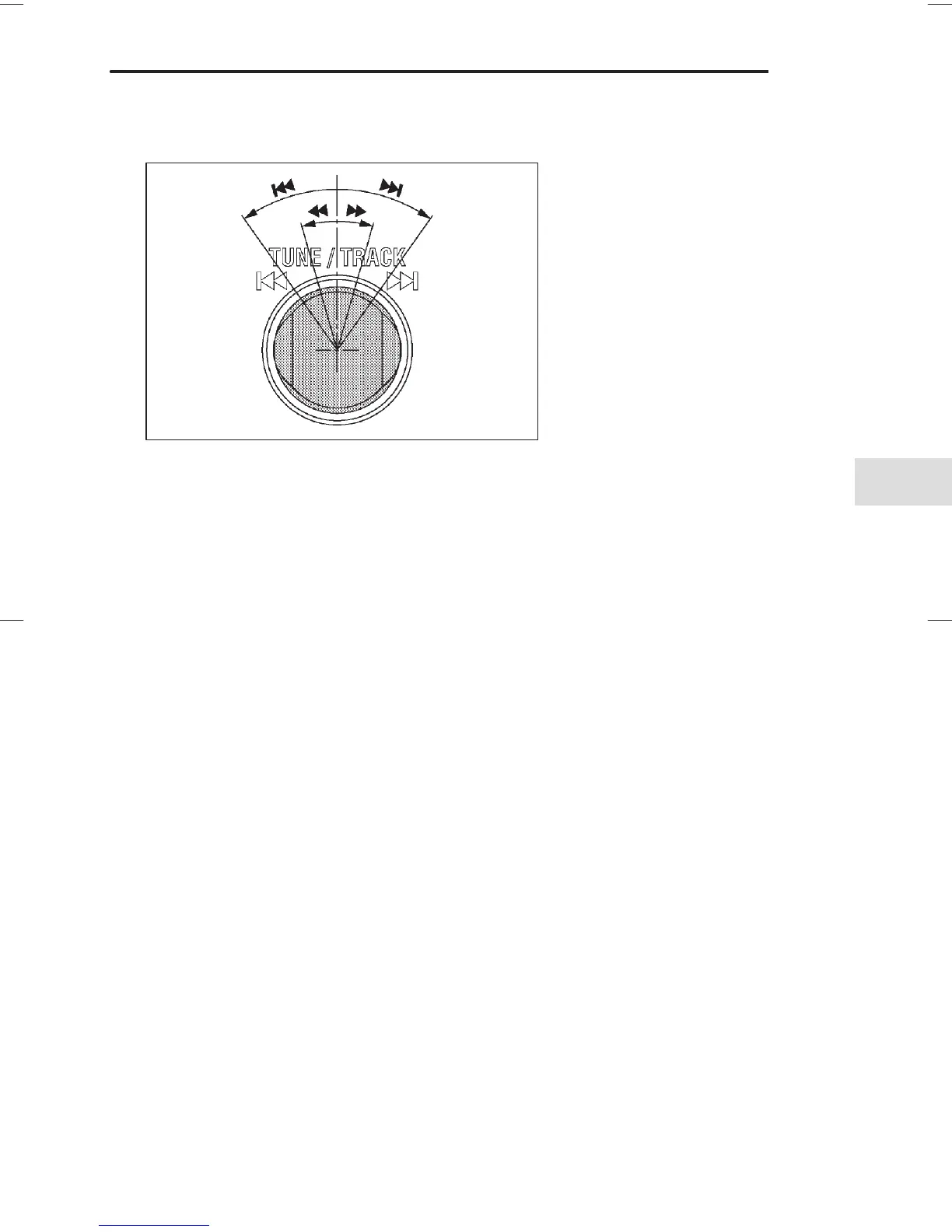
B Selecting a desired track (TRACK)
HS5005BA
n Skipping forward
Turn the “TRACK” knob
G clockwise and release it immediately to
skip to the beginning of the next track. Each time the knob is turned
and released, the indicated track number will increase.
n Skipping backward
Turn the “TRACK” knob
G counterclockwise and release it immedi-
ately to skip to the beginning of the current track. If you continue to
turn and release the knob, the indicated truck number will decrease.
n Fast forwarding
Turn the “TRACK” knob
G clockwise and hold it continuously for more
than 2 seconds to fast forward the disc.
Release the knob to stop fast forwarding.
n Fast reversing
Turn the “TRACK” knob
G counterclockwise and hold it continuously
for more than 2 seconds to fast reverse the disc.
Release the knob to stop fast reverse.
B Repeat playback
Press the “RPT” button
H while a song is playing to play the song
repeatedly. The “RPT” indicator will come on and the song will be
played continuously. To cancel the repeat mode, press the button
again. Then the “RPT” indicator goes out, and normal playback mode
is restored.
""❚ :Skipping forward
❚AA :Skipping backward
"" : Fast forwarding
AA : Fast reversing













 To Next Page