MEDIA OPERATION
74
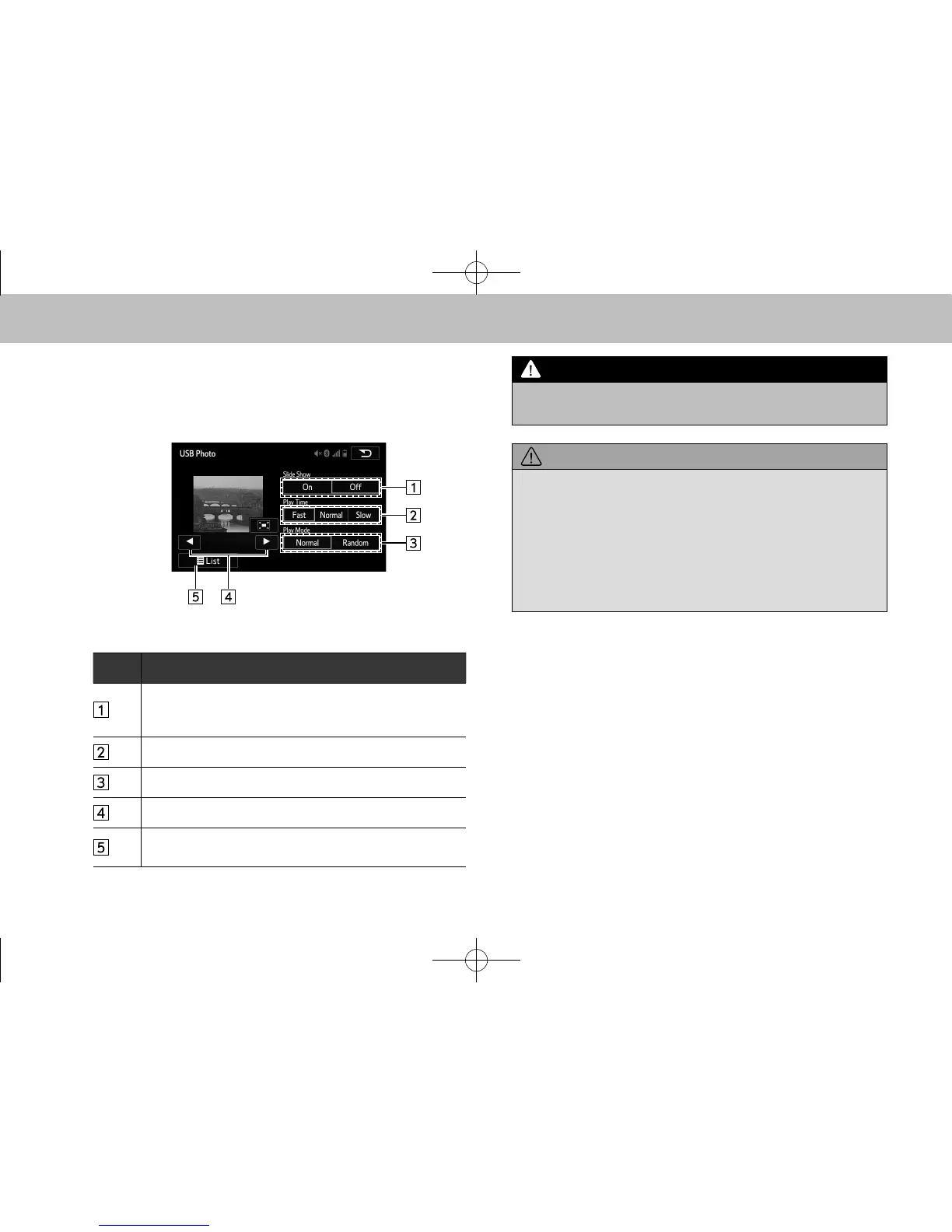
XControl screen (Photo)
No. Function
Select to set slideshow.
• The slideshow displays the images contained within
the currently selected folder.
Select to set play time of slideshow.
Select to set random playback.
The les can be switched.
Select to display the USB photo folder list selection
screen.
l Do not operate the player’s controls or connect the USB
memory while driving.
l Do not leave your portable player in the car. In particular, high
temperatures inside the vehicle may damage the portable
player.
l Do not push down on or apply unnecessary pressure to the
portable player while it is connected as this may damage the
portable player or its terminal.
l Do not insert foreign objects into the port as this may damage
the portable player or its terminal.
l Audio les and image les can be played back at the same time.
However, the slideshow interval may be longer than when an
audio le is not being played back.
l If tag information exists, the le names will be changed to track
names.
l The compatible photo le extensions are JPG and JPEG.
docstructure.indb 74 2014/08/20 17:34:31














 To Next Page