5 Installation Procedure
15
◆ Communication Cable Wiring
■ Procedure
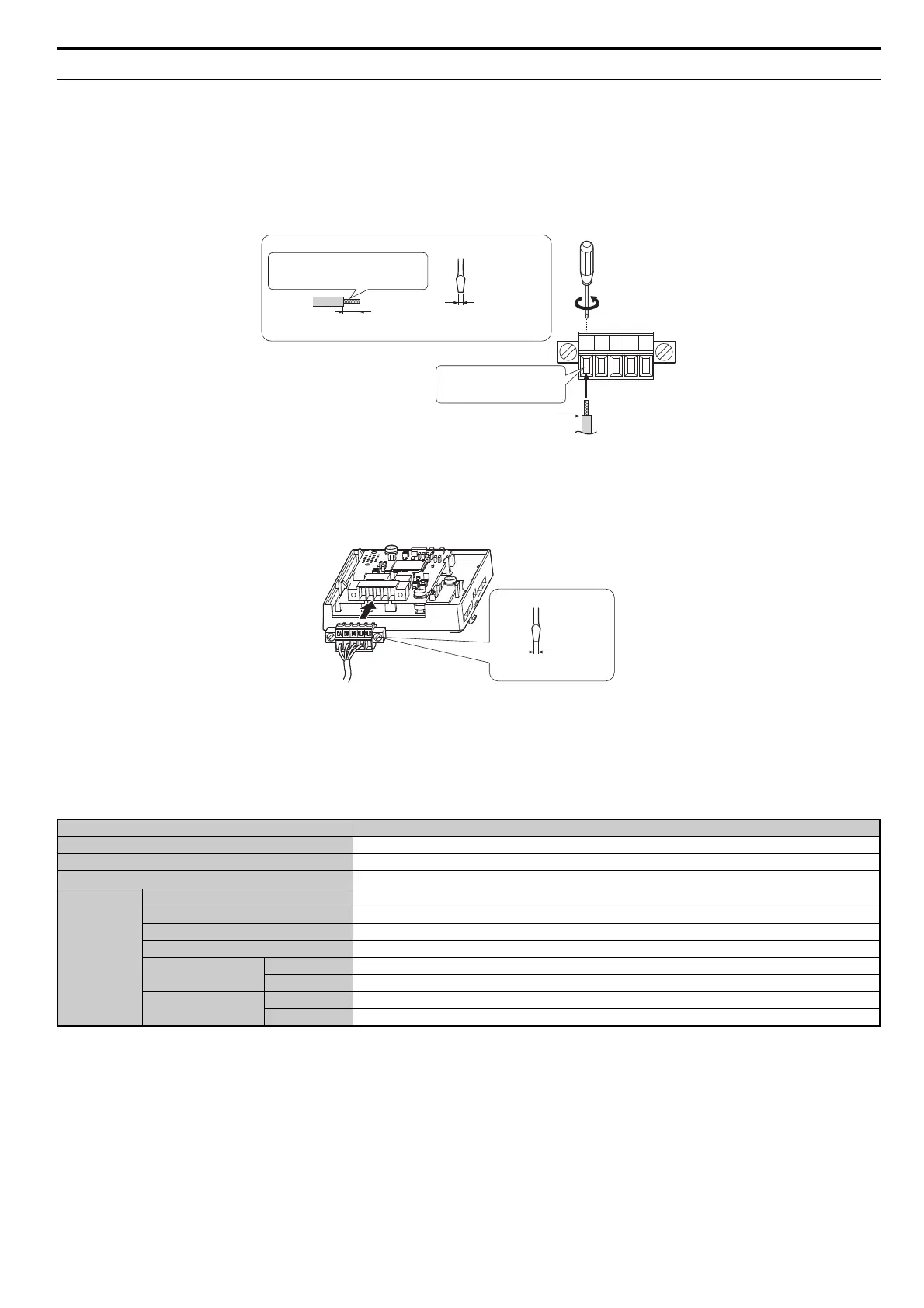
Follow the instructions below to connect the communications cable to the terminal block.
NOTICE: Tighten all terminal screws according to the specified tightening torque. Tightening screws too tight could damage the terminal block, and leaving screws too loose
can cause a short-circuit or drive malfunction.
1. Connect the communications cable to the terminal block as shown in the diagram below.
Note: Communication lines should be separated from main circuit wiring and other electrical lines. (Tightening torque: 0.22 to 0.25 (Nm))
Figure 12
Figure 12 Comm Cable Wiring
2. Ensure all wiring connections are tightened and wire insulation is not pinched in the terminal block. Remove any stray wire strands that touch
other terminals.
3. After the terminal block is fully attached to the option unit, tighten the screws on the left and right sides of the terminal block. (Tightening
torque: 0.22 to 0.25 (Nm))
Note: Be sure to put the option cover back on after you have completed all necessary wiring.
Figure 13
Figure 13 Terminal Block Installation
■ Communication Cable Specifications
Use only CC-Link dedicated communication cable; the Sumitomo warranty does not cover other cable types. For more information on cables, refer
to the CC-Link website at http://www.cc-link.org/.
Sumitomo recommends using CC-Link cables suitable for the conditions listed in Table 5.
Table 5 Communication Cable Requirements
Specifications
Cable Type triple-core shielded twisted-pair cable
Gauge 8.0 mm max
Drain Wire 20 lines / 0.18 mm or 24 lines / 0.18 mm
Electrical
Characteristics
Conductor Resistance (20°C) 37.8 Ω/km
Insulation Resistance 10000 MΩkm or more
Voltage Tolerance 500 Vdc, 60 s
Capacitance (1 kHz) 60 nF/km max
Impedance
1 MHz 110 ±15 Ω
5 MHz 110 ± 6 Ω
Attenuation (20°C)
1 MHz 1.6 dB / 100 m max
5 MHz 3.5 dB / 100 m max
DA DB DG SLD SLD
Terminal block
Preparing wire ends:
Screwdriver blade size
When not using
terminal extensions
about 5.5 mm
up to
2.5 mm
Blade width
up to 0.4 mm
Pull back the sheilding and lightly
twist the end with fingers, keeping
the ends from fraying
CC-Link comm cable
(do not soldered ends)
Loosen the screws and
insert the cable into the
opening on the terminal block
screwdriver blade size
up to
3.5 mm
blade width
up to 0.6 mm



 To Next Page