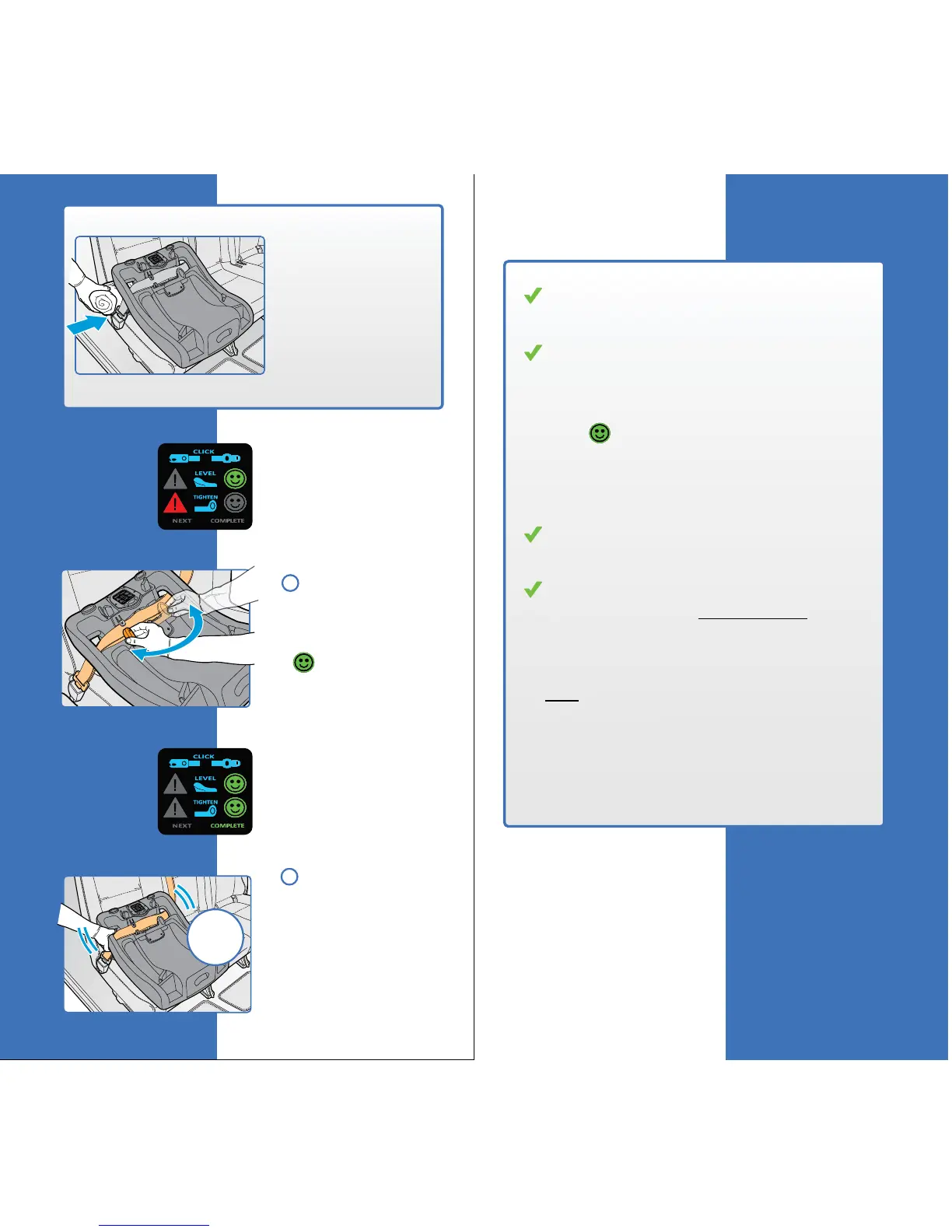
Once the angle is
correct the word
“Tighten” will
automatically light up
on the Smart Screen.
Tighten the
installation by rotating
the Belt Tightening
Handle to the left until
a appears.
The word “Complete”
will light up on the
Smart Screen letting
you know the
installation is complete.
ALWAYS check
for a secure installa-
tion. If the Base moves
more than one inch
side-to-side at the belt
path, repeat the above
steps.
Checklist
11
12
41
Base Installation
less
than
1”
Check that the seat belt is secure,
untwisted, and routed correctly.
Check that the base angle is correct when
parked on a level surface:
1. Check the the Smart Screen shows a
under “Level”, AND
2. Check that the level to ground line
on the side of the Base is level to
the ground.
Check that the Base is securely fastened
to the vehicle.
Check that the base cannot move more than
one inch side-to-side at the belt path.
If the Base is not secure, repeat the installa-
tion making sure that the seat belt is pulled
snug before rotating the Belt Tightening
Handle.
REMEMBER! Use the “TEST” button
on the Control Panel to check your
installation approximately 30 days
from now, or as needed.
40
Base Installation
NOTE: If needed, a
pool noodle or a
tightly rolled towel
may be used under
the Recline Adjust-
ment Foot to
correctly adjust the
angle of the base.
The foot MUST be
on the lowest
position (#
1).
rotate!



 To Next Page