27
Menu Adjustments
The Channel provides the setup / changes of your television to receive broadcast channels, store your favorite chan-
nels, add or skip channels in memory and label or name channels.(For antenna and Auto Channel Scan setup, please
refer to page 19.)
How to Navigate:
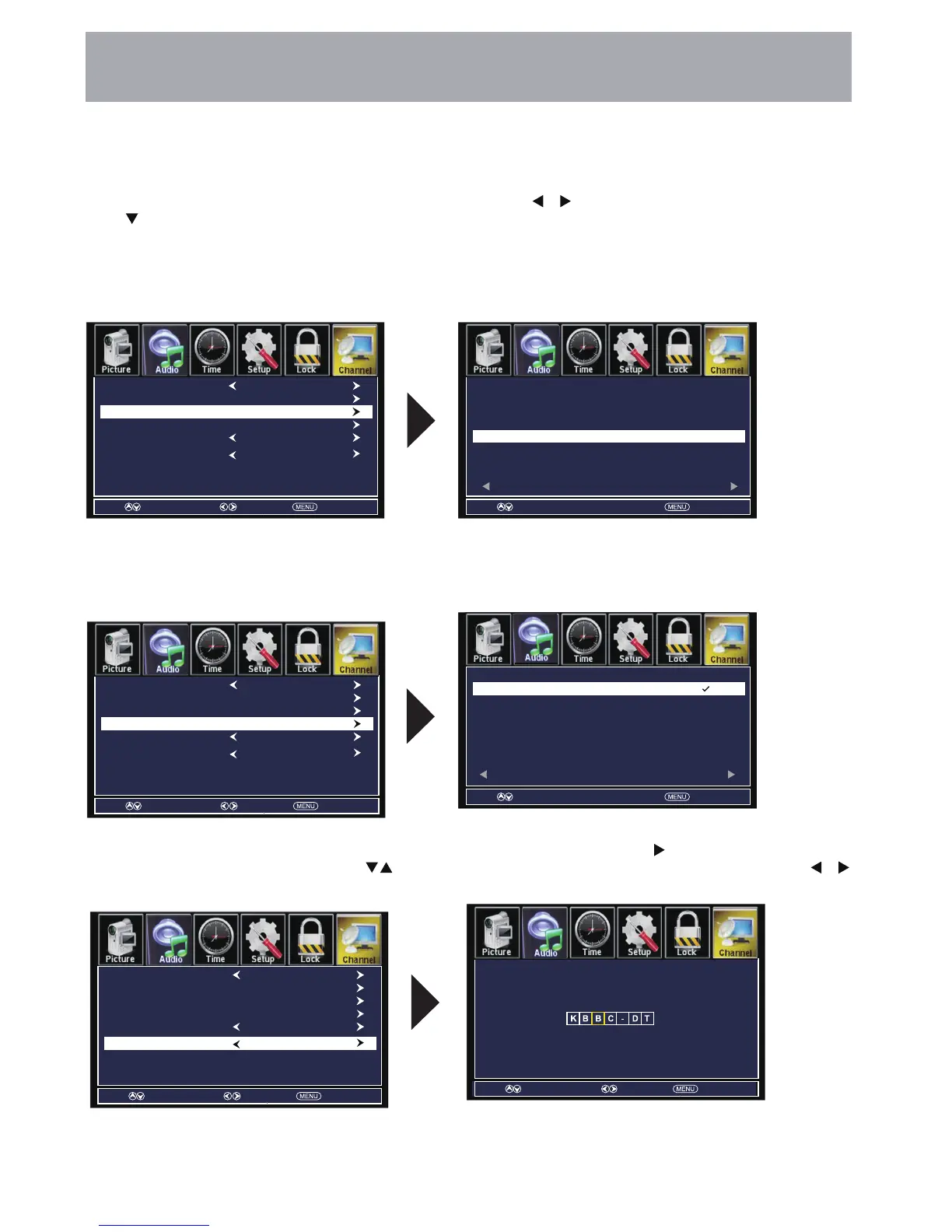
Press the MENU button on the remote control. Navigate using arrow buttons to select Channel. Press the
down button to highlight your preferences.
• Highlight Favorite to add channels to your Favorites List. Navigate using the ◄►▼▲ arrow buttons to select channels to be
added or deleted from your list. Press ENTER to add or delete a channel. A checkmark indicates a channel has been added.
You may also display your list of Favorite channels by pressing the FAV button on the remote control
• Highlight Show / Hide to select or skip channels already in memory. Navigate using the ◄►▼▲ arrow buttons to
access the list of available channels. Press ENTER to change the channels status. A checkmark indicates a channel
has been added.
• Highlight Channel Label to name or rename a broadcast channel. Navigate using the
arrow button to enter the
screen menu to relabel a channel. Use the arrow buttons to spell out each letter, number or character. Use
arrow buttons to advance to the next space.
• Favorite
• Show / Hide
• Channel Label
TV Settings
Air/Cable
Auto Scan
Favorite
Show/Hide
Channel No.
Channel Label
Air
7-2
KABC-SD
Move Press ENTER change Return
Channel Channel Label
46-1
50-0
50-1
50-2
50-3
Favorite
Move Press ENTER change Return
Channel Channel Label
7-0
7-1
7-2
7-3
9-0
KABC-DT
KABC-SD
KABC-WN
KCAL-DT
Hide
txeNverP 1/1
txeNverP 1/1
DTV Signal
Move Select Return
Air/Cable
Auto Scan
Favorite
Show/Hide
Channel No.
Channel Label
Air
7-2
KABC-SD
DTV Signal
Move Select Return
Air/Cable
Auto Scan
Favorite
Show/Hide
Channel No.
Channel Label
Air
7-2
KABC-SD
DTV Signal
Move Select Return
Move Select Return



 To Next Page