30
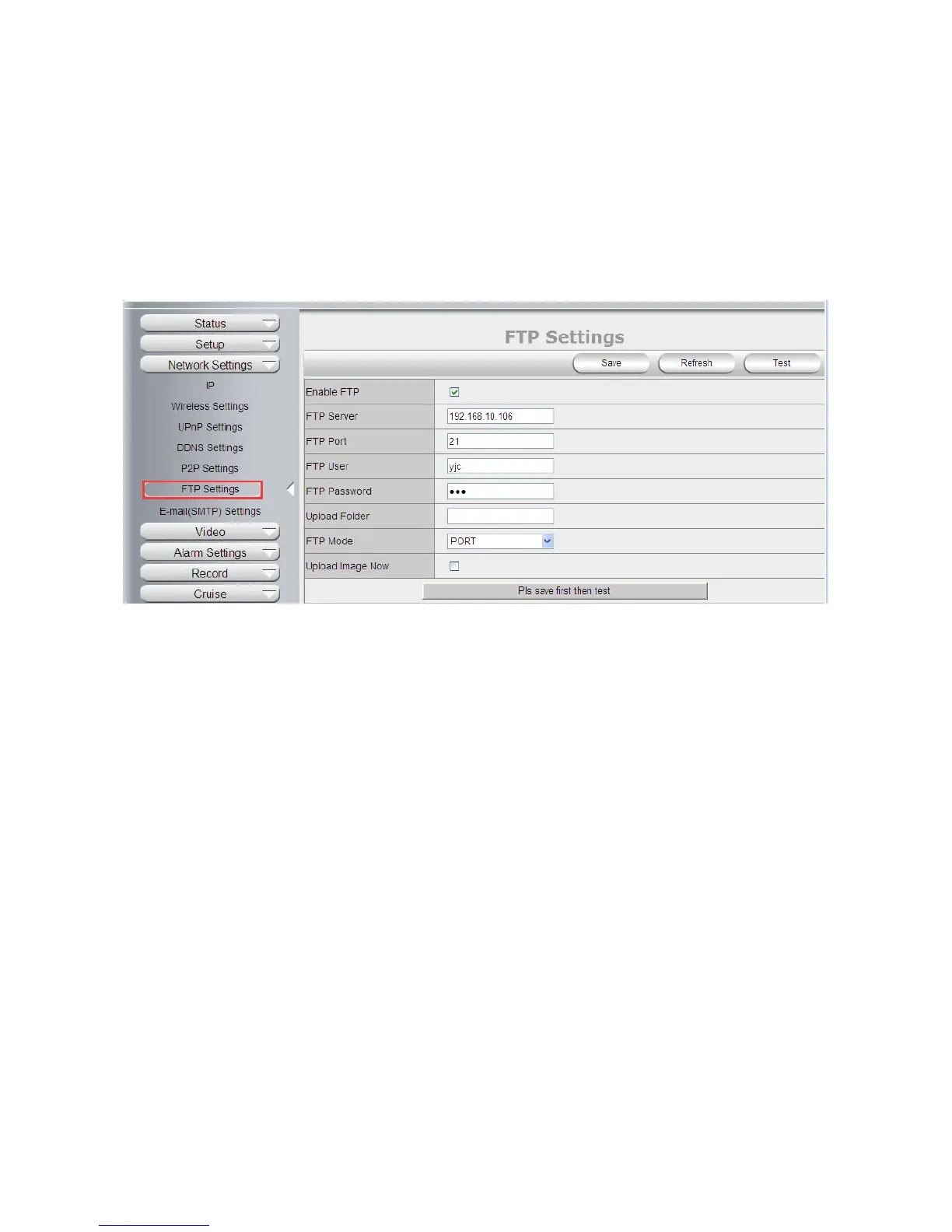
FTP Port: Set the port of FTP server, default is 21.
FTP User: Set the user name of FTP server.
FTP Password: Set the password of FTP server.
Upload Folder: Set the path of remote FTP server. Make sure that the folder you plan to store images exists.
(The camera cannot create the folder itself). Also, the folder must be erasable.
FTP Mode: It supports standard (POST) mode and passive (PASV) mode.
Click save to submit, click test to check the settings.
NOTE: When alarmed, there will be 3 snapshots sent to the FTP server every 1 second
4.3.7 E-mail(SMTP) Settings
Enable Email: Set e-mail function ON/OFF.
Sender: Set sender’s name or email address
Sender’s email: Set sender’s email address.
Receiver: Set receiver’s email box. (Supports 3 receivers’ emails simultaneously)
SMTP Server: The sender address SMTP server.
SMTP Port: The sender’s SMTP Port, usually is 25, some SMTP servers have their own port, e.g., the smtp
port for Gmail is 465.
Auth User: Verify the user settings.
SMTP Username: Set sender’s user name or email address.
SMTP password: Set sender’s email address password.
Note: User can save the settings first, then click Test buttom to see if settings working. If not, pls double check
your settings or spelling.



 To Next Page