9
2. INSTALLATION AND SETTINGS
System Requirement:
Operating System: Windows 2000 / XP / Vista / 7/8/10/Mac OS
Network Protocol: TCP/IP
Network Structure: Applies to all network connections 10/100M LAN platform
Browser: Internet Explorer 6.0 or above. Firefox, Google, Safari, or Chrome.
2.1 Network Connection
Intranet and Extranet Connection Reference:
Extranet means public IP (i.e. The Internet), Intranet means private IP. If your IP belongs to the follow range,
then it’s a private IP :
Category A: 10.0.0.0 - 10.255.255.255
Category B: 172.16.0.0 - 172.31.255.255
Category C: 192.168.0.0 - 192.168.255.255
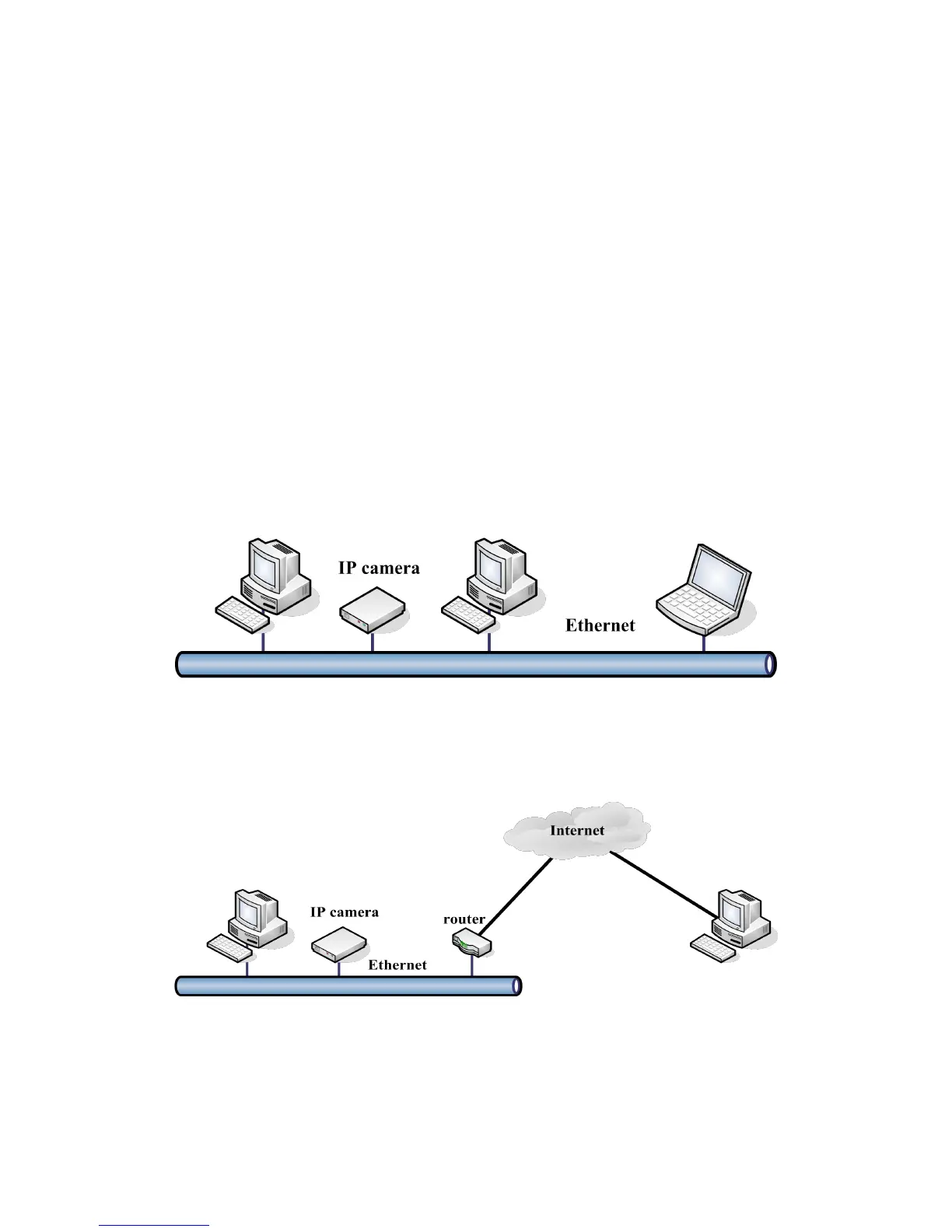
Intranet Connection: The IP camera and your computer (device) should be under the same network
environment, and both of the IPs should be under the same subnet, pictured as below:
Extranet Connection: there are 2 ways as below:
(1). IP camera connects to the Internet via a router, here camera’s IP is a private IP, client needs to connect
to the IP camera through a router, with port forwarding to be connected correctly, as below:
(2). IP camera connects to the Internet directly, if it’s a fixed IP provided by your ISP, just input it. If it’s a
floating IP, then input the account and password provided by your ISP to dial-up connection.



 To Next Page