2
Set the parameters as required. The following table
describes some major parameters.
Exposure
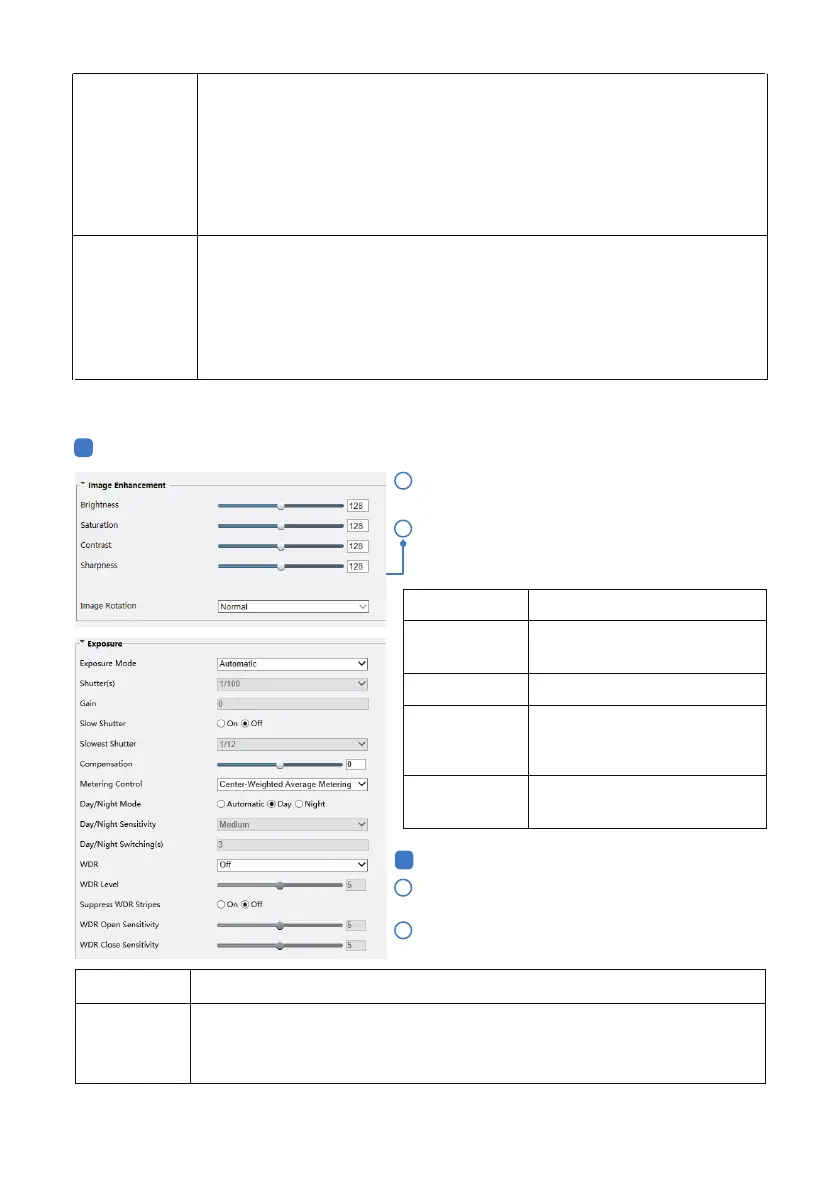
Click Setup > Image > Image and then click
Exposure.
2
1
4.2 Image Setting
1
1
Smoothing
Image Enhancement
Click Setup > Image > Image and then click Image
Enhancement.
Set the extent of smoothing. Choosing Clear means disabling Smoothing. Moving
the slider toward Smooth increases the level of smoothing but will aect image
quality.
Note:
In a poor network environment, you can enable smoothing to get more fluent
video.
Use the sliders to change the settings. You may also
enter values directly. The following table describes
some major parameters.
Item Description
Brightness
Set the degree of brightness of
images.
Saturation
The amount of a hue contained in a color.
Contrast
Set the degree of dierence
between the blackest pixel and
the whitest pixel.
Sharpness
Contrast of boundaries of
objects in an image.
2
U-Code
- 09 -
Basic Mode: The actual bit rate is around 3/4 of the set bit rate.
Advanced Mode: The actual bit rate is around 1/2 of the set bit rate.
Note:
When U-Code is enabled, video compression only supports H.264 and H.265.
MJPEG is not supported.
When U-Code is enabled, the capture mode does not support frame rates higher
than 30.
Parameter
Description
Exposure Select the correct exposure mode to achieve the desired exposure eect.
Automatic: The camera automatically adjusts exposure according to the
environment.



 To Next Page