10.Smart Event Conguration
Sunba IP camera supports various types of intelligent alarms including head count, face capture and line
cross detection.
Some detections would interfere with each other, and thus cannot be activated simultaneously. Below is
the setup of each type of smart detection:
Click Setup > Intelligent > Smart Settings.
9.Video Motion Detection
Motion detection detects the object motion in a specified rectangular area during a period. You can
customize parameters such as a pre-defined detection area, sensitivity of detection, object size, and
history for the camera to decide whether to report a motion detection alarm when it detects motion.
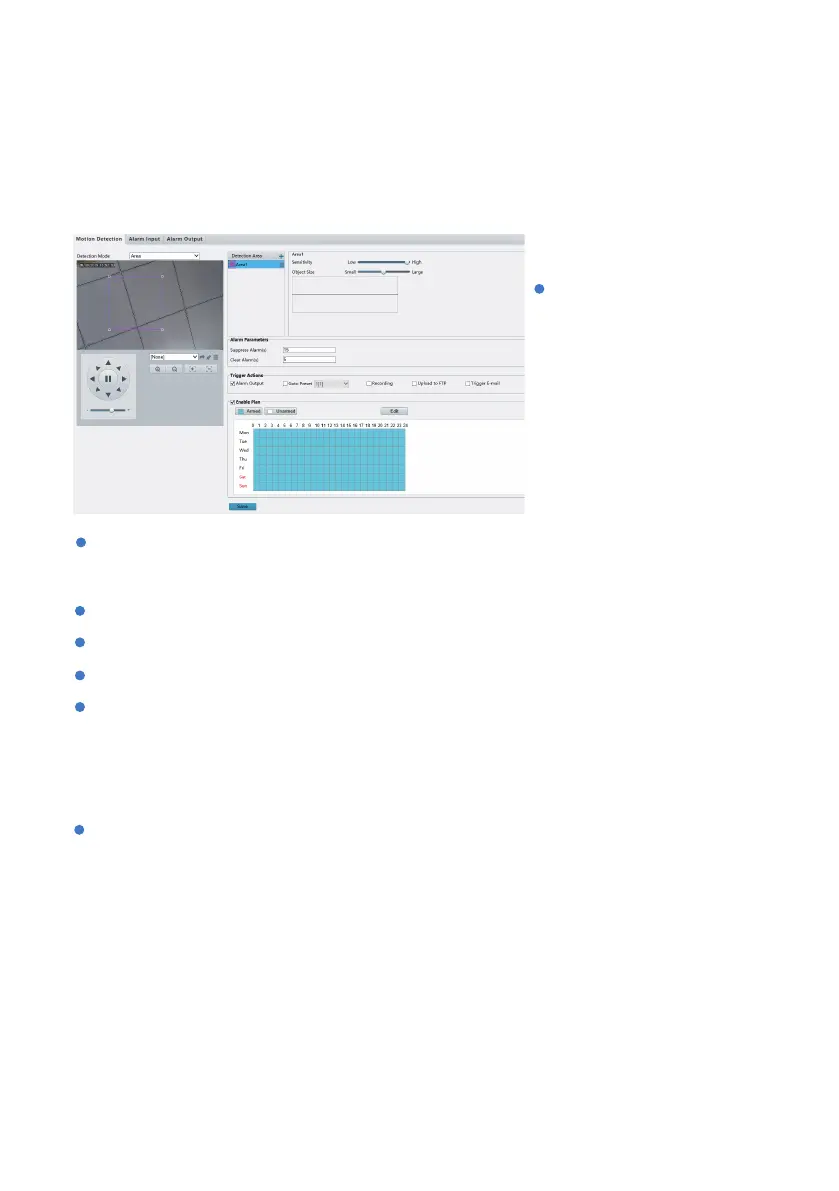
Click Setup > Events > Common Alarm > Motion Detection.
Detection Mode: You can switch
between grid detection and
area detection. Area detection
allows you to customize the
detection object size (see
below) for each area and grid
detection applies to more
uniformly sized moving objects.
Object Size: Object size specifies the minimum ratio of the object's size to the size of the total detection
area before an alarm will be reported. That is to say, to detect motion of tiny objects, you need to draw
a small box (detection area) in the actual motion area accordingly.
Alarm Output: This only applies if the camera is connected to external 3rd party alarm device.
Go to Preset: When motion alarm triggers, the camera will travel to a specific preset location. For
Suppress Alarm(s): Aer an alarm is triggered, the same alarm will not be reported within the set time.
Recording: Record the motion detection clip to the storage card.
Clear Alarm(s): Aer an alarm is triggered,
a. If the same alarm is not triggered within the set time, the alarm will be cleared and the same alarm
can be reported again.
b. If the same alarm is triggered within the set time, the alarm will not be cleared until the suppress
alarm time expires. Then the same alarm can be reported again.
- 21 -



 To Next Page