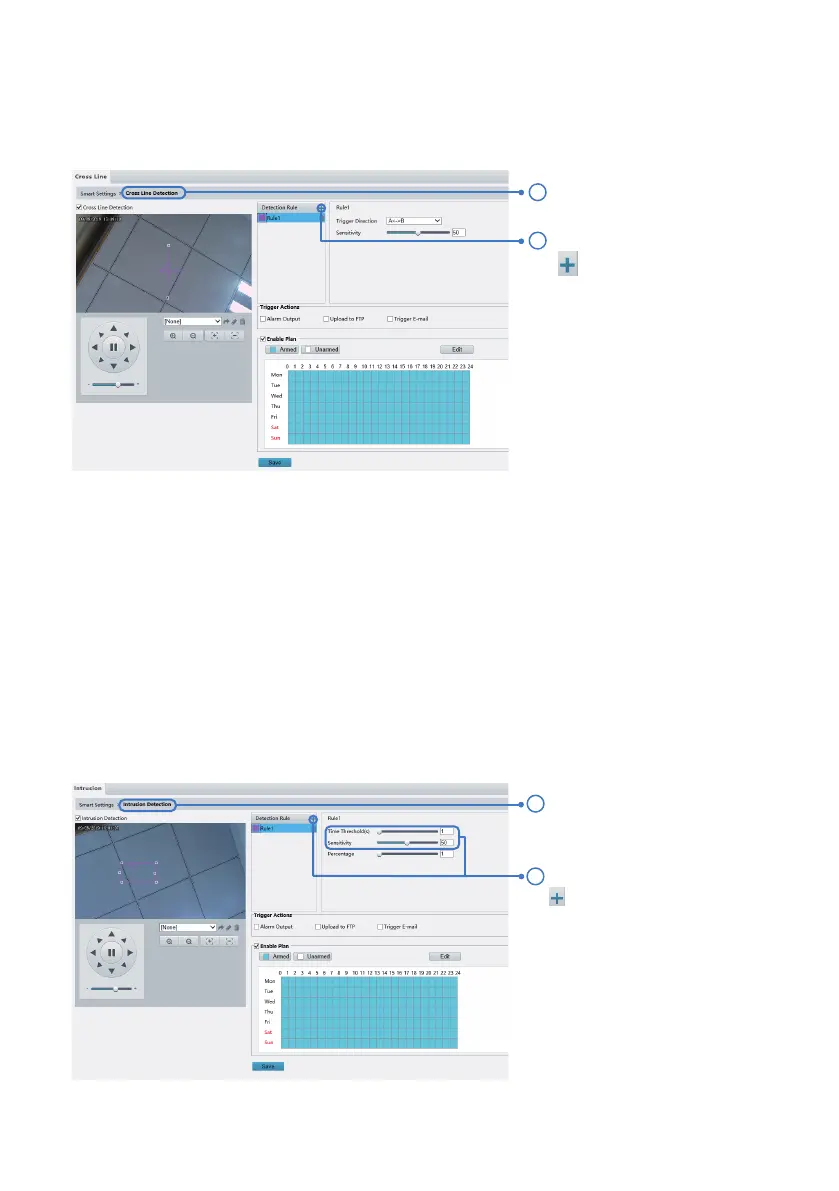
Intrusion detection detects objects that enter a specified area in live video and triggers alarm when such
an event is detected.
10.2 Intrusion Detection
Select Intrusion. .Detection.
In the Detection Rule area, click
to add a new detection area.
You can set the sensitivity level,
time threshold (minimum time
the intruder stays in the
detection area before the alarm
triggers) and the percentage of
the object (the minimum ratio
of the intruder's size to the size
of the specified detection area
before an alarm will be
reported).
Cross line detection detects objects that cross a virtual line in live video and triggers alarm when such an
event is detected.
Select Cross Line Detection.
10.1 Cross Line Detection
Trigger Actions:
Upload to FTP: this will send snapshots to FTP server once the alarm is triggered. For details, see
Chapter 3.4.
Trigger E-mail: this will send an email notification for the alarm along with a snapshot. For details, see
Chapter 3.3.
In the Detection Rule area, click
to add a new line. You can
set the sensitivity level and the
direction of line cross that
would trigger an alarm.
Line cross detection cannot be enabled when either of the face capture or people head counting is
turned on.
- 22 -
1
2
1
2



 To Next Page