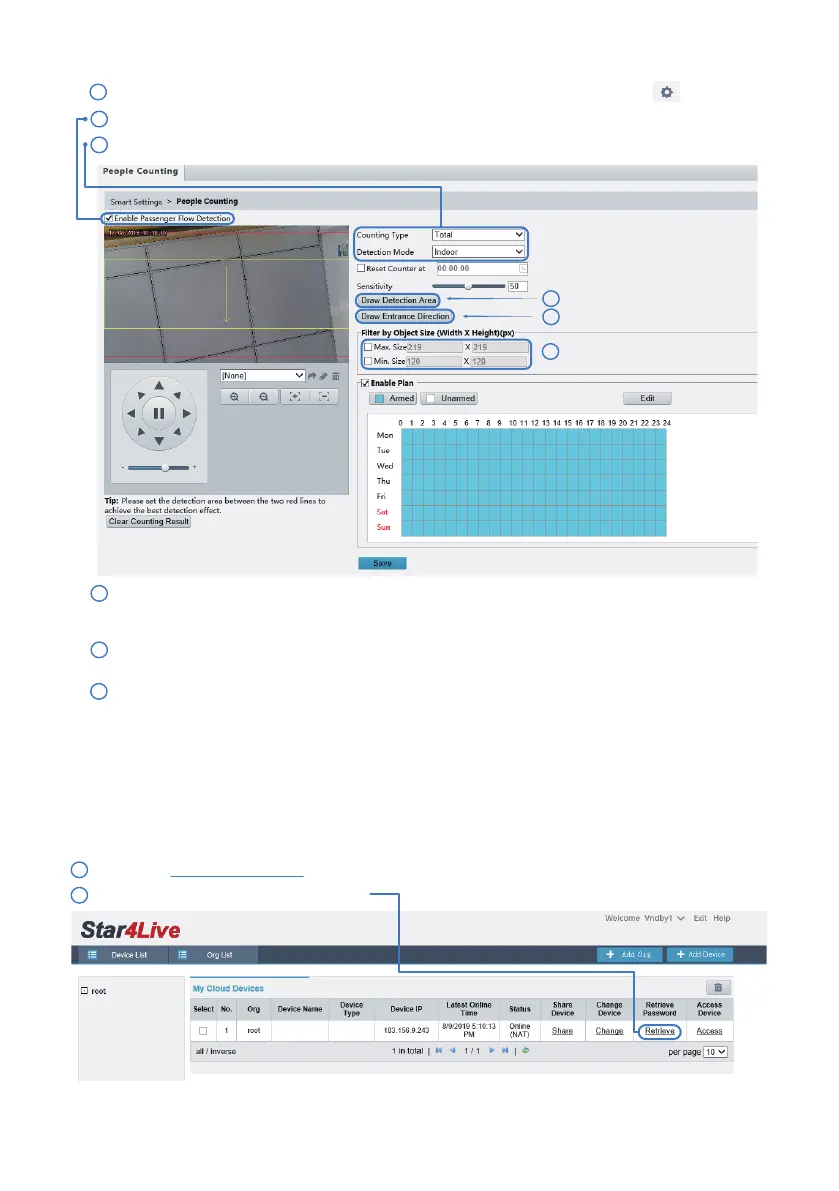
Click Setup > Intelligent > Smart Settings. Choose People Counting and then click .
1
Select Enable Passenger Flow Detection.
2
Counting Type: Select whether to count people entered, people le or total (both).
3
Set Max. Size and Min. Size under Filter by Object Size. Only objects within the size range will be
counted; others will be filtered and not counted. The maximum width or height must be greater
than the minimum width or height.
4
4
Click Draw Detection Area, and then draw a detection area on the preview window on the le, e.g.,
a square.
5
5
6
- 25 -
1
2
6
Click Draw Entrance Direction, and then draw the direction on the preview window on the le.
The direction is usually vertical or sloping.
This method only works if you have a cloud account upfront and the cloud account has added the specific
IP camera you want to recover the password.
Please visit http://star4live.com. Login using your cloud account.
Method A
11. Forget Password
Click “Retrieve” under Retrieve Password.
Sunba



 To Next Page