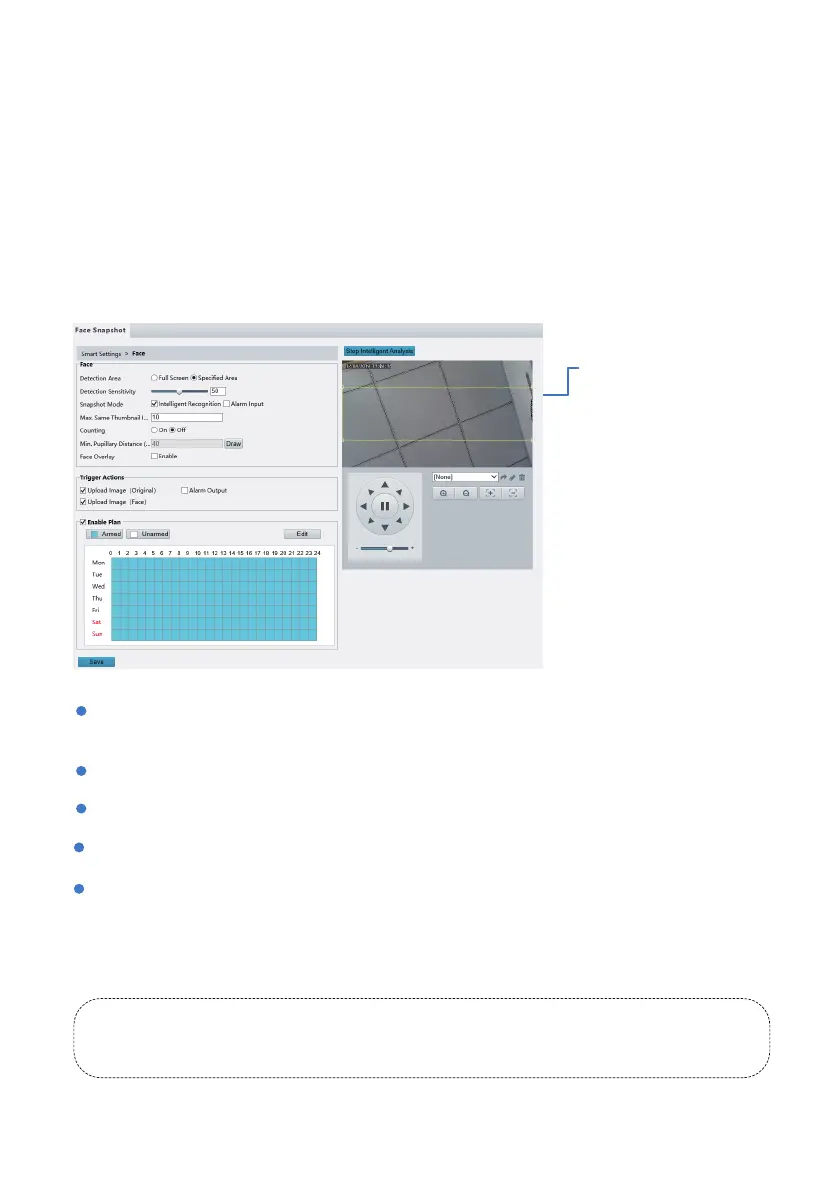
Detection Area: You can set to detect and capture face appeared in the selected area or in the full
screen.
Max. Same Thumbnail Images: Set the maximum thumbnail image of the same face.
Min Pupillary Distance (px): The minimum pupillary distance of the detection object.
Counting: Turn on to count the number of faces detected by the IP camera.
Face Overlay: Show green detection box on the screen.
10.6 People Counting
Note: People counting detects human figures in terms of the appropriate ratio between head
and shoulder. So it is important the IP camera is mounted high enough and are able to capture
the upper part of any human figure.
Face detection detects human faces in live video, and can upload the captured faces to the FTP server.
10.5 Face Capture
Click Setup > Intelligent >
Smart Settings. Choose
Face and then click .
Trigger Actions:
Upload to FTP: this will send snapshots to FTP server once the alarm is triggered. For details, see
Chapter 3.4.
Trigger E-mail: this will send an email notification for the alarm along with a snapshot. For details, see
Chapter 3.3.
- 24 -
Object le cannot be enabled when either of the face capture or people head counting is turned on.



 To Next Page