Extraction temperature
The espresso Thermoblock heats water so
that espresso extracts at 92°C for a balanced
espress
o.
You can adjust the water temperature used
for espresso extraction, in 2°C increments
between 88°C - 96°C, to cater for different
types of roasted coffee beans and for
personal preference.
- Higher temperatures increase bitterness
and decrease acidity.
- Lower temperatures decrease bitterness
and increase
acidity.
- Check power
- Ensure that the machine is plugged into
and switched on at the power outlet.
- The power plug is inserted into the outlet
and switched on.
- The levers are in the OFF position.
- The machine is on and in the READY state
.
- Adjusting extraction temperature
- Ensure the machine is plugged in and
switched on at the power outlet.
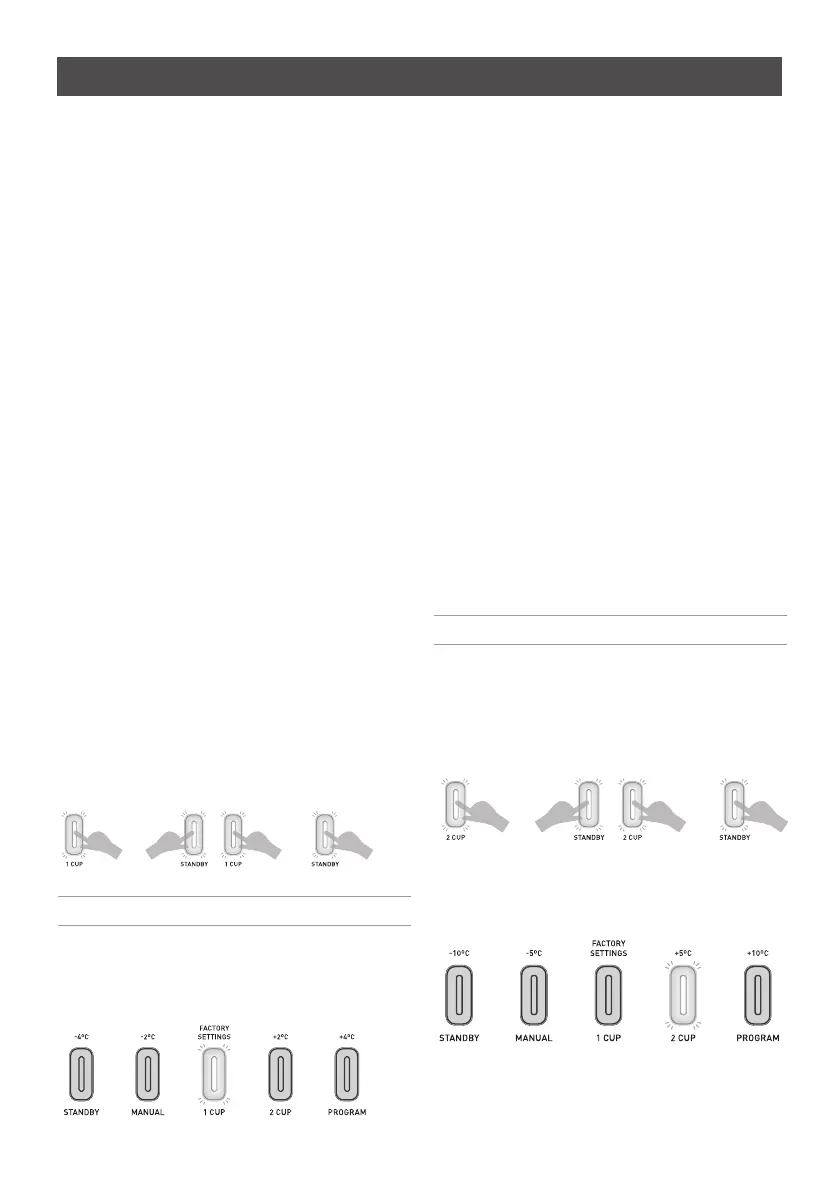
- Press and hold the 1 CUP button.
- While holding the 1 CUP button, press the
STANDBY button and then release the 1
CUP button.
To indicate you have activated the extraction
temperature mode, a light on one of the
buttons will illuminate.
- Press and release one of the buttons
depending on the required extraction
temperature setting:
-4°C:
press the STANDBY button.
-2°C:
press the MANUAL button.
+2°C:
press the 2 CUP button.
+4°C:
press the PROGRAM button.
- When the new temperature setting has
been selected, the machine will beep
twice.
- The machine will then automatically
power on.
Steam temperature
The steam Thermoblock temperature of this
machine delivers a powerful and constant
dry steam for milk texturing.
The temperature of the steam can be
adjusted in 5°C increments.
- Adjusting steam temperature
- Ensure the machine is plugged in and
switched on at the power outlet.
- Press and hold the 2 CUP button.
- While holding the 2 CUP button, press the
STANDBY button and then release the 2
CUP button.
To indicate you have activated the steam
temperature mode, a light on one of the
buttons will illuminate.
This light will remain on for up to 5 seconds
before automatically returning to factory
settings if no action is taken. The machine
will then power on.
22
Customisable – extraction and steam temperature
Note:
Do not press the STANDY button.
Note:
Do not press the STANDY button.






 To Next Page