ONE CUP
TWO CUP
–MAX–
–MIN–
CENTRE
2.TURN
1. ALIGN
& INSERT
CENTRE
2.TURN
1. ALIGN
& INSERT
The Compact Barista features
Auto Shot Volumetric Control.
It pours just the right
amount of espresso then
automatically stops.
• 1 CUP - Pours 1 shot espresso - 30mL
• 2 CUP - Pours 2 shots espresso - 60mL
You can adjust the pour volume to suit
how you like your coffee.
Preparing for shot programming
• Check water tank
Ensure there is enough water in the water
tank.
• Power
Ensure that:
- The dial is in the OFF position.
- The power plug is inserted into the outlet
and turned on.
- The machine is ON and in the ready state.
• 1 CUP – shot volume program
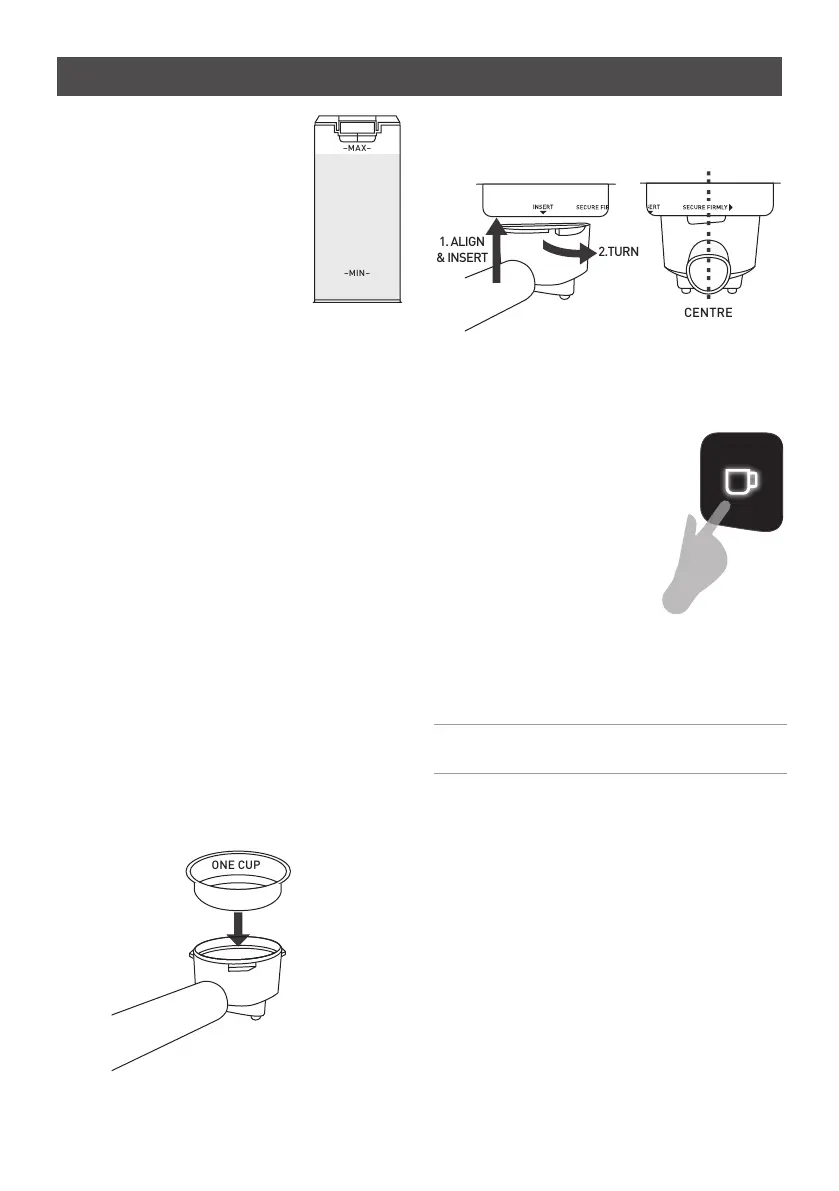
- Insert a 1 CUP filter basket into the group
handle. Fill with coffee grinds and tamp.
- Place the group handle into the group
head.
- Hold and press the 1 CUP
button for 3 seconds until
the machine beeps.
- Press the 1 CUP button
again.
- Espresso will start to pour
and the 1 CUP button will
pulse.
- When you reach your
desired single shot volume,
press the 1 CUP button
again.
- The new single shot volume
has been programmed.
- The programming mode has
finished and will return to
the ready state.
22
Customisable - shot volumes
Note:
Single shot volumes can be
adjusted between 25mL and 60mL.









 To Next Page