EasyManua.ls Logo

Sunnect AP501 - Volume Control

Sunnect AP501
27 pages
Print Icon
To Next Page IconTo Next Page
To Previous Page IconTo Previous Page
Loading...
16
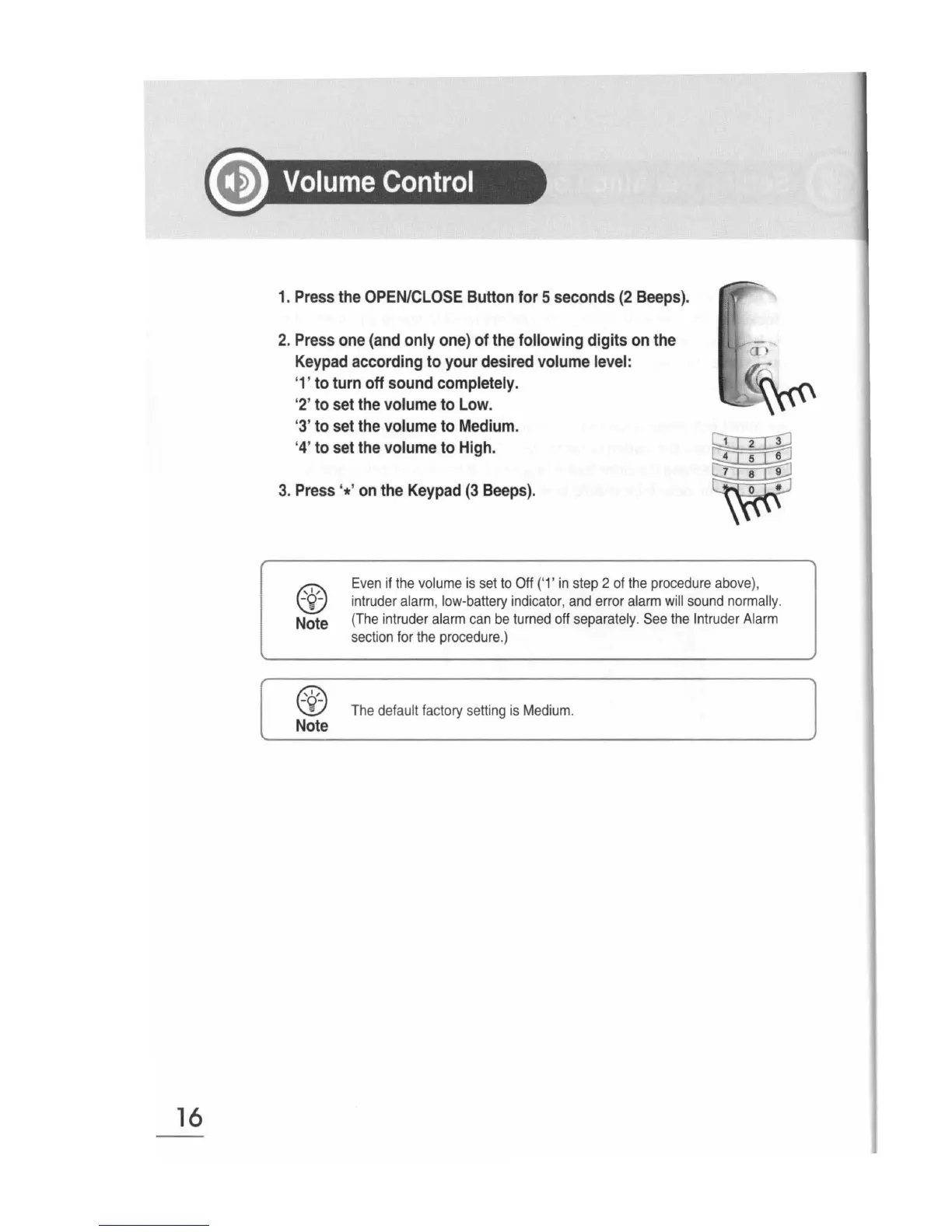
1.
Press
the
OPEN/CLOSE
Button
for
5
seconds
(2
Beeps).
2.
Press
one
(and
only
one)
of
the
following
digits
on
the
Keypad
according
to
your
desired
volume
level:
'1'
to
turn
off
sound
completely.
'2'
to
set
the
volume
to
Low.
'3'
to
set
the
volume
to
Medium.
'4'
to
set
the
volume
to
High.
3.
Press
'*'
on
the
Keypad
(3
Beeps).
rs;:c..
w
Note
@
-
.
Note
Even
if
the
volume
is
set
to
Off
('1'
in
step
2
of
the
procedure
above
),
intruder
alarm
,
low-battery
indicator
,
and
error
alarm
will
sound
normally.
(
The
intruder
alarm
can
be
turned
off
separately
.
See
the
Intrud
er
Alarm
section
for
the
procedure
.)
The
default
factory
setting
is
Medium
.