EasyManua.ls Logo

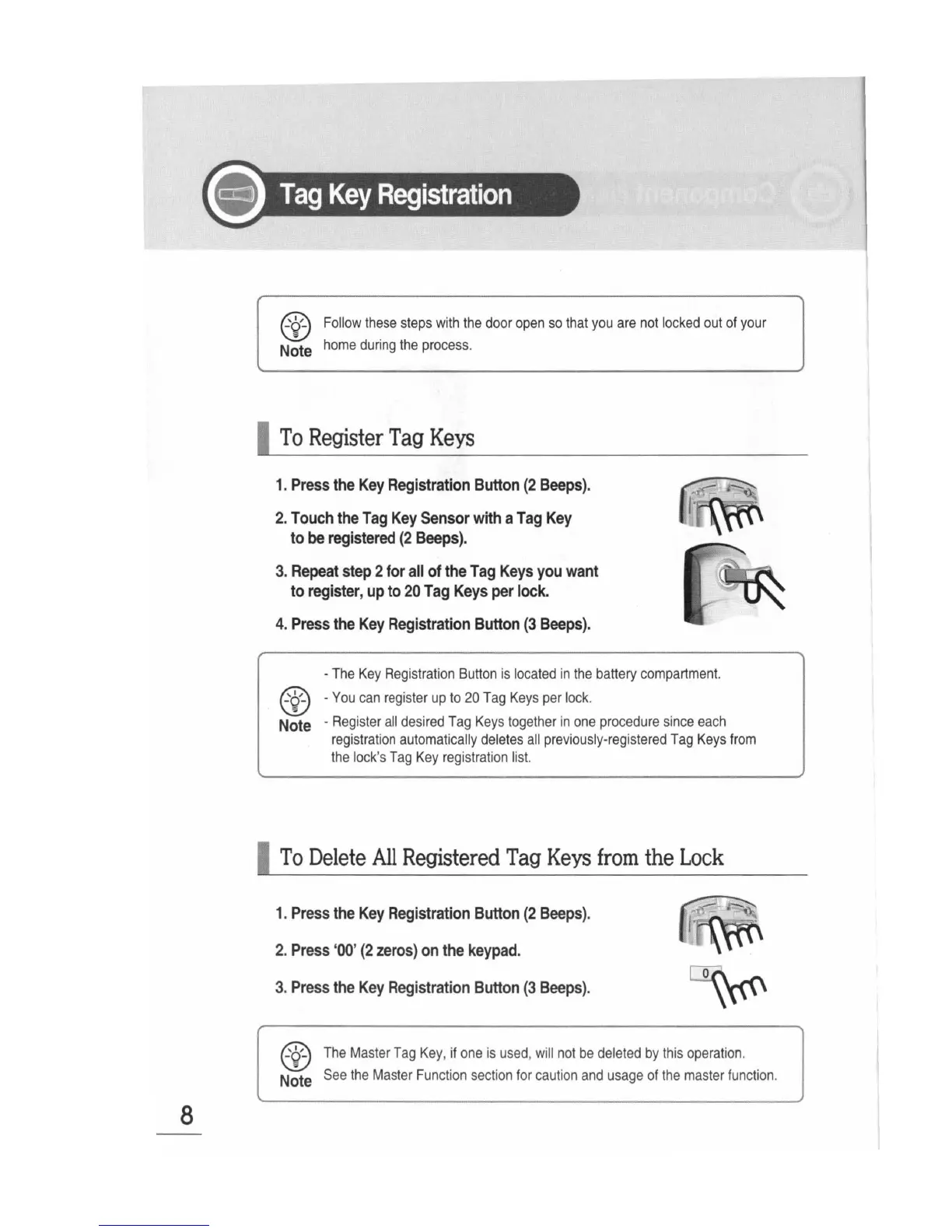
Sunnect AP501 - Tag Key Registration; To Register Tag Keys

Sunnect AP501
27 pages
Print Icon
To Next Page IconTo Next Page
To Previous Page IconTo Previous Page
Loading...
8
@
Follow
these
steps
with
the
door
open
so
that
you
are
not
locked
out
of
your
Note
home
during
the
process.
I
To
Register
Tag
Keys
1.
Press
the
Key
Registration
Button
(2
Beeps).
2.
Touch
the
Tag
Key
Sensor
with
a
Tag
Key
to
be
registered
(2
Beeps).
3.
Repeat
step
2
for
all
of
the
Tag
Keys
you
want
to
register
,
up
to
20
Tag
Keys
per
lock.
4.
Press
the
Key
Registration
Button
(3
Beeps).
-
The
Key
Registration
Button
is
located
in
the
battery
compartment.
@ -You
can
register
up
to
20
Tag
Keys
per
lock.
Note
-
Register
all
desired
Tag
Keys
together
in
one
procedure
since
each
registration
automatically
deletes
all
previously
-
registered
Tag
Keys
from
the
lock
's
Tag
Key
registration
list.
I
To
Delete
All
Registered
Tag
Keys
from
the
Lock
1.
Press
the
Key
Registration
Button
(2
Beeps).
2.
Press
'00'
(2
zeros)
on
the
keypad.
3.
Press
the
Key
Registration
Button
(3
Beeps)
.
~
l
~
l\~
@
The
Master
Tag
Key
,
if
one
is
used
,
will
not
be
deleted
by
this
operation.
Note
See
the
Master
Function
section
for
caution
and
usage
of
the
master
function
.