12
Stable sensing
Difference between
incident light intensities
is not great enough.
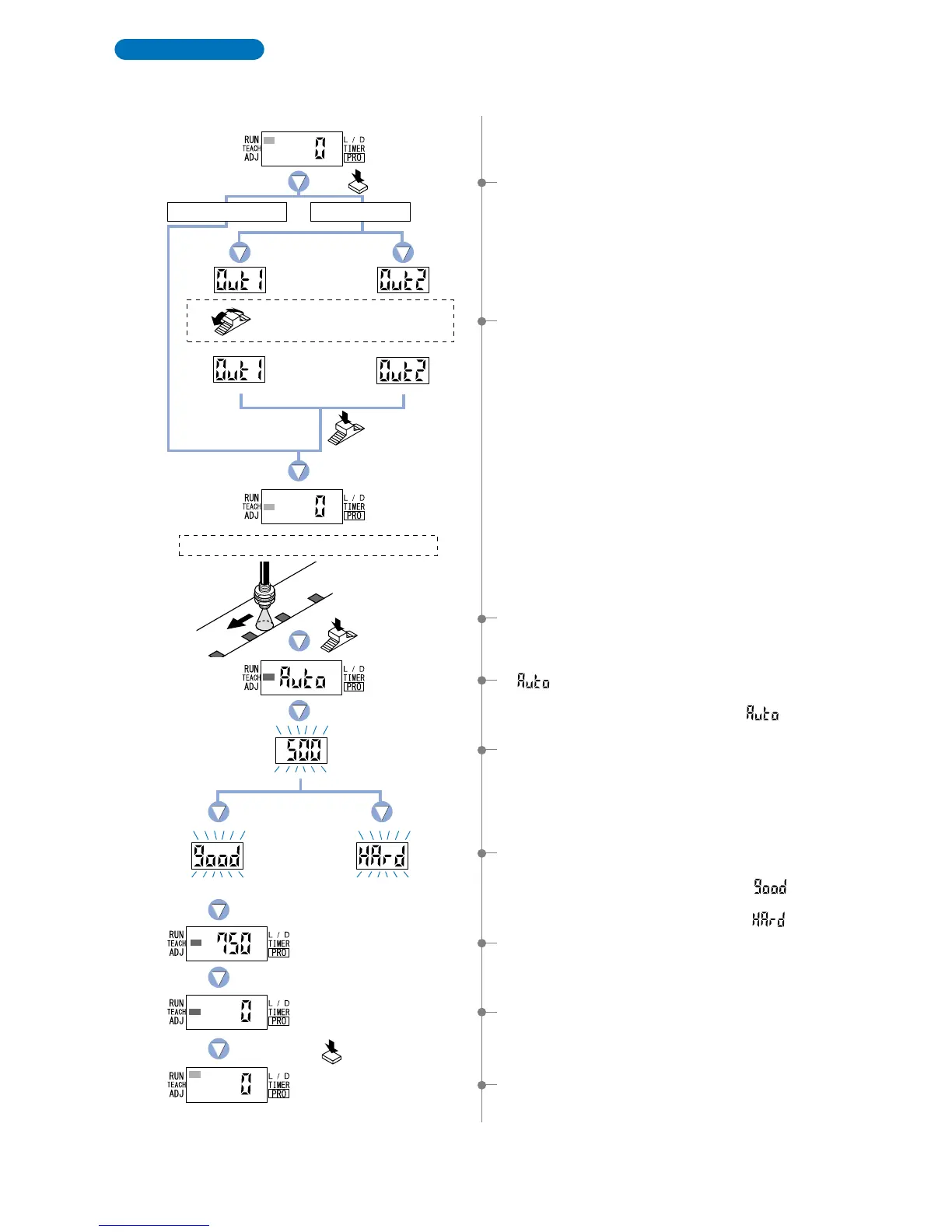
Full-auto teaching is used to set the threshould value while the sensing objects are still moving on the
production line, without stopping the production line.
* When the FX-305(P) is in differential sensing mode, set the threshold value by full-auto teaching.
(Refer to p.55)
Full-Auto Teaching
1 Press the [MODE key] once to select ‘TEACH mode’.
7The ‘threshold value’ setting will be displayed.
5The threshold value is set to a value midway between the
incident light intensities in the object present and object
absent conditions.
9Press the [MODE key] 5 times or keep it pressed for 2 sec.
or more, the amplifier will return to ‘RUN mode’ (normal
sensing operation).
8The incident light intensity will again be displayed, indicating
that configuration is now complete.
4‘ ’ is displayed on the display.
Release the jog switch when the object has passed.
* The incident light intensity is read when ‘ ’ is displayed.
3In the status condition keep the [Jog switch] pressed for
0.5 sec. or more, when the object is moving on the
production line.
2 FX-305(P): Turn the [Jog switch] to select the desired
‘output’ for setting.
6 The sensing stability status will be displayed.
• When stable sensing can be performed
nThe digital display will blink the word ‘ ’.
• When stable sensing cannot be performed
nThe digital display will blink the word ‘ ’.
Place a fiber within sensing range.
Status condition-moving the production line.
Press the MODE
key once.
Keep the Jog
switch pressed.
Press the MODE key
5 times or keep it pressed
for 2 sec. or more.
Turn the Jog switch to select
the desired output for setting.
Press the
Jog switch.
Output 1 Output 2
In case of FX-301(P)(-HS)
In case of FX-305(P)



 To Next Page