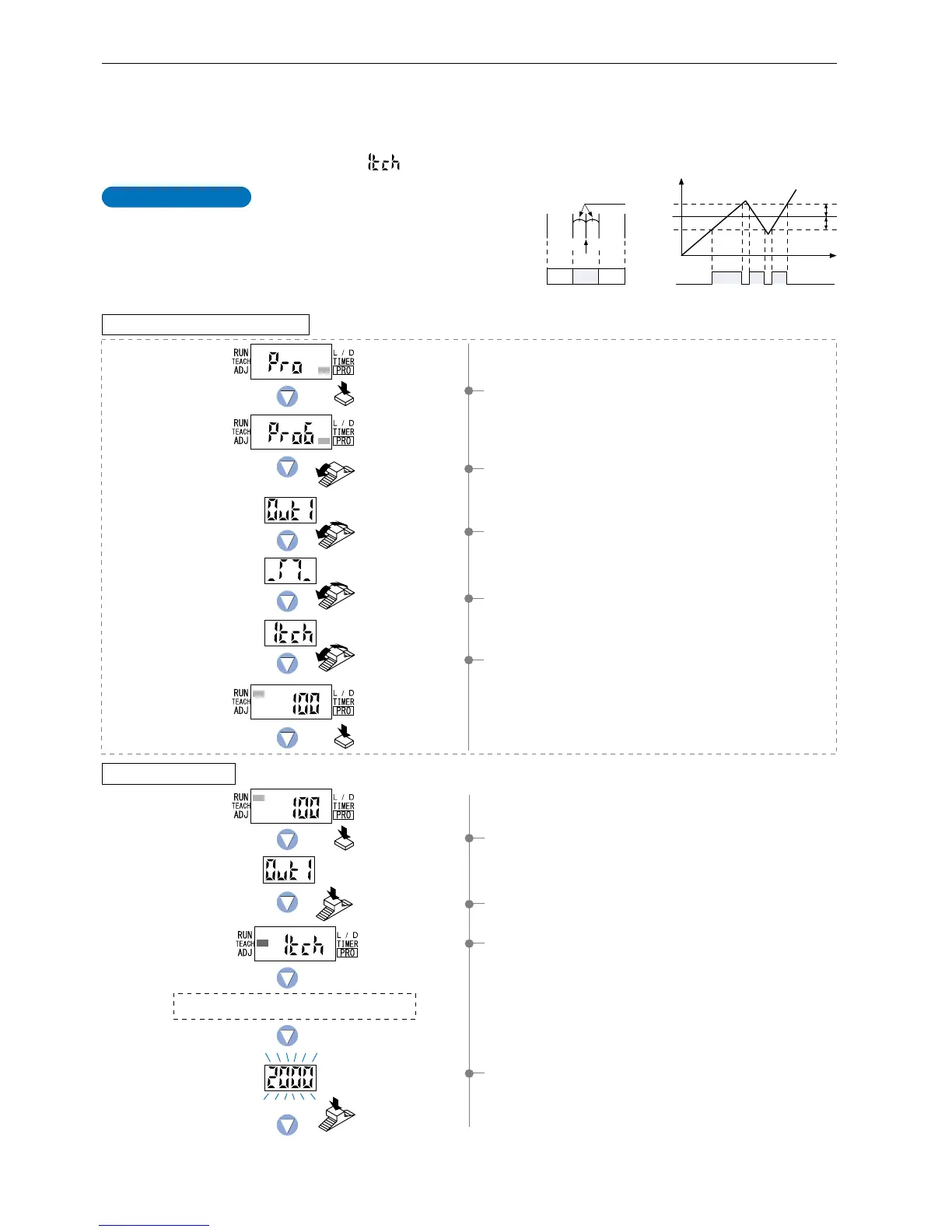
This is the method of setting the threshold
values (1_SL, 2_SL) by one level (P-1) teaching.
The shift value can be set as desired.
*
The shift value units can be selected from two units: ‘digit’ or ‘%’.
*
The shift value of the factory setting is set to ‘100’ of ‘digit’ units.
To set the shift value, refer to the section entitled ‘10-2. Output
1 Sensing Mode Settings’ from ‘PRO6 Mode’ on p.56.
1Press the [MODE key] once to select ‘TEACH mode’.
2Press the [Jog switch] to select ‘output 1’.
4-3. Teaching Mode [when using FX-305(P) window comparator mode]
1-level Teaching
The ‘threshold value’ can be set using ‘1-level teaching’, ‘2-level teaching’ or ‘3-level teaching’. When FX-305(P) is in window
comparator mode, teaching is performed using the teaching methods described in the section entitled ‘10-2. Output 1 Sensing Mode
Settings’ from ‘PRO6 Mode’ on p.56. To change the teaching method, follow the procedures also described under the same heading.
* Window comparator mode can be set for output 1 only.
* The factory setting is ‘1-level teaching ( )’.
3The current teaching method will be displayed for 0.5 sec.,
and then the unit will enter the ‘P-1’ setting state.
1Press the [MODE key] 5 times to select ‘PRO mode’.
2Turn the [Jog switch] 6 times towards the ‘
’ direction to
select ‘PRO mode’.
3Turn the [Jog switch] to select ‘output 1’, and then press the
[Jog switch] to confirm the setting.
4Turn the [Jog switch] to select ‘window comparator mode’,
and then press the [Jog switch] to confirm the setting.
5Turn the [Jog switch] to select ‘1-level teaching’, and then
press the [Jog switch] to confirm the setting.
4If the [Jog switch] is pressed while in the status condition
when a sensing object is present that can be used as a
baseline, then the display will blink and indicate the incident
light intensity reading.
Time
Shift value
Shift value
1_SL
2_SL
P-1
0
Incident light
intensity
9,999
Output
(L-ON)
P-1
2_SL1_SL
Output
(L-ON)
Shift value
OFF ON OFF
ON
OFF
For further details, refer to ‘10-2. Output 1 Sensing Mode Settings’ on p.56.
The status condition when a sensing object is
present that can be used as a baseline.
Setting in PRO6 mode beforehand
Setting in NAVI mode
Incident light
intensity of P-1.
Press the
Jog switch.
Press the
Jog switch.
Turn the Jog switch
6 times toward the
‘’ direction.
Turn the Jog switch
to select output 1.
Press the
MODE key once.
Press the MODE key
3 times or keep it pressed
for 2 sec. or more.
Output 1
Press the
MODE key 5 times.
Turn the Jog switch
to select window
comparator mode.
Turn the Jog switch
to select 1-level
teaching.
To be continued on the next page
13



 To Next Page