Need help?
Do you have a question about the Supermicro AOC-UTG-I2 and is the answer not in the manual?
Highlights the advanced capabilities of the AOC-UTG-I2 Ethernet add-on card.
Precautions to prevent damage from Electrostatic Discharge (ESD).
Standard safety practices for handling computer components.
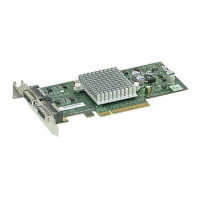
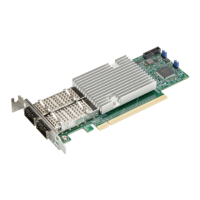
Details the physical LAN ports (CX4 connectors) and their specifications.
Explains the function of LEDs for link speed, activity, and optical connection.
Step-by-step guide for physically installing the add-on card into the system.
The Supermicro AOC-UTG-I2 is an add-on card designed to enhance network connectivity in enterprise environments, offering high-performance 10 Gigabit Ethernet capabilities. This card is primarily intended for system integrators, PC technicians, and knowledgeable PC users who need to integrate advanced networking solutions into their systems.
The AOC-UTG-I2 serves as a dual-port 10 Gigabit Ethernet add-on card, providing robust and high-speed network connections. It is built around the Intel® 82598EB controller, which is a key component for delivering its high-performance networking features. The card utilizes a PCI-E x8 interface, ensuring maximum performance and compatibility with PCI-E Gen 2 systems. This allows for efficient data transfer and reduced bottlenecks, crucial for demanding enterprise applications.
A core function of this card is to facilitate faster and more reliable network communication. It supports Intel I/O Acceleration Technology (I/O AT), which is designed to improve CPU utilization by offloading network processing tasks from the main processor. This results in more efficient system operation and better overall performance, especially in data-intensive environments.
For virtualized environments, the AOC-UTG-I2 incorporates x16 Virtual Machine Device queues (VMDq). This feature helps to optimize network traffic management for multiple virtual machines, enhancing performance and scalability in virtualized server setups. By providing dedicated queues for each virtual machine, VMDq reduces the overhead associated with network processing in virtualized environments, leading to smoother operation and improved efficiency.
Another significant function is Direct Cache Access (DCA), which helps to eliminate cache misses and reduce CPU load. DCA allows network data to be placed directly into the CPU cache, bypassing main memory and reducing the latency associated with data access. This contributes to a more responsive system and better performance for network-bound applications.
The card also performs Tx/Rx, IP, TCP, and UDP checksum offloading for both IPv4 and IPv6. This offloading capability shifts the burden of checksum calculations from the CPU to the network card, further increasing throughput and lowering processor utilization. This is particularly beneficial in high-traffic networks where the CPU would otherwise spend a significant amount of time on these calculations.
For network monitoring and management, the AOC-UTG-I2 includes Simple Network Management Protocol (SNMP) and Remote Network Monitoring (RMON) statistic counters. These counters provide valuable data on network performance and activity, enabling administrators to effectively monitor and troubleshoot their network infrastructure.
The card supports Intel® PROSet Utility for teaming, which allows multiple network adapters to be grouped together to form a single logical connection. This provides benefits such as increased bandwidth, load balancing, and fault tolerance, ensuring continuous network availability even if one adapter fails.
Preboot execution Environment (PXE) support is also a key function, enabling network booting of systems. This feature is useful for deploying operating systems and software images across a network, simplifying system administration and maintenance tasks.
The AOC-UTG-I2 is designed with energy efficiency in mind, consuming a maximum of 6.5W. This low power consumption helps to reduce operational costs and environmental impact, making it a suitable choice for data centers and other environments where energy efficiency is a priority. Furthermore, the card is RoHS Compliant 6/6, indicating its adherence to environmental standards for the restriction of hazardous substances.
The AOC-UTG-I2 is designed for straightforward integration into existing server and workstation systems. Its dual CX4 connectors allow for flexible cabling options, supporting both copper-based CX4 cables for shorter distances (up to 15 meters) and InfiniBand 4x DDR cables (which convert CX4 to optical) for longer distances (up to 100 meters). This versatility in cabling makes it adaptable to various network topologies and infrastructure requirements.
Installation of the card involves standard hardware procedures. Users need to power down the system, remove the power cord, and take anti-static precautions before handling the card. The card is then positioned in an available PCI-E slot on the motherboard and gently pushed until it seats correctly. Securing the card to the chassis and attaching the necessary network cables completes the hardware installation.
The card's LED indicators provide immediate visual feedback on its operational status. These LEDs show connection speed (1-Gb/second or 10-Gb/second), whether an optical cable is connected, and LAN activity. This allows users to quickly ascertain the status of their network connections without needing to access software diagnostics. For example, a green LED for "Link Speed 10-Gb/second" indicates a high-speed connection, while a blinking green LED for "LAN Activity" signifies ongoing data transfer.
Software installation is supported across various operating systems, including Windows (2003/2000) and Linux. For Windows, drivers are typically provided on a CD-ROM, and the installation process is guided by an installer application. In Linux environments, users have the option to build a binary RPM package or manually build the driver from source. The manual build process involves untarring the driver archive, changing to the source directory, compiling the module, and then loading it using commands like modprobe or insmod. After driver installation, users can assign an IP address to the interface and verify network functionality using commands like ifconfig and ping.
The card's support for teaming via Intel® PROSet Utility enhances its utility in critical applications. Teaming allows for the aggregation of bandwidth and provides redundancy, ensuring that network services remain available even if one of the physical links experiences an issue. This is a crucial feature for servers and other systems where uptime is paramount.
Maintenance of the AOC-UTG-I2 primarily involves ensuring proper driver installation and keeping the drivers updated. Supermicro provides driver updates on its support website, allowing users to download the latest versions to ensure optimal performance and compatibility with evolving operating systems and network standards. Regular driver updates can address bugs, improve performance, and introduce new features.
Troubleshooting is aided by the LED indicators on the card. By observing the status of the LEDs, users can quickly diagnose common network issues such as a lack of link, incorrect speed negotiation, or absence of network activity. For instance, if the "Link Speed 10-Gb/second" LED is off but the "Link Speed 1-Gb/second" LED is on, it indicates that the connection is operating at a lower speed, which might point to a cable issue or a misconfigured network device.
In case of hardware issues, Supermicro outlines a clear process for returning merchandise for service. A receipt or copy of the invoice with the purchase date is required for warranty service. Users can obtain a Returned Merchandise Authorization (RMA) number, which should be prominently displayed on the shipping carton. When returning the card, it is recommended to use the original Supermicro packaging and anti-static bags to prevent damage during transit. This ensures that the card is protected from electrostatic discharge and physical damage, which are critical for electronic components.
The warranty covers normal consumer use and explicitly excludes damages incurred from shipping, alteration, misuse, abuse, or improper maintenance. This highlights the importance of careful handling and adherence to installation guidelines. For any product problems during the warranty period, users are advised to contact their distributor first.
The design of the card, with its energy-efficient components and RoHS compliance, also contributes to its long-term maintainability and environmental responsibility. By using fewer hazardous materials and consuming less power, the card is designed for a longer operational life and reduced environmental impact, which can simplify disposal and recycling processes at the end of its lifecycle.
 General
| Product Name | AOC-UTG-I2 |
|---|---|
| Manufacturer | Supermicro |
| Category | Network Card |
| Interface Type | PCIe |
| PCIe Version | 3.0 |
| PCIe Lanes | x4 |
| Ports | 2 |
| Form Factor | Low Profile |
| Data Rate | 10 Gbps |
| Controller | Intel 82599 |
| Compatibility | Supermicro Servers |

 To Next Page