79
Chapter 6: Optional Components
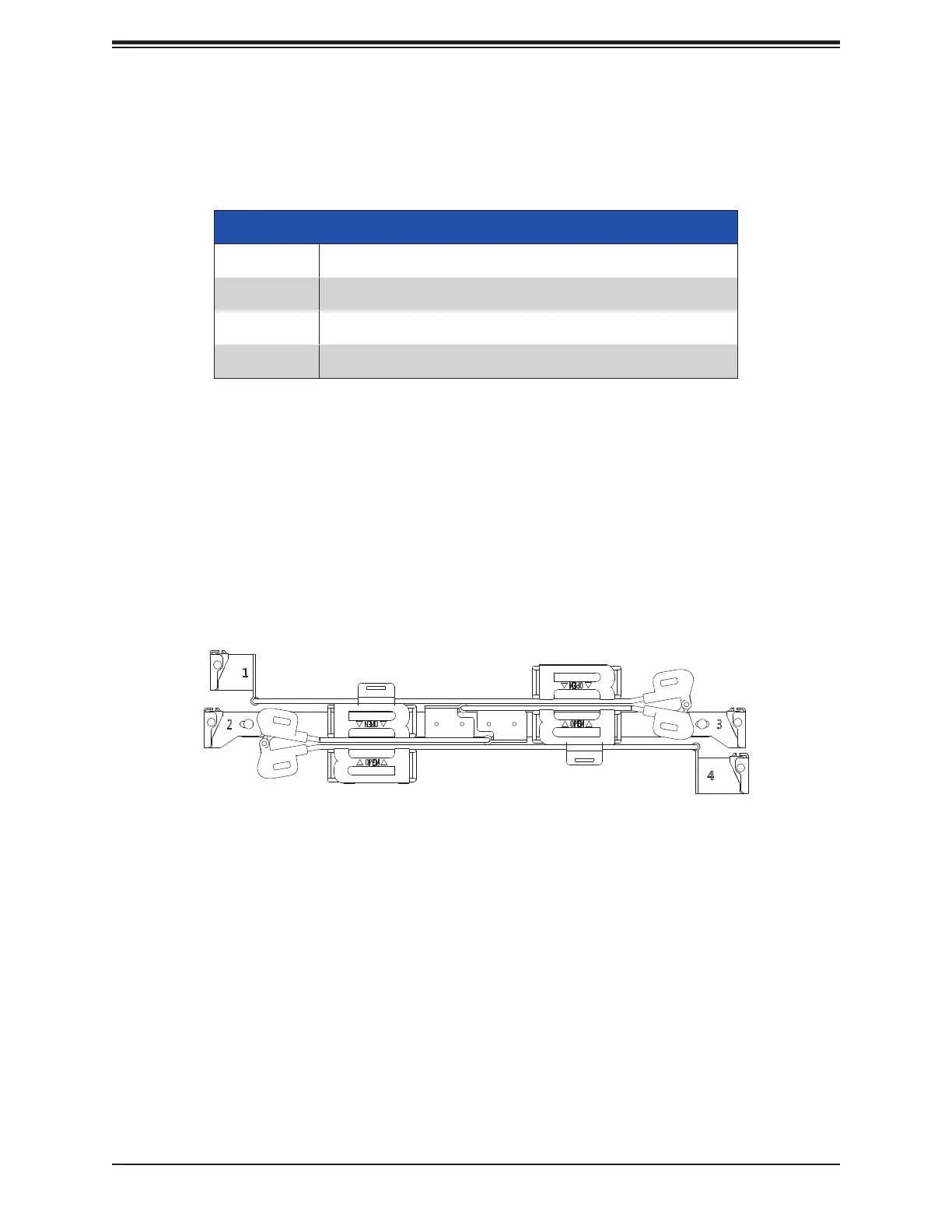
Figure 6-1. Cable Management Arm
6.4 Cable Management Arm
The system supports a cable management arm (CMA), which keeps the rear cables organized
and clear of the rail mechanisms when the system is extended out the front of the rack for
maintenance.
The CMA attaches to the rack mounting rails by means of four connectors. They are labeled
on the connectors 1, 2, 3, and 4.
Installing the Cable Management Arm
1. Slide CMA connector #1 forward onto the two posts on the rear of the right inner rail
(right side when viewed from the front). It snaps into place.
2. Slide CMA connector #2 forward onto the two posts on the rear of the right middle rail. It
snaps into place.
6.3 GPU Support
Only single-width, half-length GPUs are supported. Installation is the same as PCIe expansion
cards.
GPU Support
Quantity Two double-width, full-length, full-height
Power Cable Optional
Thermal Kit Upgraded fans: three FAN-0206L4
Conditions Supports up to 400W TDP CPU





 To Next Page