2017-08-30 43 1715054
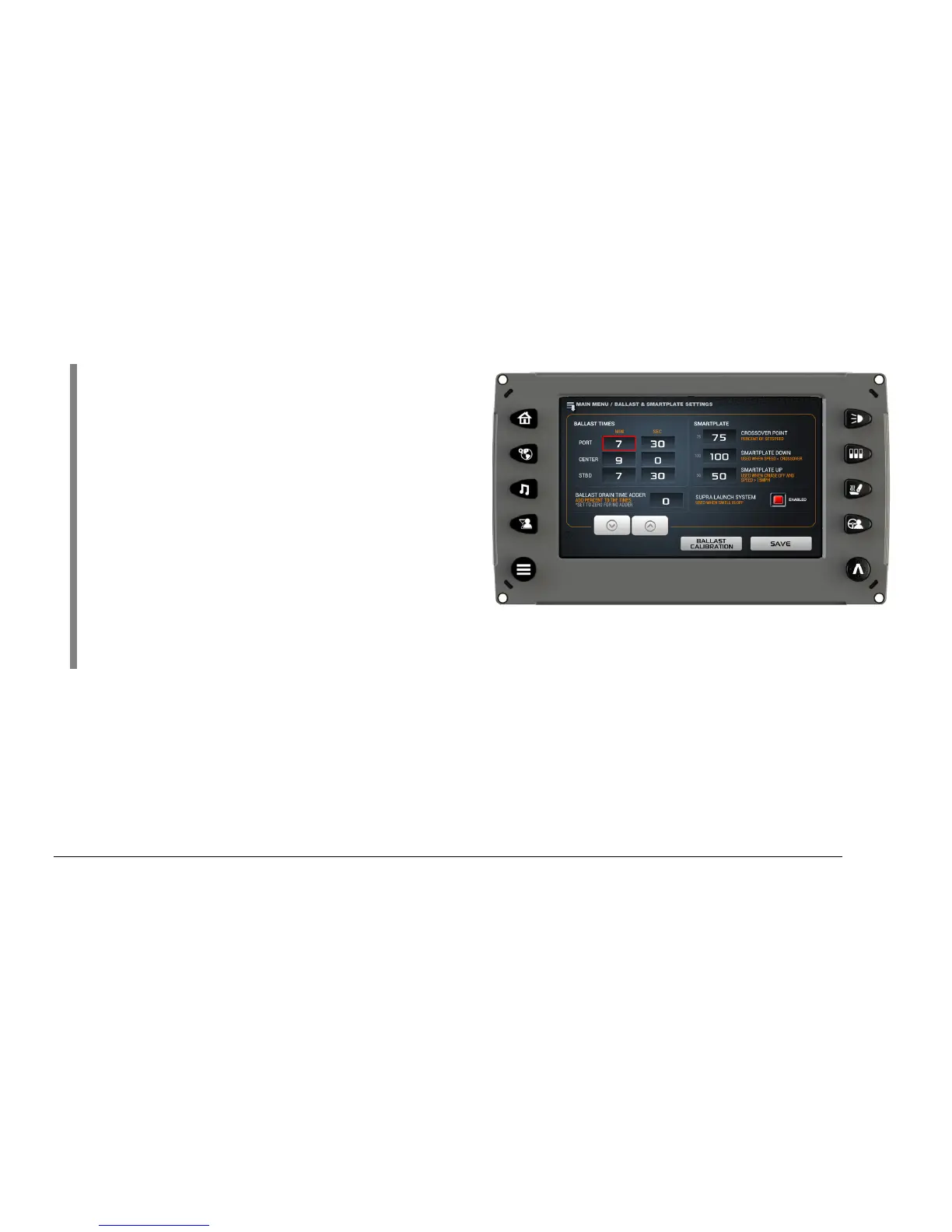
NOTE: The [Crossover Point] defaults to 50
percent of your set speed. This is the point at
which the SmartPlate will be automatically
driven to the active profile set point. If no set
point is active, the SmartPlate will be driven to
the [SmartPlate Up] setting (default 50
percent). The [SmartPlate Down] setting
(default 100 percent) is the position that the
SmartPlate is driven to below the crossover
setting. Having the SmartPlate deployed to 100
percent when the boat is at rest and then
automatically retracting to the SmartPlate set
point at the crossover is what helps the boat keep the bow down and on plane during
acceleration.
If additional time is required to empty the Ballast tanks, add percentage to the [Ballast Drain Time
Adder] to increase the drain time. Or set the [Ballast Drain Time Adder] to 0 percent for no
additional time.
The [Ballast Calibration] normally is not changed.
The [Ballast Calibration] function recalibrates the ballast level displayed to read Full (100 percent)
or Empty (0 percent). The Ballast display levels are based on time to level calculations.



 To Next Page