Installation
11
Power supply connection
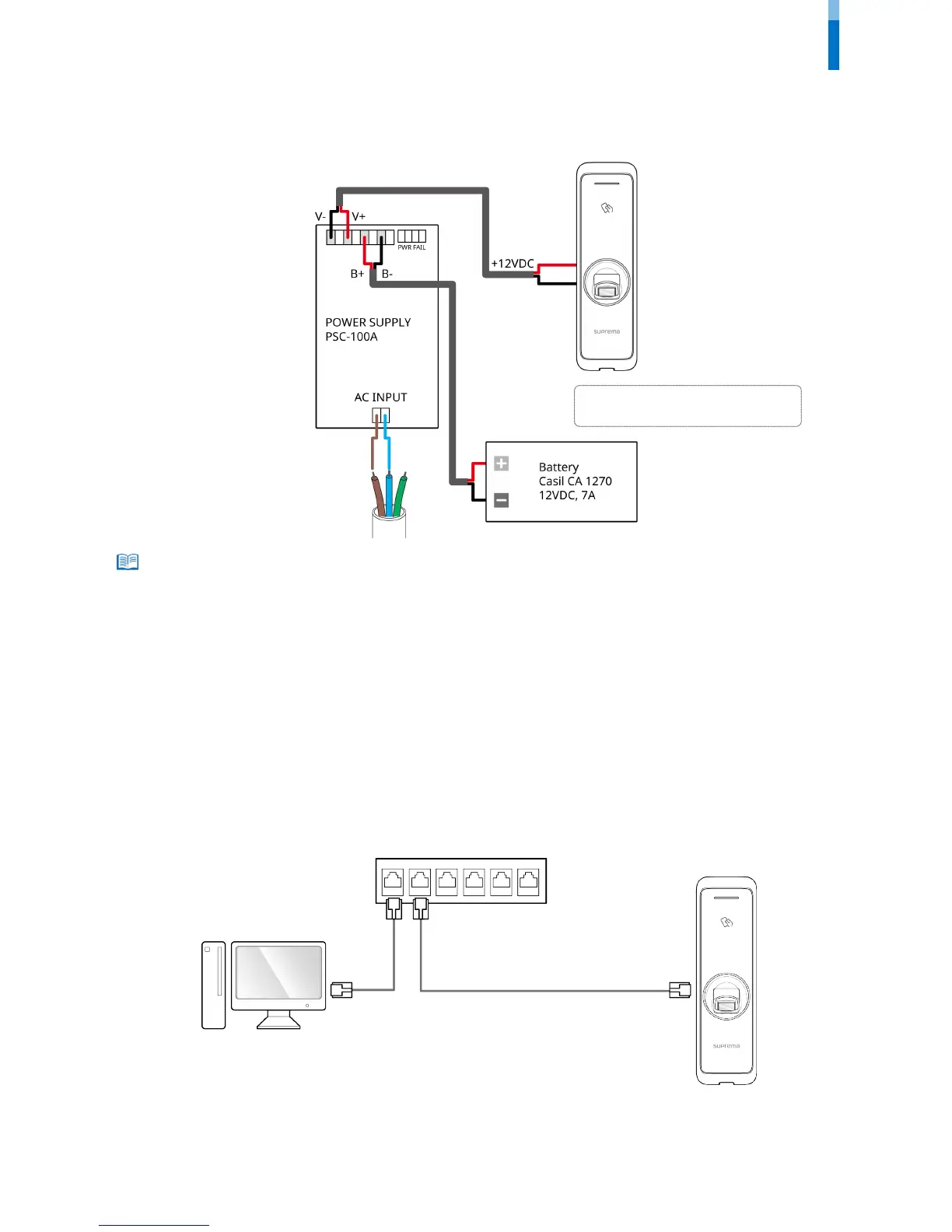
• Listed Class 2 power unit shall be recommended to use.
• The unit is powered by external Listed Class 2 power supply with 12VDC or by Listed to UL 294B PoE power source.
• For ULC S319 compliance, connect PSC-100A power supply and Casil CA 1270 battery.
• Use a power supply adaptor of DC 12 V (± 10%) with a minimum of 1,500 mA which has obtained the approval of IEC/EN 60950-1. If you wish to
connect and use another device to the power supply adaptor, you should use an adaptor with a current capacity which is the same or larger than
the total power consumption required for the terminal and another device.
• Use a separate power supply for Secure I/O 2, the electric lock, and the BioEntry W2 respectively. If connecting and using the power supply to these
devices together, the devices may malfunction.
• DO NOT connect the device to the DC power supply(or adapter) and PoE power supply at the same time.
Network connection
TCP/IP
LAN connection (connecting to a hub)
You can connect the product to a hub using a general type CAT-5 cable.
BioEntry W2



 To Next Page