Installation
15
Connecting as a standalone
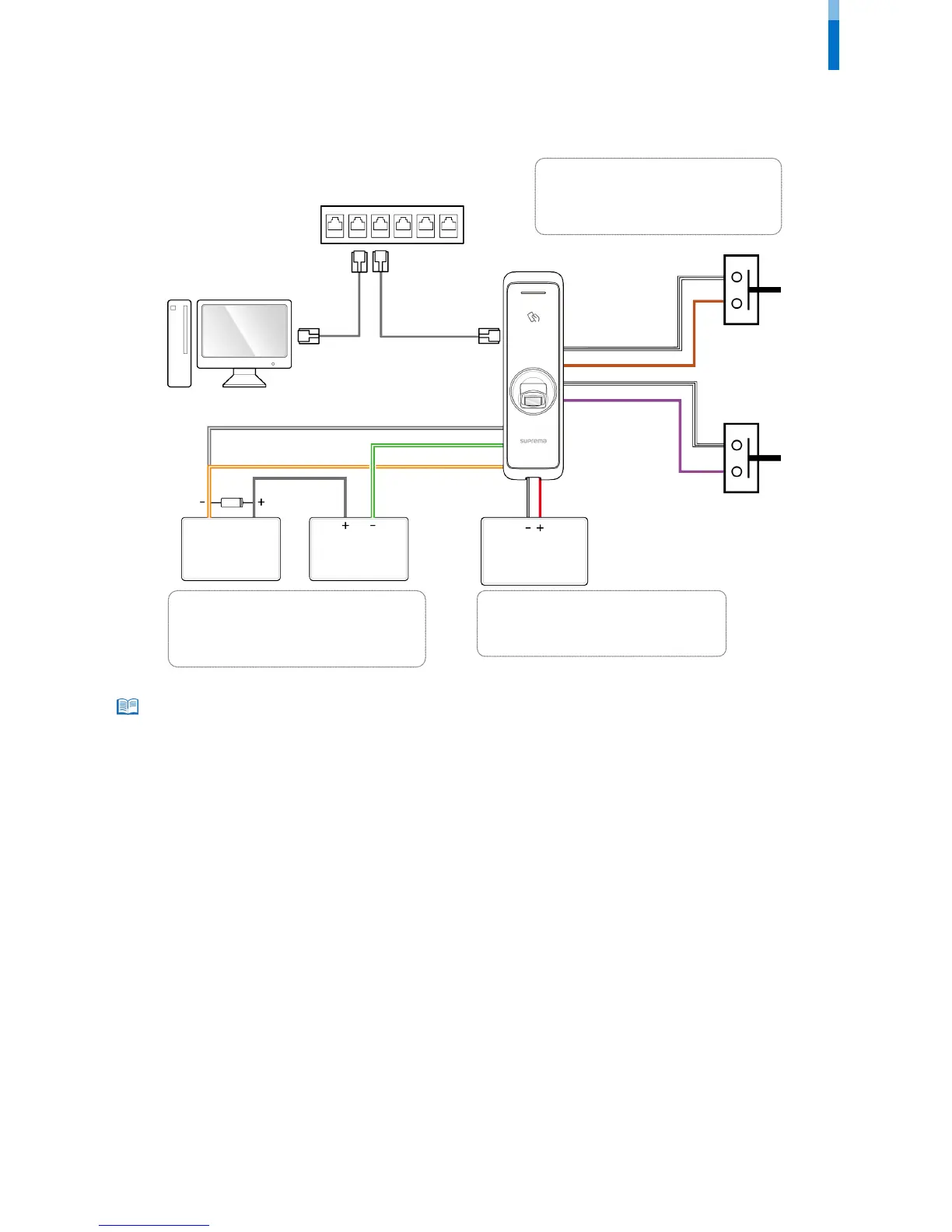
BioEntry W2 can be connected to the door lock, door button, and door sensor directly without connecting a separate I/O device.
• BioEntry W2 can be used as a multi-door controller with the slave devices with the RS485 cable. The slave devices are used as dummy readers and
authentication is performed in the master device.
• If Xpass is connected to the master device, only card authentication can be used.
• The maximum number of slave devices available to connect varies according to the authentication method, number of users, and number of
devices. Also note that the number of slave devices affects the fingerprint authentication speed.
• A master device can control 31 slave devices. The bandwidth of RS485 allows for up to 7 fingerprint authentication devices to be connected.
• For more information, contact the Suprema technical support team (support@suprema.co.kr).
TTL connection
9 - TTL IN 1 Brown
10 - TTL IN 0 Purple
16 - 485 GND White (Black stripe)
Relay connection
1 - RLY NO Gray (White stripe)
2 - RLY COM Green (White stripe)
3 - RLY NC Orange (White stripe)
Power supply connection
11 - PWR +VDC Red
13 - PWR GND Black (White stripe)



 To Next Page