EasyManua.ls Logo

Suunto D4i - Navigating Menus and Understanding Buttons

Suunto D4i
118 pages
Print Icon
To Next Page IconTo Next Page
To Previous Page IconTo Previous Page
Loading...
3.1. Navigating in the menus
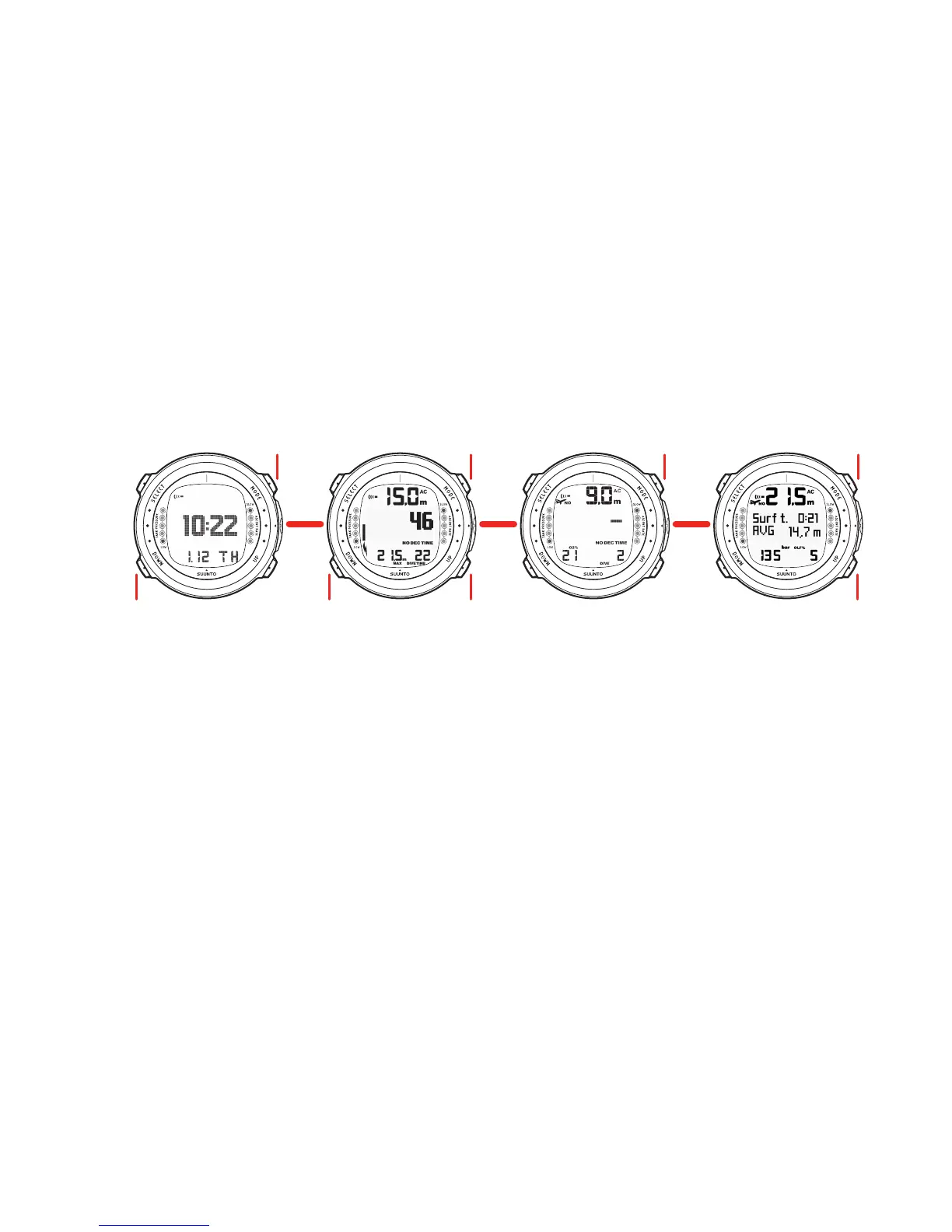
Suunto D4i has four main operating modes - TIME mode (TIME), DIVE mode (DIVE),
PLAN mode (PLAN), and MEMORY mode (MEM). To toggle between the main modes,
press the MODE button. To select a submode in DIVE and MEM modes, press the
UP/DOWN buttons.

SETTINGS
Alarm
Time
Dual Time
Date
Units
Backlight
Contrast
Tones
SUB-MODES
Air
Nitrox
Free
SETTINGS
Nitrox
Personal/Altitude
Tank Press Pairing
Tank Press Alarm
Depth Alarm
Depth Notify Alarm
Dive Time Alarm
Surface Time Notify Alarm
Sample Rate
Deepstop
Units
TIME DIVE PLAN MEM
SUB-MODES
Logbook
History
LIGHT LIGHT LIGHT LIGHT
17

Table of Contents