2 GETTING STARTED
2.1 Basic settings
Press any button to activate your Suunto t6d. You will be prompted to set your PERSONAL
settings: your physical characteristics and activity class. The device suggests a default
fitness METS level, but if you know your real fitness METS, you should use that value.
NOTE: The maximum performance capacity measured in a laboratory test is sometimes
given as ml oxygen/kg/min (VO
2
max). If you want to compare the maximum performance
capacity calculated by the program in METs to your measured VO
2
max, use the relation 1
MET = 3.5 ml/min/kg.
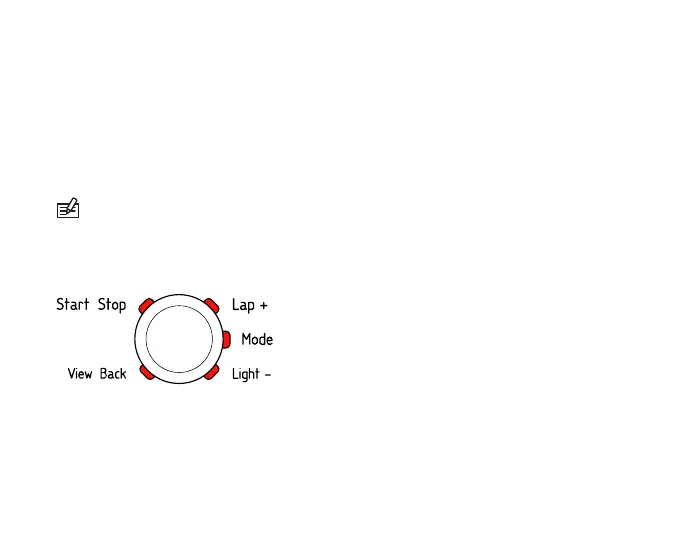
1. Change the values with the [Lap +] and [Light -] buttons.
2. Accept the settings and move to the next setting with the [Mode] button.
3. Return to the preceding setting by pressing the [View Back] button.
4. After setting the fitness METS level, continue to UNITS and GENERAL settings, or
quick exit to TIME mode by pressing the [Start Stop] button.
6



 To Next Page