13
DUALITY DIGITAL PIANO
Connector Panel
USB
LINE IN
L R L R
LINE OUT
IN OUT
MIDI
PEDAL
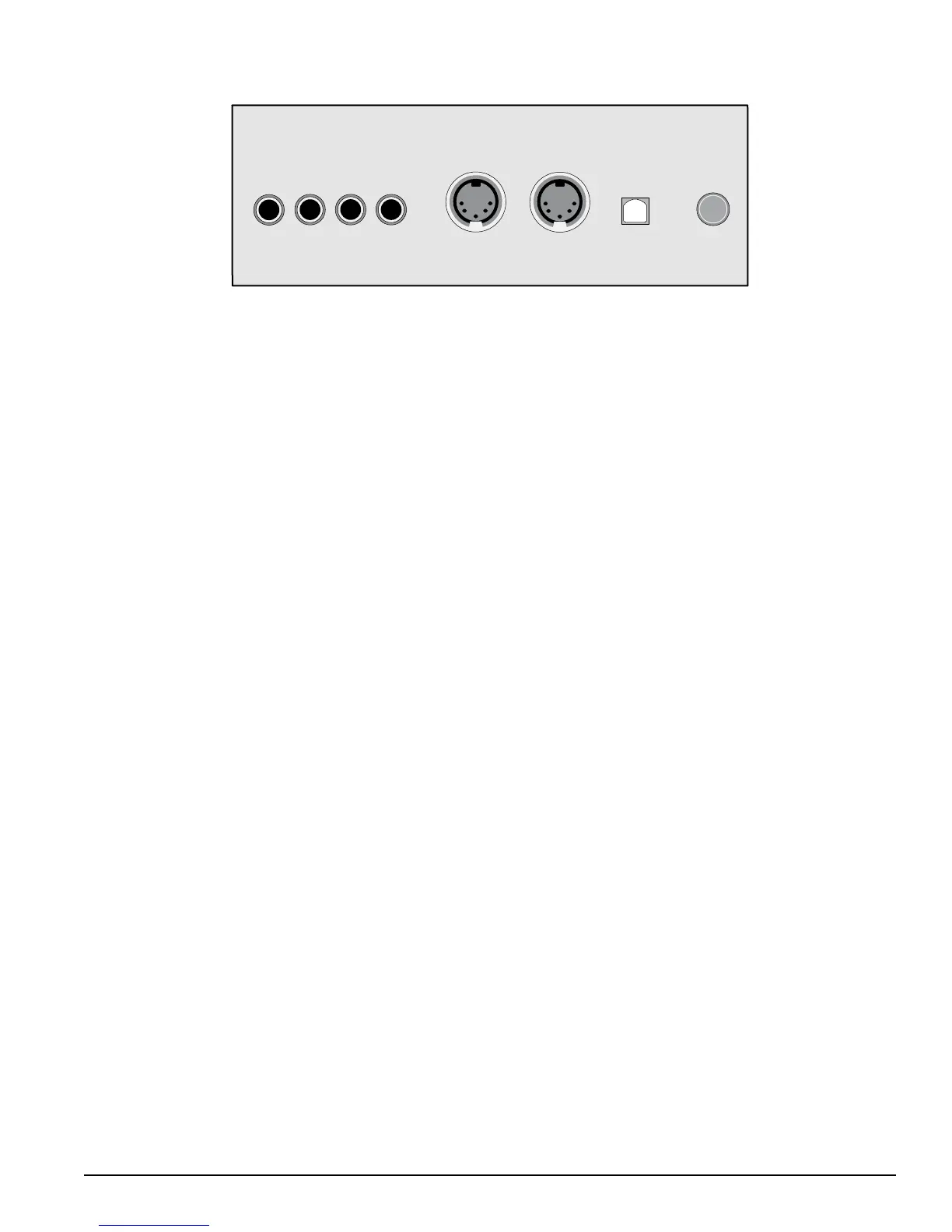
This connector panel, with its various jacks, is located on the bottom left of the piano, under the keybed.
Line In — These stereo audio input jacks will amplify the supplied signal through
the internal sound delivery system. They can be used to hook up items such as CD
players, MP3 player or Cassette player.
Line Out — These stereo audio output jacks supplies the piano’s output signal
to external amplication, such as home stereo, PA system or other stand alone
ampliers.
Midi In / Midi Out — This piano contains MIDI in and MIDI output ports. MIDI jacks
allow communication with other products equipped with MIDI interfaces.
Please see the MIDI section of this manual for further details.
USB — The USB connector allows you to connect the piano directly to your
computer’s USB port.
Pedal — Pedal connector jack is where you connect the piano to its pedal board.
Please be careful to make sure that the Pedal cable plug is aligned properly with the
Pedal Jack connector before inserting it.




 To Next Page