1
Press [STANDBY-ON
].
Turn the TV on and be sure to
select the input to which the unit is
connected.
2
Press [OPEN/CLOSE A] .
The disc tray will open.
3
Insert your disc with its label fac-
ing up. Align the disc to the disc
tray guide.
4
Press [OPEN/CLOSE A] to close
the disc tray.
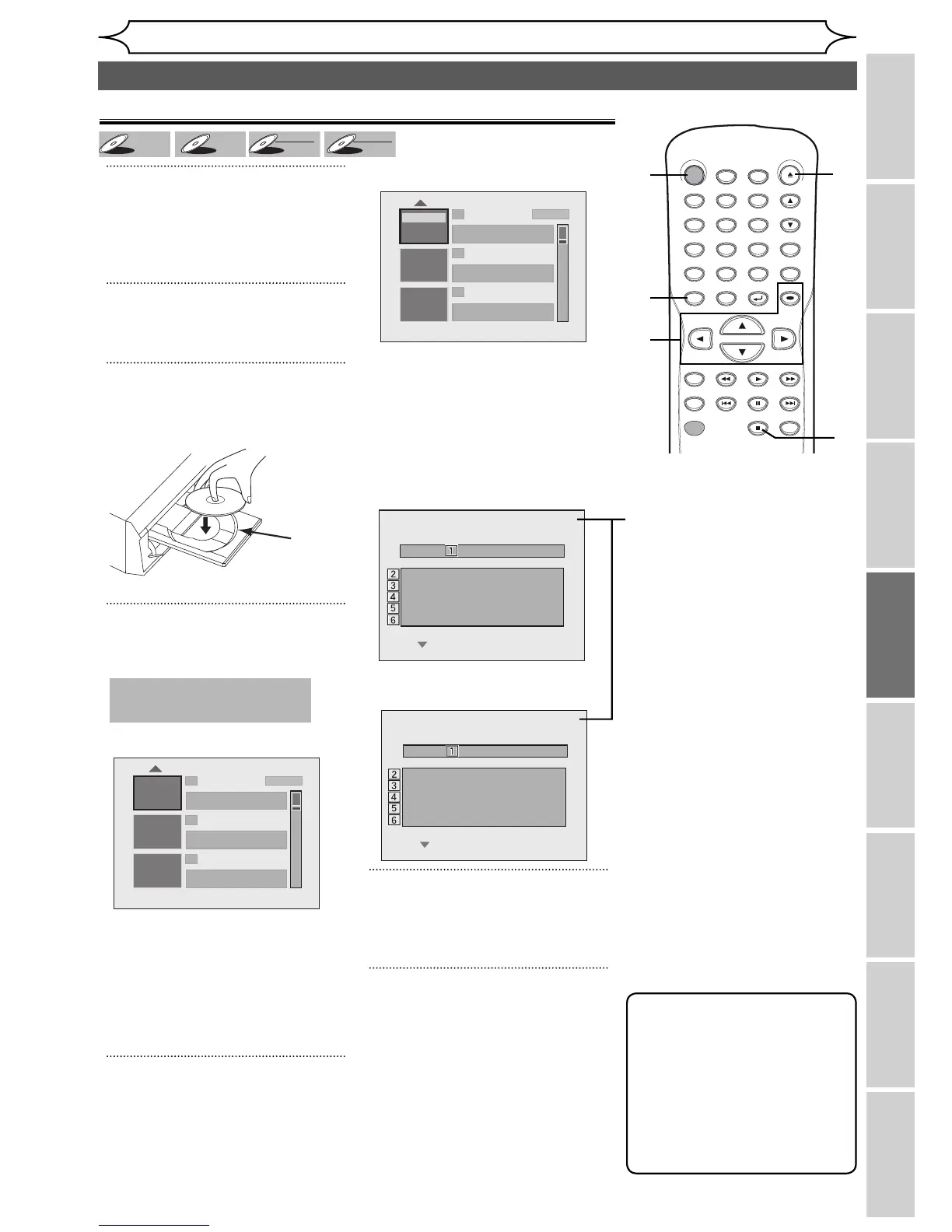
Title list will appear automatically.
If you want to return to the
playback while you are stopping
temporarily, press [TITLE] to
resume play.
To exit the title list, press
[STOP C].
5
Using [K / L], select a desired
title. Press [OK].
Pop-up window will appear.
If you want to see Disc
information, press [{ ] when
the first page of the title list is
displayed or press [ K ] when
the first title is selected but
“Play”, “Edit” or “Overwrite” is not
highlighted.
When inserting <DVD+RW> disc.
When inserting
<DVD+R/DVD-RW/DVD-R> disc.
6
Using [K / L], select “Play”.
Press [OK].
Playback will start.
7
Press [STOP C] to stop play-
back.
To eject the disc, press [OPEN/
CLOSE A] to open the disc tray,
then remove the disc before
turning the unit off.
No Disc Name
Disc DVD+RW
Total Titles 3
Disc Space Used 0:30:48
Disc Protect OFF
Make Edits Compatible Needed
No Disc Name
Disc DVD+R
Total Titles 5
Disc Space Used 1:30:48
Disc Protect OFF
Finalize Finalized
DVD+
DVD-R
+VR
39
EN
EditingBefore you start
Changing the
Setup menu
Others Español
Connections Getting started
Recording Playing discs
Playing discs
Basic playback
Playback
This operation may take a
while to be recognized.
disc tray
guide
1 SP (2Hr)
2
3
NOV/21/06 11:00
AM
CH12 SP
NOV/21/06 0:20:44
NOV/22/06 11:35
AM
CH13 EP
NOV/22/06 0:10:33
EMPTY TITLE
1:37:52 SP(2Hr)
Edit
Overwrite
Play
1 SP (2Hr)
2
3
NOV/21/06 11:00
AM
CH12 SP
NOV/21/06 0:20:44
NOV/22/06 11:35
AM
CH13 EP
NOV/22/06 0:10:33
EMPTY TITLE
1:37:52 SP(2Hr)
Note
• Some discs may start
playback automatically.
• You can also start playback
by pressing [PLAY B]
instead of [OK] at step 5.
• Press [B
] to display the
next page, and press
[{] to
display the previous page.
1. Disc name
(Default “No Disc Name”)
2. Disc Type
(DVD+RW/DVD+R/DVD-RW/
DVD-R)
3. Total number of title
(include “Empty Title”)
4. Total time of recorded disc
space
5. Status of disc protection
(“ON” is protected disc.)
6. Making edits compatible/
Finalize
• When DVD+RW disc is
inserted:
If edit for which “Make Edits
Compatible” is necessary is
done, “Needed” is displayed.
“Not Needed” is not necessary.
• When DVD+R, DVD-RW or
DVD-R disc is inserted:
If “Finalize” is done, “Finalized”
is displayed. Otherwise,
“Unfinalized” is displayed.
STANDBY-ON
.@/: ABC DEF
GHI
OPEN/CLOSE
ZOOM
TIMER
PROG.
1
PQRS
4
DISPLAY
7
TITLE
REC MODE
RAPID PLAY
REC
REV
PREV
PLAY
PAUSE
STOP
FWD
NEXT
CM SKIP
JKL
2
TUV
5
SPACE
8
DISC MENU
0
MNO
3
WXYZ
6
CLEAR
9
RETURN
CH
REPEAT
SETUP
OK
1
6
4
2
4
7
4
7
5



 To Next Page