Player
TV TV
Mini-jack to mini-jack
signal cable
2RCA to mini-jack
signal cable
DVD/CD/Media player
HDMI cable
3RCA to 3RCA
composite
AV cable
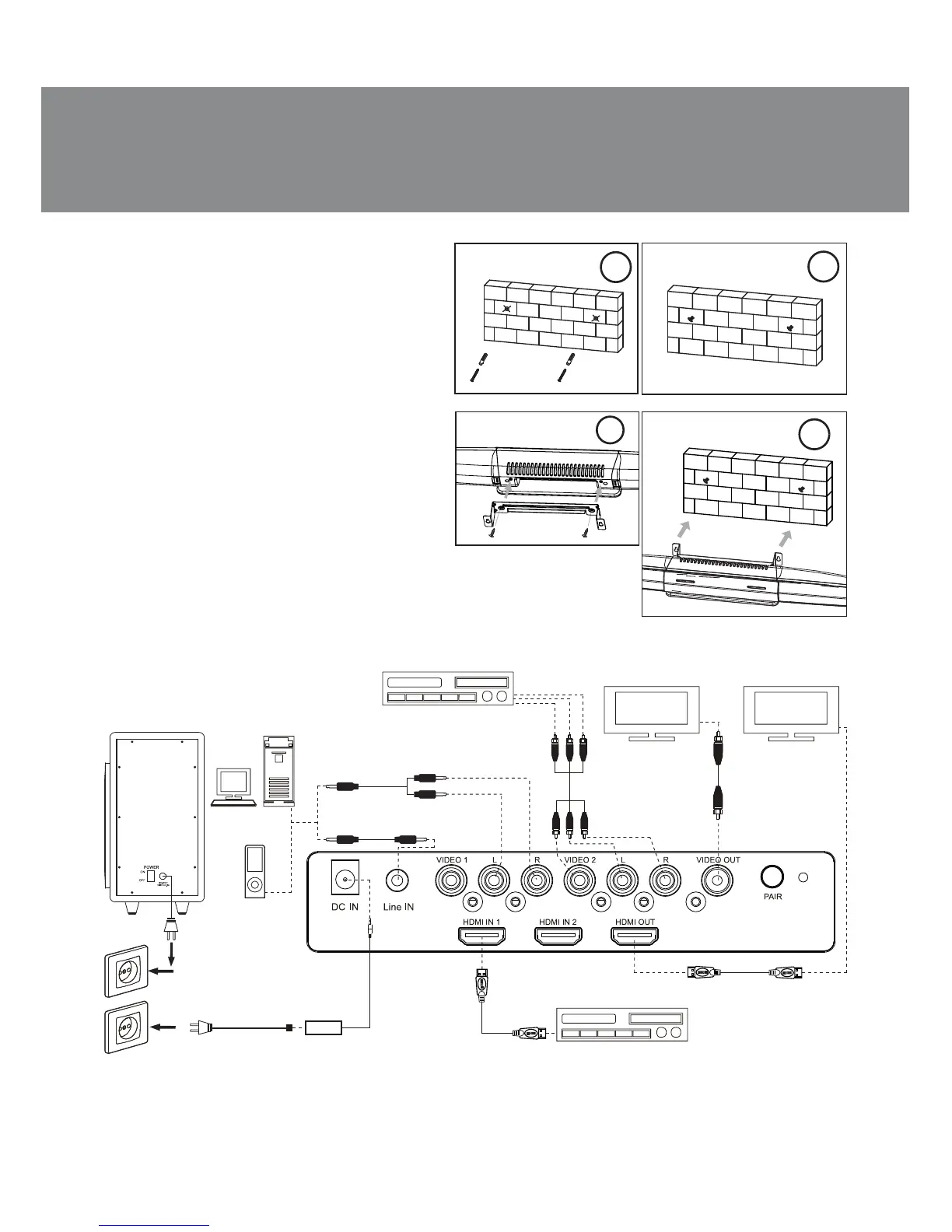
Fig. 6. Connection diagram
DŽDž
DVD/CD/
Media player
RCA to RCA
signal cable
Subwoofer
Power
cable
Sockets
Power
adapter
MSS ǥonnecting and control
SB-550 soundbar with a wireless sub-
woofer can be connected to virtually
any audio source: DVD/CD player, TV,
PC, laptop, etc. (see connection dia-
gram in Fig. 6).
• Connect the power cable with the
power adapter (included). Then con-
nect it to the the DC IN h jack of the
soundbar (see Fig. 6). Connect the
subwoofer power cable to the mains
oulet.
1
2
Fig. 5. Wall mounting
3
4
ENG
5
Operation Manual
SB-550



 To Next Page