ENglISH VErSIoN
29
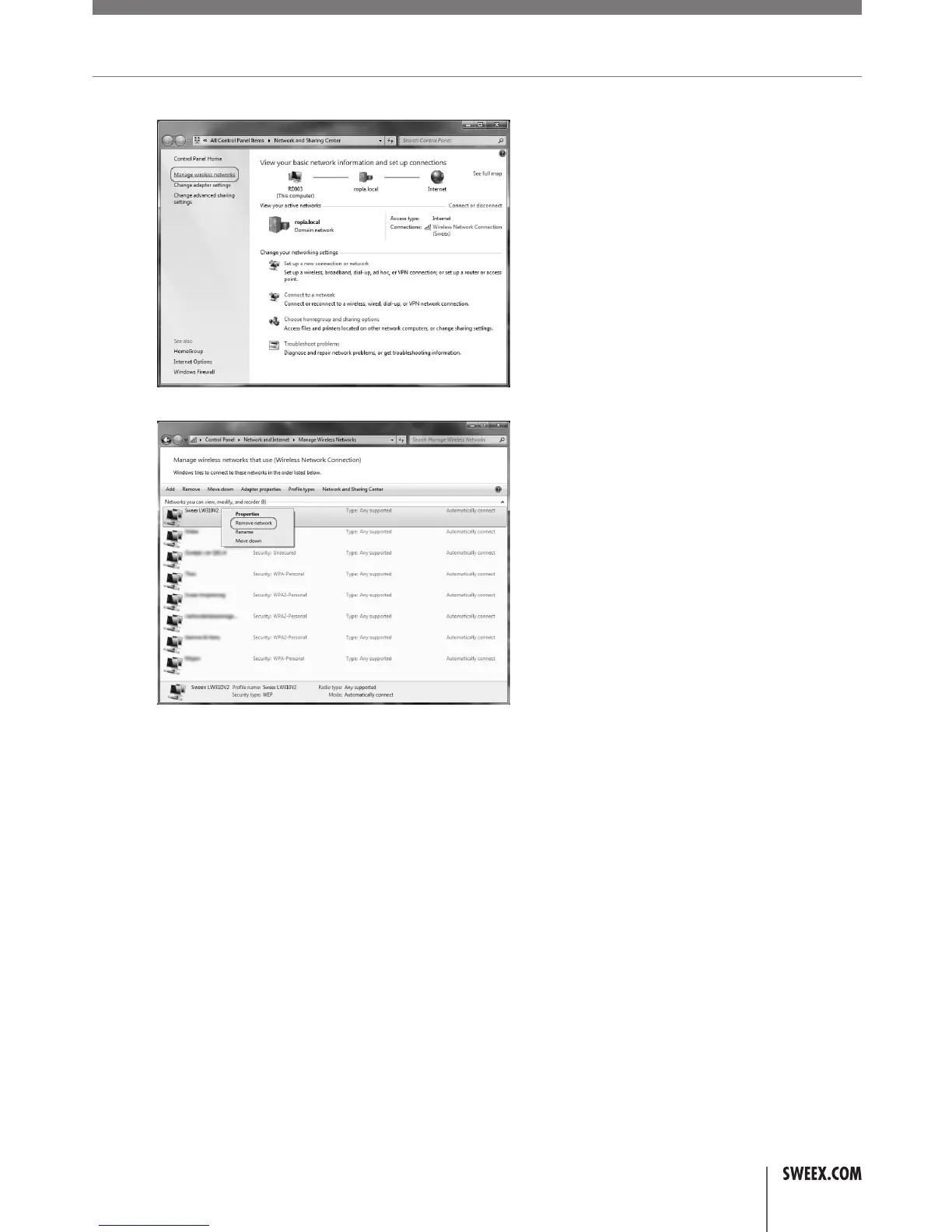
3. IntheNetworkandSharingCenter,click“Managewirelessnetworks”:
4. Thefollowingwindowwillappear,rightclickthenetworkthatwasindicatedwitharedcrossinstep2andclick“Removenetwork”:
5. Afterthenetworkhasbeenremoved,youcanclosethewindowandfollowthestepsdescribedinthe“Connectingtoawirelessnetwork”
sectionofthemanual.
• IhavelosttheWPAorWEPkeyrequiredtoaccessmywirelessnetwork.
• Therearetwopossiblesolutionsforthisissue:
1.Accesstherouterfromacomputerthatisconnectedbynetworkcableasdescribedinthe“Advancedsetup”sectionofthismanual.Click
“WirelessNetwork”–“SecuritySettings”,youcanviewthekeythere.
2.Resettheroutertoitsfactorydefaultsettings,whichisanunsecurednetwork.Theresetprocedureisdescribedfurtheron.
• Icannotfindanywirelessnetworks
• Thisproblemusuallyhappensonnotebooks,mostnotebookshaveaswitchorkeyboardcombinationtodisable/enableitsWirelessnetworking
module.Consultthemanualofyournotebookforenablingthewirelessmodule.
LW310V2_Manual_01.indd 29 03-11-09 13:32



 To Next Page