ENglISH VErSIoN
4
Simple setup
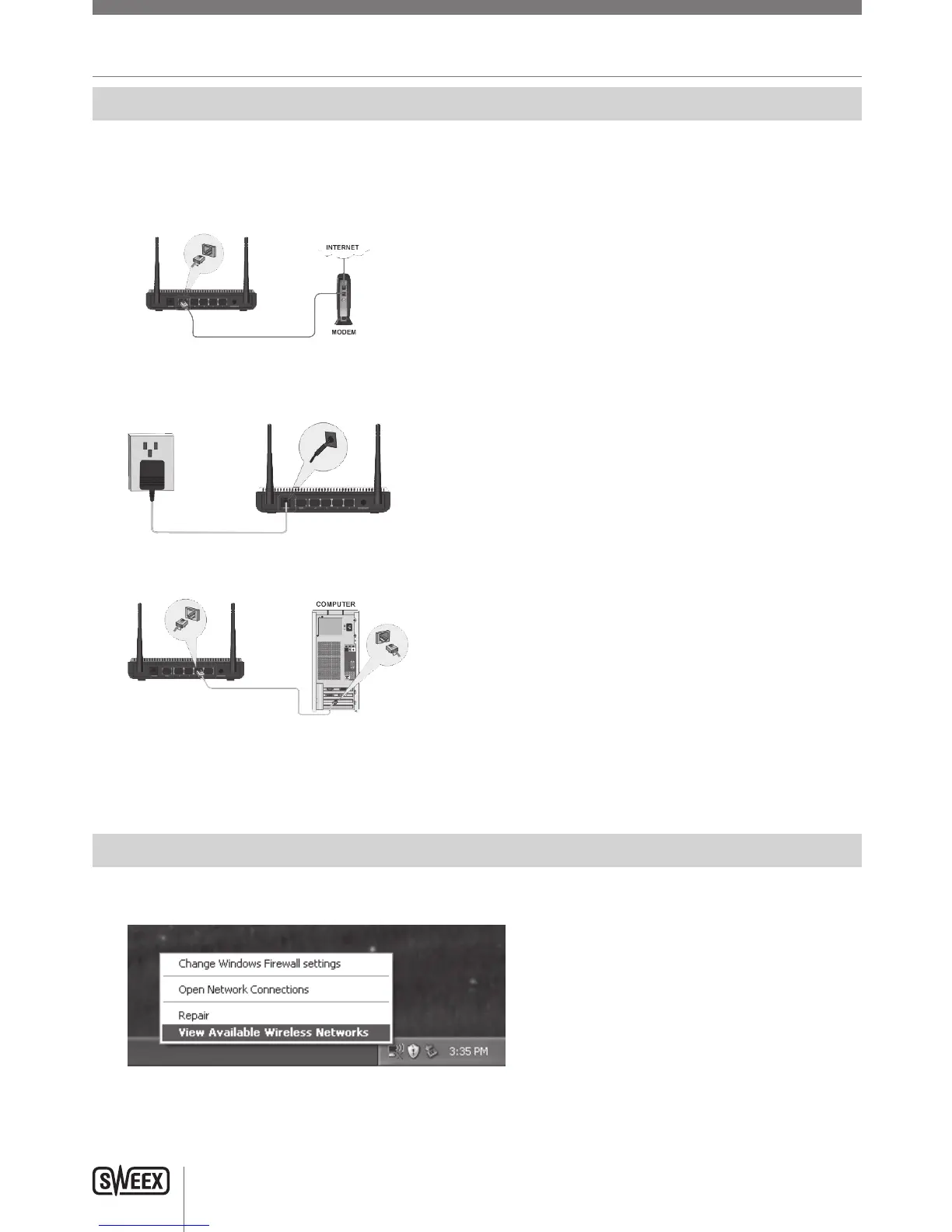
Simple setup is done in 7 steps:
1. Disconnectthepowertoyourmodem.Ifoneormorecomputerswereconnectedtoyourmodemusinganetworkcable,disconnectthem.
2. UsetheincludednetworkcabletoconnectyourmodemtotheblueWANportoftherouter.Donotconnectanycomputersyet!
3. Connectthepowertoyourmodemandwaituntilitslightsindicatenormaloperation
4. Connectthepowertotherouter,andwait1minutetogivetheroutertimetostartupandconfigureitself.Thisisimportant!
5. Ifyouhaveanycomputersorotherdevicesthatwerealreadyconnectedbyanetworkcable,youcannowconnectthesecablestotheyellow
LANportsoftherouter.
6. Waitanotherminute.Yourrouterisnowinstalled!Wiredcomputersnowhaveinternetaccess,forwirelesscomputersoneadditionalstepis
required,followtheinstructionsbelowfortheWindowsversionyouhave.
Connecting to a wireless network
• WindowsXP:Rightclickonyourwirelessadapter’siconatthebottomrightofyourscreenandclick“ViewAvailableWirelessNetworks”:
LW310V2_Manual_01.indd 4 03-11-09 13:32



 To Next Page