18
Method 1: WEP
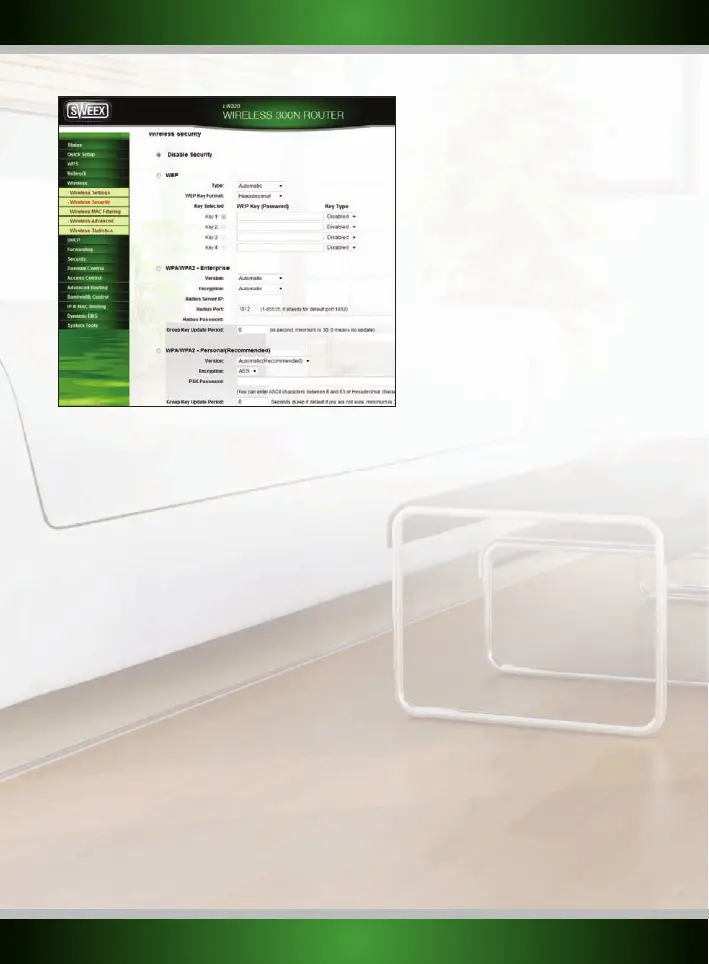
Securing your network with WEP is done in 3 steps:
1. Select the following settings:
Type: “Automatic” (it is recommended to use the default setting)
WEP Key Format: “Hexadecimal” or “ASCII”
Key Selected: Insert the chosen “WEP key” and define the “Key type”
2. When finished, click the “Save” button. If you were connected wirelessly, you will now observe that your connection is lost.
Follow the steps described in the “Connecting to a wireless network” section of the manual to regain the (now secure) connection.
Method 2: WPA
Securing your network with WPA is done in 2 steps:
1. Select the following settings:
Security Mode: “Mixed WPA/WPA2”
WPA Algorithms: TKIP (only for Enterprise) & AES
Pass Phrase: Here you have to set the security key (password) for your wireless network. This should be a difficult to guess word or phrase.
The minimum length for the pass phrase is 8 characters. We also recommend you to write the pass phrase down and store it near the router.
If the pass phrase is lost you please refer to the troubleshooting section of this manual.
2. When finished, click the “Save” button. If you were connected wirelessly, you will now observe that your connection is lost.
Follow
the steps
described in the “Connecting to a wireless network” section of the manual to regain the (now secure) connection.
Method 3: WPS
For this method no additional settings are required, simply push the WPS button at the front of the router. After a few seconds, the WPS light
at the front of the router will start to blink. As long as the light blinks, you are able to connect your WPS enabled device to the router. After a
successful connection, the WPS light will stop blinking. To connect another WPS enabled device, simply push the button again before connecting.
English version



 To Next Page