6
Back
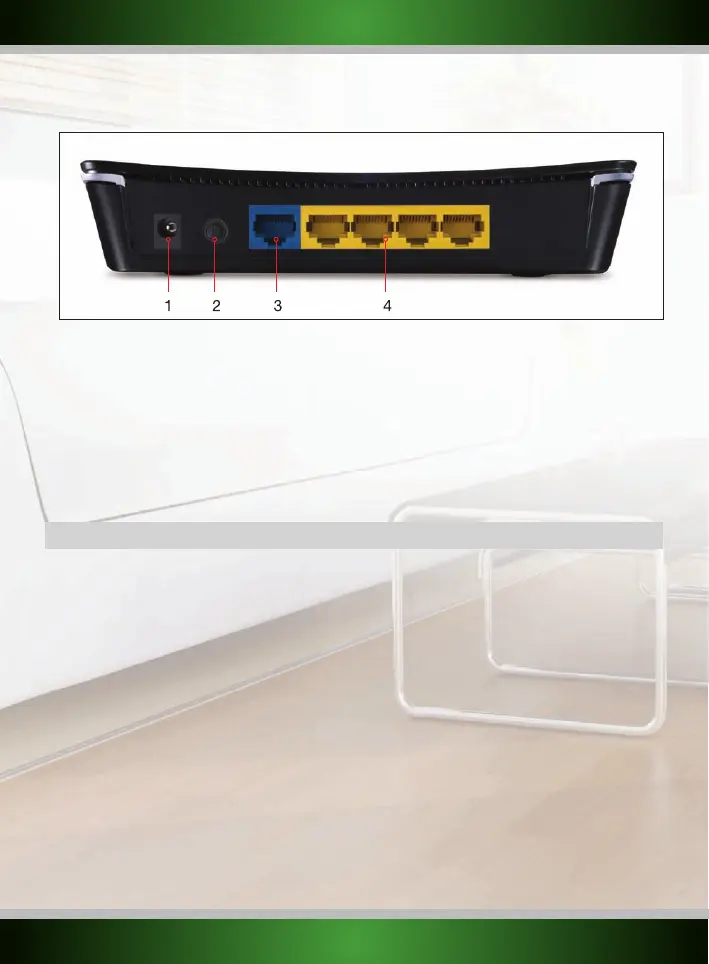
1. DC power input: Connect the supplied power adapter to this input. If the adapter is lost it can be replaced by a
similar model with 9 V DC output and 0.6 A current rating.
2. POWER ON/OFF button: Press the button in to power on the router and press again to turn off the router.
3. WAN port: Connect the network cable coming from your ISP modem to this port. Upon a successful WAN
connection, the WAN light at the front of the router will light up. This is a prerequisite for
internet access.
4. LAN port 1 - 4: You can connect a network cable coming from a computer to this port. When the computer is
turned on the corresponding light at the front of the router will light up.
Installing the router
There are two ways of installing the router:
• The Simple setup described in this manual
• The Advanced setup also described in this manual.
The wizard and simple setup assume default settings and will work for most users. If you are an advanced user or if you know which setup
method your ISP requires, you may proceed to the advanced setup immediately.
English version
1 2 3 4



 To Next Page