7
English version
Simple setup
Simple setup is done in 7 steps:
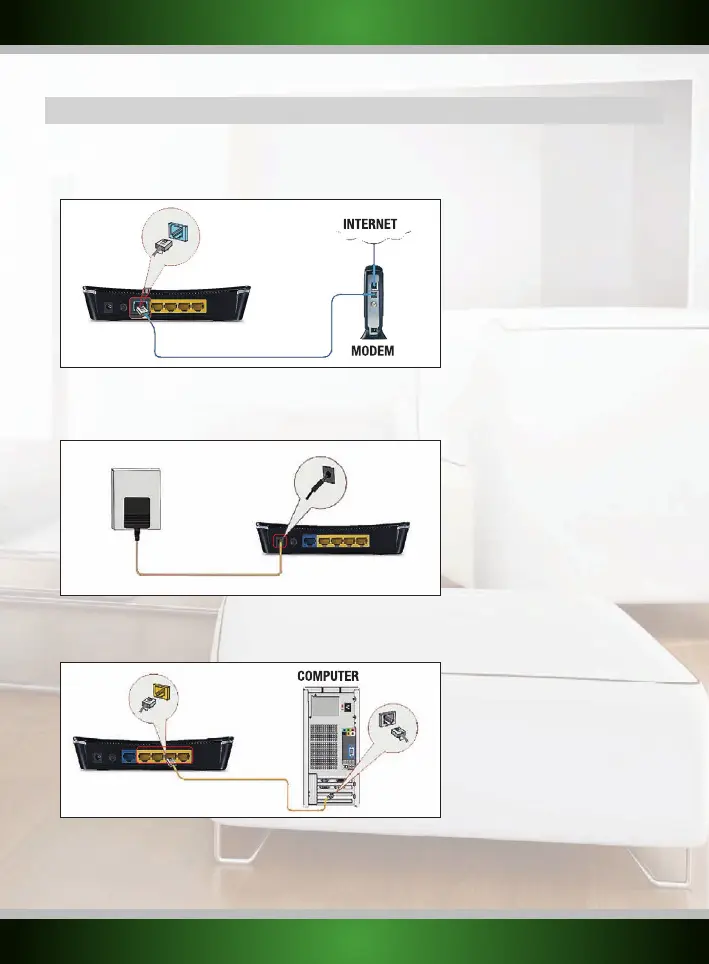
1. Disconnect the power to your modem. If one or more computers were connected to your modem using a network cable, disconnect them.
2. Use the included network cable to connect your modem to the blue WAN port of the router. Do not connect any computers yet!
3. Connect the power to your modem and wait until its lights indicate normal operation
4. Connect the power to the router and press the POWER ON/OFF button, and wait 1 minute to give the router time to
start up and configure itself. This is important!
5. If you have any computers or other devices that were already connected by a network cable, you can now connect these cables to the yellow
LAN ports of the router.
6. Wait another minute. Your router is now installed! Wired computers now have internet access, for wireless computers one additional step is
required, follow the instructions below for the Windows version you have.



 To Next Page