32
• My computer indicates that it is not connected to a network.
• This problem is usually resolved by carefully checking all connections and indicator lights. For a wired computer, follow the network cable to
the router’s backside. It must be plugged in to one of the yellow LAN ports. The yellow ports are also numbered and corresponding to each
LAN port there is an indicator light at the front of the router. This light must be lit to indicate a working connection. If the light is off, fiddle
the cable or try a different cable. For a wireless computer, check the wireless connection status icon at the bottom right of your screen, there
should not be a red cross. If you see a red cross, follow the steps described in the “Connecting to a wireless network” section of the manual.
• I have Windows Vista and I get the error message “the settings saved on this computer for the network do not match the
requirements of the network” when I try to connect wirelessly.
• This problem can be solved as follows:
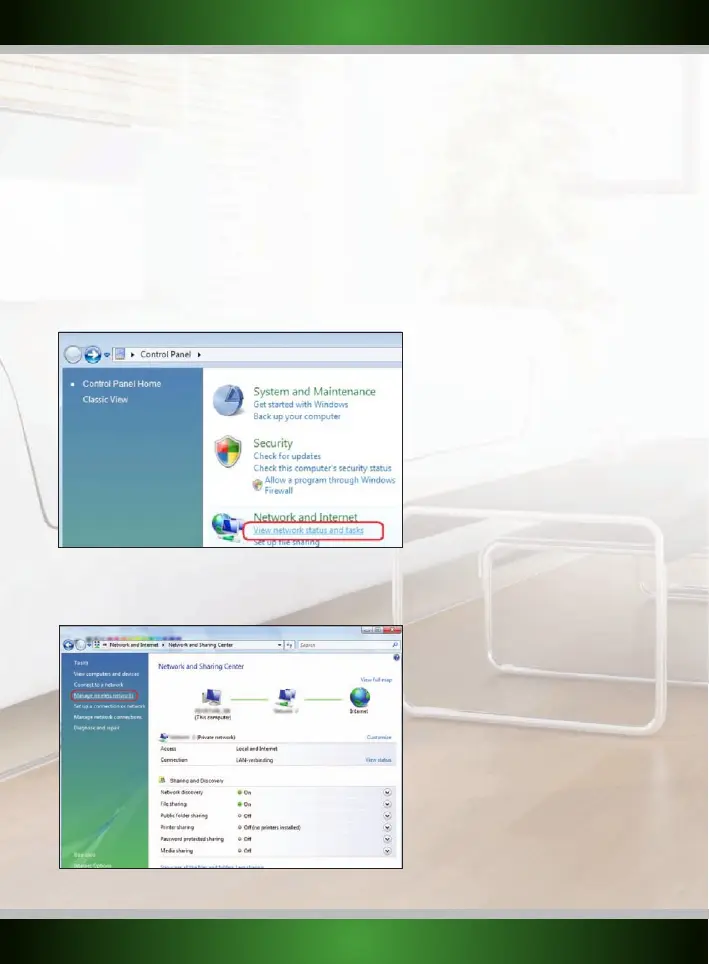
1. In the Control Panel, click “View network status and tasks”. If your Control Panel is in classic view,
open the
“Network and Sharing Center” icon:
2. The Network and Sharing Center window should now open.
In the Network and Sharing Center, click “Manage wireless networks” in the bar on the left side:
English version



 To Next Page