©2018 SwellPro All Rights Reserved
16
Clockwise HubCounter Clockwise Hub
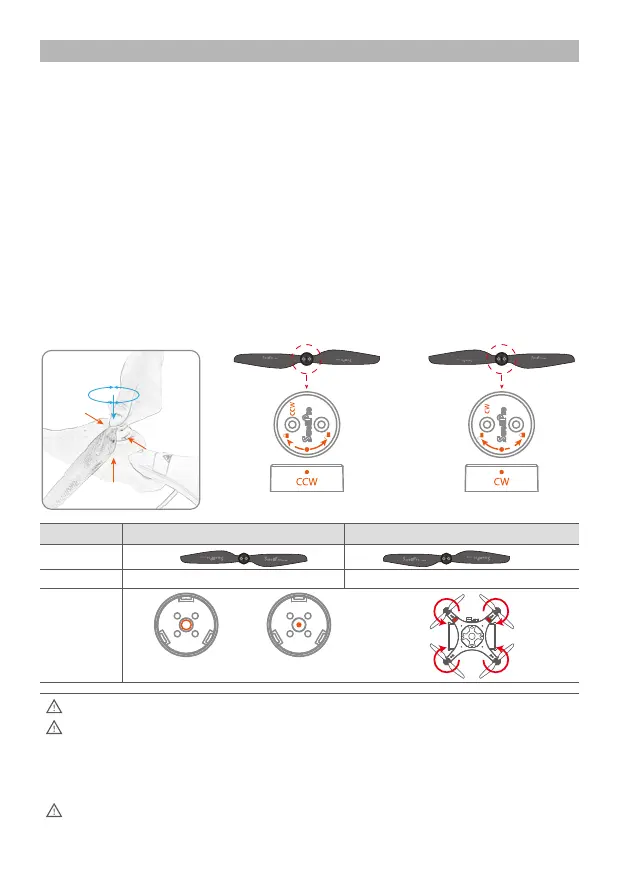
Attaching and Removing the propellers:
1. To prevent damaging the landing gear, always use one hand to properly support each
motor as you install its propeller. Use this hand to also stop the motor hub rotating while
installing the propellers.
2. Check that the propeller rotation (CW or CCW) matches the motor hub. This is the normal
direction the propellers spin during fight.
3. Rotate the propeller in the hub until it engages, then push the propeller downwards and
rotate it 1/8th of a turn opposite to its name to lock it.
4. Check the propeller is completely locked by checking that the dots on the propeller and
hub align or by holding to motor hub frmly and ensuring that the propeller cannot be
turned.
5. To remove propellers, support the motor with one hand and press the propeller down and
then rotate it 1/8th of a turn according to its name to unlock it from the hub.
Quick Attach Propellers
The blades are sharp, please be careful to avoid accidental cutting or scratches.
When installing or removing the propellers, place one hand under the motor to
support it when installing or removing propellers. Failure to provide this support could
result in bending or breaking the landing gear.
Prior to each fight, please check that the propellers are smooth all over and are
correctly installed and securely fastened.
Propeller CCW Propeller CW Propeller
Picture
Direction
Turn clockwise to lockInstallation Turn counter-clockwise to lock
CW Propeller SlotCCW Propeller Slot














 To Next Page