©2018 SwellPro All Rights Reserved
33
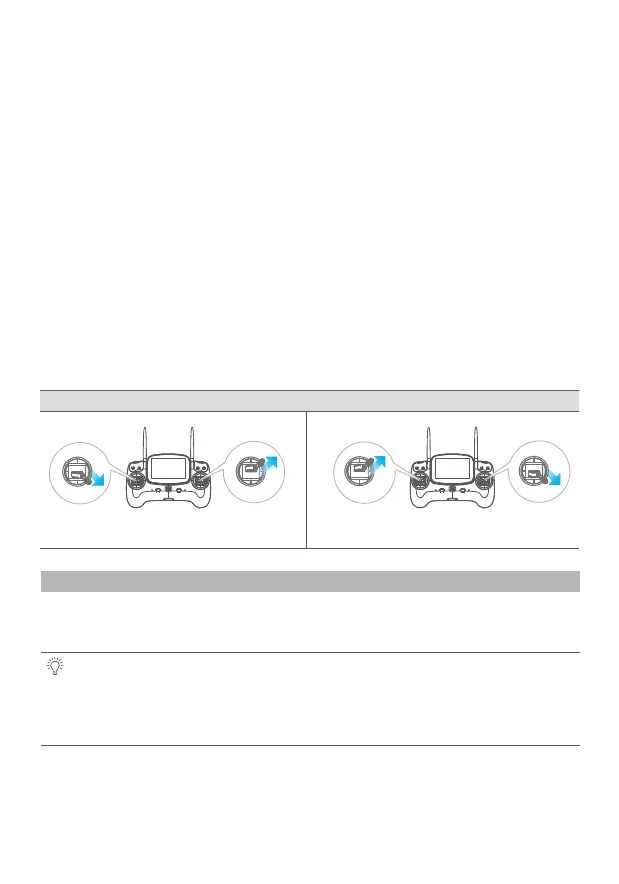
Accelerometer Calibration Steps:
Remote Control Operation
Please Note: It is recommended to calibrate the compass at the proposed flying area
before flying. Flying anywhere close to any magnetic interference is HIGHLY
DISCOURAGED. (Please make sure to keep far away from the following: High-Voltage
transmission power lines, Emitting base stations, metal objects, etc.)
Compass Calibration
Please refer to the status indicator light for compass calibration. Calibration notes are as
follows:
Calibration is necessary in below cases:
1. Before flying the drone for the first time.
2. If 100KM or more away from the last compass calibration location.
1.Place the drone on a horizontal surface, power on the controller, followed by the drone,
after hearing a “DI” tone, switch to “Return-Home” mode on the controller.
2. Mode 1 - Left hand throttle: Place the left joystick into the right lower corner(45°) position,
and the right joystick into the upper right corner(45°) position. Maintain this gesture for 2
seconds.
Mode 3 - Right hand throttle: Move the Left joystick to the upper right corner (45 °), and the
right hand joystick to the lower right corner (45 °) . Maintain the joysticks in their position.
3. Observe that the light changes to a fast blinking red-green-yellow. The drone then enters
into its accelerometer calibration process.
4. Wait until the light stops fast blinking, now release the joysticks.
The accelerometer calibration is now complete.
Mode 1 - Left hand throttle Mode 3 - Right hand throttle














 To Next Page