©2018 SwellPro All Rights Reserved
24
B16.2V
P -0.1°
R 3.3°
V 0.0M/S
Y 26.8°
15
00:07:00
0.0
D 0M
H 0M
FS
ATT
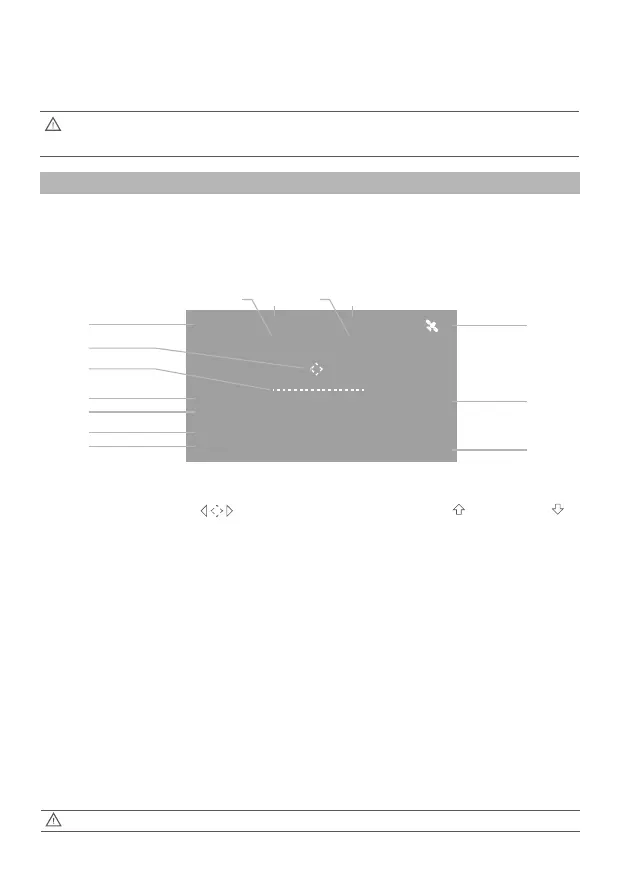
FPV screen
Display Interface
The Splash Drone 3 uses 5.8G video transmission technology, reducing the delay to a
minimum. The 5.8G transmission range can reach 1km. 40 channels are available to select
from.
2. Hold either left or right paring button (No.2 or 17 in Page 9), then power on the remote
control. When the left indicator become solid red, it enter into pairing mode. Release the
buttons when the indicator changes to solid green, the paring is successful.
When the pairing is successful, make sure to remove the JUMPER on the receiver's
B/VCC channel.
With the absence of obstacles, or without interference, the video transmission range can reach 1.3km
[01] Battery Voltage
Drone battery voltage
[02] Return Home direction
[03] Flight Attitude
Verification of the flight attitude
[04] Flight Distance
The horizontal distance between the drone, and
the home point
[05] Flight Height
The vertical height of the drone above the home
point
[06] Connection lost notice
Notification when the connection is lost between
the drone and the controller.
[07] Flight Mode
[08] Time
The running time
[09] Ascend speed / Descend speed
[10] Satellite Quantity
The receiving satellite quantity
[11] Horizontal speed
The drone’s horizontal speed
[12] Angle of yaw
The actual angle of yaw
[13] Angle of roll
The actual angle of roll
[14] Angle of tilt
The actual angle of tilt
[01]
[04]
[05]
[06]
[07]
[08]
[09]
[10]
[12][13] [11][14]
[03]
[02]
Dynamically displays the relative angle between
the nose and the return point. When the mark is
displayed in middle of the FPV screen, it means the
nose of the drone is facing the return point.
The vertical speed of the drone
when ascending or descending,
units are metres/ second
ATT: ATTI Mode, GPS:GPS Mode, CIR:Smart
Cruise














 To Next Page