©2018 SwellPro All Rights Reserved
20
OFF:Close Airdrop
Airdrop:Releases the payload
Video:Record Video
Preview:Preview
Photo:Take Picture
Photo
OFF
Airdrop
Video
Preview
Press down and slide open the battery cover to open it, install the remote control battery and
replace the cover.
Remote Control Battery Installation
Remote Control Operation
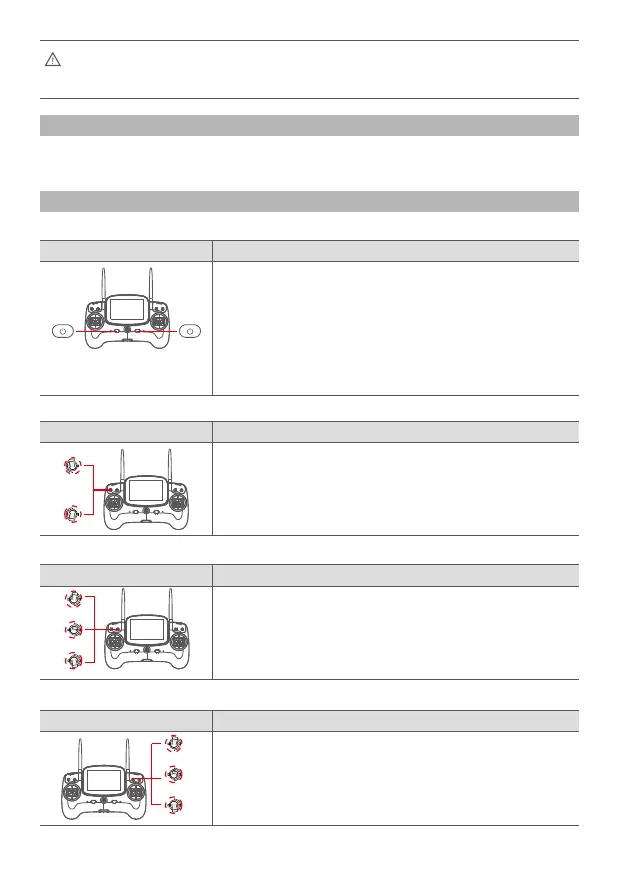
Power ON and Power OFF
The default remote control configuration is left hand as throttle. If you prefer to have
right hand throttle, please consult your local dealer.
Airdrop Switch
Description
Remote Control Operation
Camera Control
Description
Remote Control Operation
Flight Mode
Description
Remote Control Operation
Description
Remote Control Operation
1. Simultaneously press the two power switches for about 3
seconds, the remote control will power on, and the screen
will turn on.
2. To turn off the controller, simultaneously press the two
power switches for about 3 seconds again, the remote
control will power off, and the screen will turn off.
GPS:GPS mode
Smart Cruise:Smart Cruise Mode
ATTI:ATTI mode
GPS
Smart Cruise
ATTI














 To Next Page