©2018 SwellPro All Rights Reserved
34
Return Home
DescriptionOperation Illustration
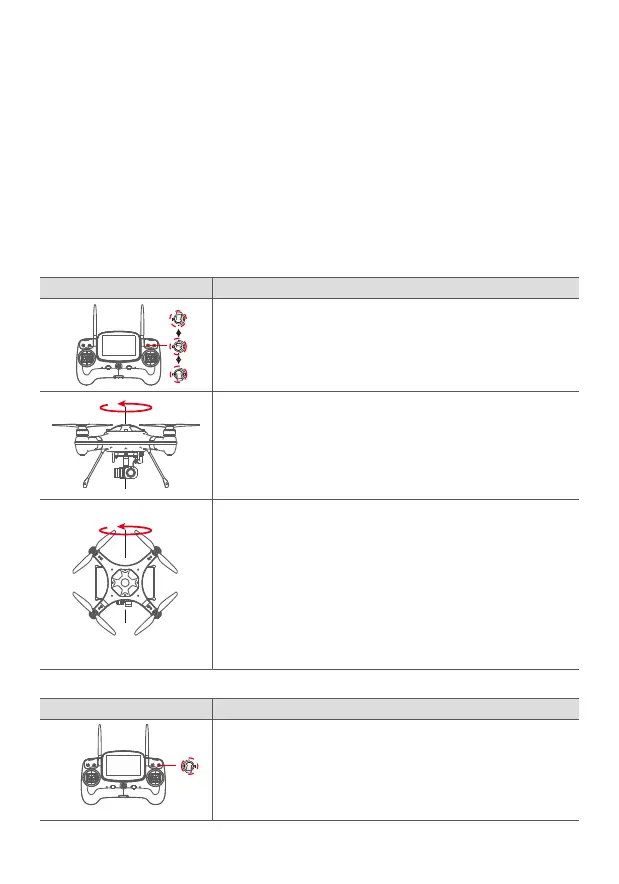
1. Place the drone onto a horizontal surface, power on the controller,
and then power on the drone. After the “DI” sound, fast flick the mode
switch from GPS-Smart Cruise-ATTI and ATTI-Smart Cruise-GPS, when
the yellow light is on, the system enters into compass calibration.
3.Swing the drone to a vertical plane, with the nose pointing downward,
rotate the drone counter clockwise until the LED changes to a blinking
red-green-yellow, indicating the completion of the calibration. If the
calibration procedure was not successful, the RED light will be on for 3
seconds, therefore, you will need to redo the calibration. (It may be
necessary to do a six-sided calibration if the two-axis calibration will not
successfully calibrate, for more information, please refer to the 6 axis
calibration below.)
2. Hold the drone horizontally, rotate counter clockwise until the green
LED light turns on.
3. The drone has been crashed/dropped by accident.
4. The drone keeps swaying / drifting during flight.
5. If the drone has incurred or was subjected to a heavy shaking during transportation.
6. If the RED light stays on, and the motors can’t be unlocked.
There are two ways to calibrate the compass, one method is to calibrate in the 2 primary
planes – horizontal and vertical (simple and fast), and the other, is to calibrate the six
surfaces, (of a cube) for higher accuracy.
It is recommended to calibrate the compass, if time and circumstances permit, using the
6 surface method.
Two Axis Calibration – (horizontal and vertical planes)
DescriptionOperation Illustration
1. Place the drone on a horizontal surface, power on the controller, and
then power on the drone. After “DI” sounds, flick the return home
switch to Return Home.
Six Axis Calibration (six sides of a cube)














 To Next Page